
Join the Conversation
- Find Answers
- :
- Using Splunk
- :
- Dashboards & Visualizations
- :
- Re: need help on the data which is available in th...
- Subscribe to RSS Feed
- Mark Topic as New
- Mark Topic as Read
- Float this Topic for Current User
- Bookmark Topic
- Subscribe to Topic
- Mute Topic
- Printer Friendly Page
- Mark as New
- Bookmark Message
- Subscribe to Message
- Mute Message
- Subscribe to RSS Feed
- Permalink
- Report Inappropriate Content
How to display data on dashboard?

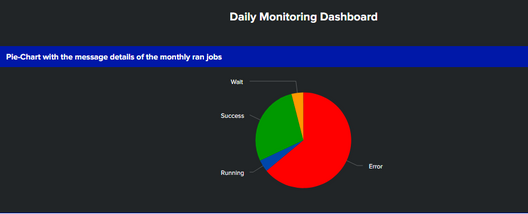
I am working on a splunk xml dashboard where the above chart shows about the events that were in wait state, error state, running state, and success state. But we can see that the events which were in error state, the same jobs ran again and went into success state but we have a requirement in such a way that if the same job ran again for the same day and the job was successful then the event has to be cleared from the dashboard and the new data has to be refreshed.
Below is the one snippet which will show the events which were in waiting state and again those events went into successful as the same jobs has ran into success again.
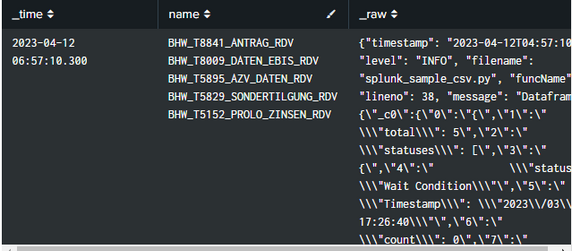
below is the sample raw text of the events with the status of the jobs which were in waiting state.
{"timestamp": "2023-03-29T04:57:07.366881Z", "level": "INFO", "filename": "splunk_sample_csv.py", "funcName": "main", "lineno": 38, "message": "Dataframe row : {\"_c0\":{\"0\":\"{\",\"1\":\" \\\"total\\\": 236\",\"2\":\" \\\"statuses\\\": [\",\"3\":\" {\",\"4\":\" \\\"status\\\": \\\"Wait Condition\\\"\",\"5\":\" \\\"Timestamp\\\": \\\"2023\\/03\\/22 17:26:40\\\"\",\"6\":\" \\\"count\\\": 0\",\"7\":\" \\\"name\\\": \\\"BHW_T8841_ANTRAG_RDV\\\"\",\"8\":\" \\\"jobId\\\": \\\"LNDEV02:0dqvp\\\"\",\"9\":\" }\",\"10\":\" {\",\"11\":\" \\\"status\\\": \\\"Wait Condition\\\"\",\"12\":\" \\\"Timestamp\\\": \\\"2023\\/03\\/22 17:26:40\\\"\",\"13\":\" \\\"count\\\": 0\",\"14\":\" \\\"name\\\": \\\"BHW_T8009_DATEN_EBIS_RDV\\\"\",\"15\":\" \\\"jobId\\\": \\\"LNDEV02:0dqvi\\\"\",\"16\":\" }\",\"17\":\" {\",\"18\":\" \\\"status\\\": \\\"Wait Condition\\\"\",\"19\":\" \\\"Timestamp\\\": \\\"2023\\/03\\/22 17:26:40\\\"\",\"20\":\" \\\"count\\\": 0\",\"21\":\" \\\"name\\\": \\\"BHW_T5895_AZV_DATEN_RDV\\\"\",\"22\":\" \\\"jobId\\\": \\\"LNDEV02:0dqvd\\\"\",\"23\":\" }\",\"24\":\" {\",\"25\":\" \\\"status\\\": \\\"Wait Condition\\\"\",\"26\":\" \\\"Timestamp\\\": \\\"2023\\/03\\/22 17:26:40\\\"\",\"27\":\" \\\"count\\\": 0\",\"28\":\" \\\"name\\\": \\\"BHW_T5829_SONDERTILGUNG_RDV\\\"\",\"29\":\" \\\"jobId\\\": \\\"LNDEV02:0dqv9\\\"\",\"30\":\" }\",\"31\":\" {\",\"32\":\" \\\"status\\\": \\\"Wait Condition\\\"\",\"33\":\" \\\"Timestamp\\\": \\\"2023\\/03\\/22 17:26:40\\\"\",\"34\":\" \\\"count\\\": 0\",\"35\":\" \\\"name\\\": \\\"BHW_T5152_PROLO_ZINSEN_RDV\\\"\",\"36\":\" \\\"jobId\\\": \\\"LNDEV02:0dqv6\\\"\",\"37\":\" }\",\"38\":\" {\",\"39\":\" \\\"status\\\": \\\"Wait Condition\\\"\",\"40\":\" \\\"Timestamp\\\": \\\"2023\\/03\\/22 17:26:40\\\"\",\"41\":\" \\\"count\\\": 0\",\"42\":\" \\\"name\\\": \\\"BHW_T5149_PROLO_KOND_RDV\\\"\",\"43\":\" \\\"jobId\\\": \\\"LNDEV02:0dqv1\\\"\",\"44\":\" }\",\"45\":\" {\",\"46\":\" \\\"status\\\": \\\"Wait Condition\\\"\",\"47\":\" \\\"Timestamp\\\": \\\"2023\\/03\\/22 17:26:40\\\"\",\"48\":\" \\\"count\\\": 0\",\"49\":\" \\\"name\\\": \\\"BHW_T5144_ZUT_SALDEN_RDV\\\"\",\"50\":\" \\\"jobId\\\": \\\"LNDEV02:0dqux\\\"\",\"51\":\" }\",\"52\":\" {\",\"53\":\" \\\"
also we have extracted the job names and statuses of the events separately.
The above jobs went into success after running again.
Please help us on this.
- Mark as New
- Bookmark Message
- Subscribe to Message
- Mute Message
- Subscribe to RSS Feed
- Permalink
- Report Inappropriate Content

Just use "| dedup JobID"
- Mark as New
- Bookmark Message
- Subscribe to Message
- Mute Message
- Subscribe to RSS Feed
- Permalink
- Report Inappropriate Content


It is often said that a picture paints a thousand words, but in this instance, a picture raises a thousand questions! Well, perhaps not a thousand. The point is, a picture of an event is virtually useless to us.
Does your event hold the status of one job or many?
Have you already extracted the job name and status, and what are the field names?
Can you share the event(s) in a code block </> so we can see and test with accurate representations of the data?
- Mark as New
- Bookmark Message
- Subscribe to Message
- Mute Message
- Subscribe to RSS Feed
- Permalink
- Report Inappropriate Content
Hi,
Thanks for your response. As mentioned by you below is the sample raw text of the events with the status of the jobs which were in waiting state.
{"timestamp": "2023-03-29T04:57:07.366881Z", "level": "INFO", "filename": "splunk_sample_csv.py", "funcName": "main", "lineno": 38, "message": "Dataframe row : {\"_c0\":{\"0\":\"{\",\"1\":\" \\\"total\\\": 236\",\"2\":\" \\\"statuses\\\": [\",\"3\":\" {\",\"4\":\" \\\"status\\\": \\\"Wait Condition\\\"\",\"5\":\" \\\"Timestamp\\\": \\\"2023\\/03\\/22 17:26:40\\\"\",\"6\":\" \\\"count\\\": 0\",\"7\":\" \\\"name\\\": \\\"BHW_T8841_ANTRAG_RDV\\\"\",\"8\":\" \\\"jobId\\\": \\\"LNDEV02:0dqvp\\\"\",\"9\":\" }\",\"10\":\" {\",\"11\":\" \\\"status\\\": \\\"Wait Condition\\\"\",\"12\":\" \\\"Timestamp\\\": \\\"2023\\/03\\/22 17:26:40\\\"\",\"13\":\" \\\"count\\\": 0\",\"14\":\" \\\"name\\\": \\\"BHW_T8009_DATEN_EBIS_RDV\\\"\",\"15\":\" \\\"jobId\\\": \\\"LNDEV02:0dqvi\\\"\",\"16\":\" }\",\"17\":\" {\",\"18\":\" \\\"status\\\": \\\"Wait Condition\\\"\",\"19\":\" \\\"Timestamp\\\": \\\"2023\\/03\\/22 17:26:40\\\"\",\"20\":\" \\\"count\\\": 0\",\"21\":\" \\\"name\\\": \\\"BHW_T5895_AZV_DATEN_RDV\\\"\",\"22\":\" \\\"jobId\\\": \\\"LNDEV02:0dqvd\\\"\",\"23\":\" }\",\"24\":\" {\",\"25\":\" \\\"status\\\": \\\"Wait Condition\\\"\",\"26\":\" \\\"Timestamp\\\": \\\"2023\\/03\\/22 17:26:40\\\"\",\"27\":\" \\\"count\\\": 0\",\"28\":\" \\\"name\\\": \\\"BHW_T5829_SONDERTILGUNG_RDV\\\"\",\"29\":\" \\\"jobId\\\": \\\"LNDEV02:0dqv9\\\"\",\"30\":\" }\",\"31\":\" {\",\"32\":\" \\\"status\\\": \\\"Wait Condition\\\"\",\"33\":\" \\\"Timestamp\\\": \\\"2023\\/03\\/22 17:26:40\\\"\",\"34\":\" \\\"count\\\": 0\",\"35\":\" \\\"name\\\": \\\"BHW_T5152_PROLO_ZINSEN_RDV\\\"\",\"36\":\" \\\"jobId\\\": \\\"LNDEV02:0dqv6\\\"\",\"37\":\" }\",\"38\":\" {\",\"39\":\" \\\"status\\\": \\\"Wait Condition\\\"\",\"40\":\" \\\"Timestamp\\\": \\\"2023\\/03\\/22 17:26:40\\\"\",\"41\":\" \\\"count\\\": 0\",\"42\":\" \\\"name\\\": \\\"BHW_T5149_PROLO_KOND_RDV\\\"\",\"43\":\" \\\"jobId\\\": \\\"LNDEV02:0dqv1\\\"\",\"44\":\" }\",\"45\":\" {\",\"46\":\" \\\"status\\\": \\\"Wait Condition\\\"\",\"47\":\" \\\"Timestamp\\\": \\\"2023\\/03\\/22 17:26:40\\\"\",\"48\":\" \\\"count\\\": 0\",\"49\":\" \\\"name\\\": \\\"BHW_T5144_ZUT_SALDEN_RDV\\\"\",\"50\":\" \\\"jobId\\\": \\\"LNDEV02:0dqux\\\"\",\"51\":\" }\",\"52\":\" {\",\"53\":\" \\\"
also we have extracted the job names and statuses of the events separately.
The above jobs went into success after running again.
- Mark as New
- Bookmark Message
- Subscribe to Message
- Mute Message
- Subscribe to RSS Feed
- Permalink
- Report Inappropriate Content

Hi @Renunaren,
You can use the latest function to find the latest status of the jobs like below. If you can share your query we can help better.
| stats latest(status) as status by name
| stats count by status
Join the Splunk Community Slack to learn, troubleshoot, and make connections with fellow Splunk practitioners in real time!
Join Splunk User Groups to connect and learn in-person by region or remotely by topic or industry.
Index This | What travels the world but is also stuck in place?
Discover New Use Cases: Unlock Greater Value from Your Existing Splunk Data
Continue Your Journey: Join Session 2 of the Data Management and Federation Bootcamp ...
