
Join the Conversation
- Find Answers
- :
- Using Splunk
- :
- Dashboards & Visualizations
- :
- How to create a text box using condition
- Subscribe to RSS Feed
- Mark Topic as New
- Mark Topic as Read
- Float this Topic for Current User
- Bookmark Topic
- Subscribe to Topic
- Mute Topic
- Printer Friendly Page
- Mark as New
- Bookmark Message
- Subscribe to Message
- Mute Message
- Subscribe to RSS Feed
- Permalink
- Report Inappropriate Content

Hello
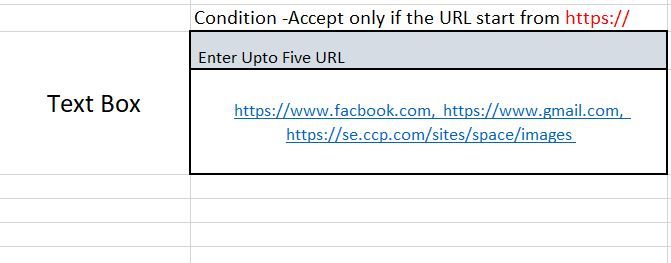
How to create the text box with the condition for Accepting user input only if the URL starts from https://somthinglike.com.
if any user enters www.facebook.com it ll not consider or save to the text box because https is missing.
Need to implement
1.URL condition.
2. Only 5 URL allow
Below is the screenshort
- Mark as New
- Bookmark Message
- Subscribe to Message
- Mute Message
- Subscribe to RSS Feed
- Permalink
- Report Inappropriate Content

@hrs2019 you can use an independent search to pass the URLs from text box to SPL and process to validate whether it matches your Upto 5 URL criteria and all URL beginning with https criteria.
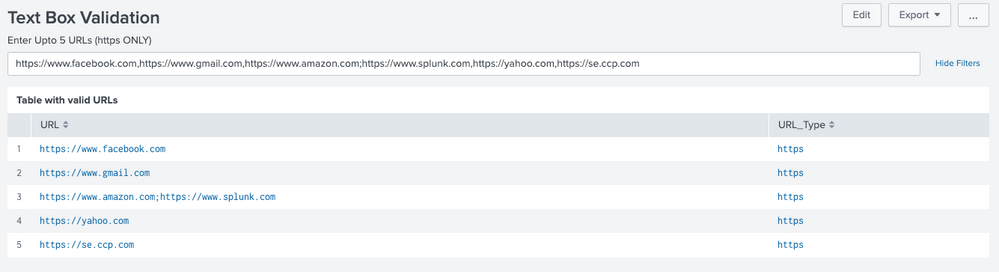



Following is a run anywhere sample dashboard for above example. Please try out and confirm!
<form>
<label>Text Box Validation</label>
<search>
<query>| makeresults
| eval url="$url$"
| eval url_count=split(trim(url),",")
| rex field=url "(?<url_type>(https|http))" max_match=0
| eval boolValidationURLCount=case(mvcount(url_count)<=5,"true",true(),"false")
| eval boolValidationURLCondition=case(url_type="https" AND url_type!="http","true",true(),"false")</query>
<earliest>$earliest$</earliest>
<latest>$latest$</latest>
<done>
<condition match="$result.boolValidationURLCount$=="true" AND $result.boolValidationURLCondition$=="true"">
<set token="tokValidURLs">$result.url$</set>
</condition>
<condition match="$result.boolValidationURLCount$=="false" AND $result.boolValidationURLCondition$=="false"">
<set token="tokValidationError">Only upto 5 URLs allowed. URL must start with https</set>
<unset token="tokValidURLs"></unset>
</condition>
<condition match="$result.boolValidationURLCount$=="false" AND $result.boolValidationURLCondition$=="true"">
<set token="tokValidationError">Only upto 5 URLs allowed.</set>
<unset token="tokValidURLs"></unset>
</condition>
<condition match="$result.boolValidationURLCount$=="true" AND $result.boolValidationURLCondition$=="false"">
<set token="tokValidationError">URLs must start with https</set>
<unset token="tokValidURLs"></unset>
</condition>
</done>
</search>
<fieldset submitButton="false">
<input id="splunk_input_text_url" type="text" token="url" searchWhenChanged="true">
<label>Enter Upto 5 URLs (https ONLY)</label>
<default>https://www.facebook.com,https://www.gmail.com,https://www.amazon.com;https://www.splunk.com,https://yahoo.com,https://se.ccp.com</default>
</input>
</fieldset>
<row>
<panel>
<html rejects="$tokValidURLs$">
<style>
#splunk_input_text_url{
width: 1220px !important;
}
</style>
<div>
<b style="color:red">$tokValidationError$.</b>
</div>
<div>
Please validate input <b style="color:red">$url$</b>!!!
</div>
</html>
<table depends="$tokValidURLs$">
<title>Table with valid URLs</title>
<search depends="$tokValidURLs$">
<query>| makeresults
| fields - _time
| eval URL="$tokValidURLs$"
| makemv URL delim=","
| mvexpand URL
| rex field=URL "(?<URL_Type>(https|http))"
| table URL, URL_Type</query>
<earliest>$earliest$</earliest>
<latest>$latest$</latest>
</search>
<option name="refresh.display">progressbar</option>
<option name="rowNumbers">true</option>
</table>
</panel>
</row>
</form>
| makeresults | eval message= "Happy Splunking!!!"
- Mark as New
- Bookmark Message
- Subscribe to Message
- Mute Message
- Subscribe to RSS Feed
- Permalink
- Report Inappropriate Content
@hrs2019 you can use an independent search to pass the URLs from text box to SPL and process to validate whether it matches your Upto 5 URL criteria and all URL beginning with https criteria.
Following is a run anywhere sample dashboard for above example. Please try out and confirm!
<form>
<label>Text Box Validation</label>
<search>
<query>| makeresults
| eval url="$url$"
| eval url_count=split(trim(url),",")
| rex field=url "(?<url_type>(https|http))" max_match=0
| eval boolValidationURLCount=case(mvcount(url_count)<=5,"true",true(),"false")
| eval boolValidationURLCondition=case(url_type="https" AND url_type!="http","true",true(),"false")</query>
<earliest>$earliest$</earliest>
<latest>$latest$</latest>
<done>
<condition match="$result.boolValidationURLCount$=="true" AND $result.boolValidationURLCondition$=="true"">
<set token="tokValidURLs">$result.url$</set>
</condition>
<condition match="$result.boolValidationURLCount$=="false" AND $result.boolValidationURLCondition$=="false"">
<set token="tokValidationError">Only upto 5 URLs allowed. URL must start with https</set>
<unset token="tokValidURLs"></unset>
</condition>
<condition match="$result.boolValidationURLCount$=="false" AND $result.boolValidationURLCondition$=="true"">
<set token="tokValidationError">Only upto 5 URLs allowed.</set>
<unset token="tokValidURLs"></unset>
</condition>
<condition match="$result.boolValidationURLCount$=="true" AND $result.boolValidationURLCondition$=="false"">
<set token="tokValidationError">URLs must start with https</set>
<unset token="tokValidURLs"></unset>
</condition>
</done>
</search>
<fieldset submitButton="false">
<input id="splunk_input_text_url" type="text" token="url" searchWhenChanged="true">
<label>Enter Upto 5 URLs (https ONLY)</label>
<default>https://www.facebook.com,https://www.gmail.com,https://www.amazon.com;https://www.splunk.com,https://yahoo.com,https://se.ccp.com</default>
</input>
</fieldset>
<row>
<panel>
<html rejects="$tokValidURLs$">
<style>
#splunk_input_text_url{
width: 1220px !important;
}
</style>
<div>
<b style="color:red">$tokValidationError$.</b>
</div>
<div>
Please validate input <b style="color:red">$url$</b>!!!
</div>
</html>
<table depends="$tokValidURLs$">
<title>Table with valid URLs</title>
<search depends="$tokValidURLs$">
<query>| makeresults
| fields - _time
| eval URL="$tokValidURLs$"
| makemv URL delim=","
| mvexpand URL
| rex field=URL "(?<URL_Type>(https|http))"
| table URL, URL_Type</query>
<earliest>$earliest$</earliest>
<latest>$latest$</latest>
</search>
<option name="refresh.display">progressbar</option>
<option name="rowNumbers">true</option>
</table>
</panel>
</row>
</form>
| makeresults | eval message= "Happy Splunking!!!"
- Mark as New
- Bookmark Message
- Subscribe to Message
- Mute Message
- Subscribe to RSS Feed
- Permalink
- Report Inappropriate Content
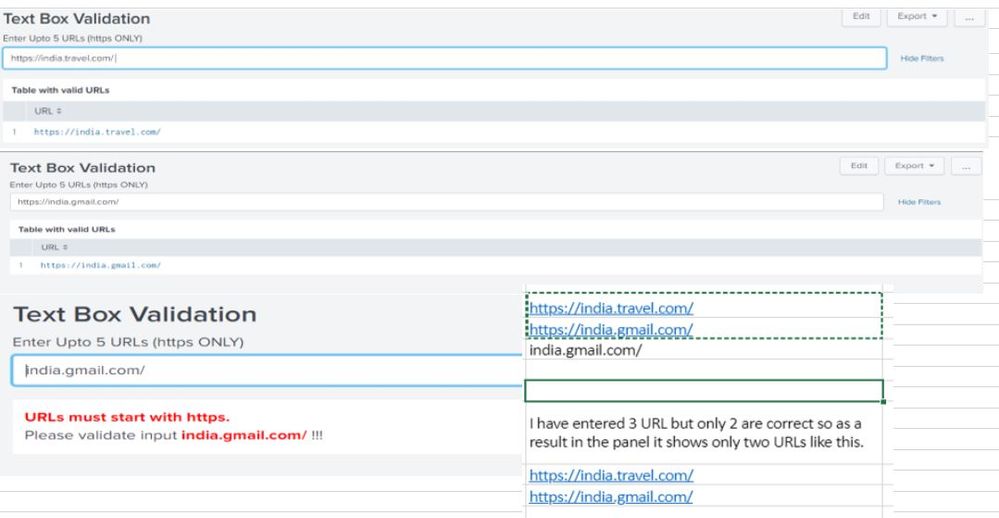
Hi, @niketn Thank You so much for your solution.
Actually I am getting one issue that needs your help.
While entering the URL 1 it shows URL1 in the panel which is correct, but while entering URL 2 it shows only Url 2, ideally it has to show both the URLs.
This is applicable for 5 URLs as we have set the condition.
If any URL is missing https//: it ll not allow and ll not display in the panel.
Can you please help me to fix this. I have added the screenshot for more info.
- Mark as New
- Bookmark Message
- Subscribe to Message
- Mute Message
- Subscribe to RSS Feed
- Permalink
- Report Inappropriate Content
Based on the original ask, my intent was to show you how to use the SPL to perform validations you need. I would expect you to incorporate any further validations as per your needs. I am not sure why you want to treat a URL without https and http as valid URL. Nevertheless take advantage of SPL and add as many validations you need!
Do upvote the answers that helped!
| makeresults | eval message= "Happy Splunking!!!"


Join the Splunk Community Slack to learn, troubleshoot, and make connections with fellow Splunk practitioners in real time!
Join Splunk User Groups to connect and learn in-person by region or remotely by topic or industry.
Ditch the Manual Grind: Building AI Agents with Splunk
Cisco Data Fabric from Architecture to Investigation, Better SOC Visibility, and More ...
The Trust Gap: Why a Data Foundation is Fundamental to an Agentic Enterprise
