
Join the Conversation
- Find Answers
- :
- Using Splunk
- :
- Dashboards & Visualizations
- :
- How to create a dynamic dropdown in Dashboard Stud...
- Subscribe to RSS Feed
- Mark Topic as New
- Mark Topic as Read
- Float this Topic for Current User
- Bookmark Topic
- Subscribe to Topic
- Mute Topic
- Printer Friendly Page
- Mark as New
- Bookmark Message
- Subscribe to Message
- Mute Message
- Subscribe to RSS Feed
- Permalink
- Report Inappropriate Content
How to create a dynamic dropdown in Dashboard Studio?

I have been struggling to create a dynamic dropdown in Splunk Dashboard studio. I have watched several video but I think they mostly talk about Classic Dashboards. I have also read the documentation but it has been of no help.
My Sample Problem is:
A: B,C,D
W: X,Y,Z
I want to create two dropdowns.
Dropdown1: A, W
Dropdown 2:
- If "A", then "B","C,"D" options
- If "B", then "X","Y,"Z" options
I am unable to figure out how to do this. Any help will be much appreciated. Thank you all.
- Mark as New
- Bookmark Message
- Subscribe to Message
- Mute Message
- Subscribe to RSS Feed
- Permalink
- Report Inappropriate Content


Hi @vishalrohila,
You can create dynamic dropdowns by creating searches that populate based on the value of tokens.
For example, you can create a dropdown to let users pick either A or W, and that sets a token, $A_or_W$
Then, in the second dropdown you can populate the list based on a lookup, search, or faking the results, and filter out based on what should be shown for A or W.
Faking the search to make the options:
|  makeresults
|  eval parent="a;w"
|  makemv parent delim=";"
|  mvexpand parent
|  eval options=case(parent="a", "a;b;c", parent="w", "x;y;z")
|  makemv options delim=";"
|  mvexpand options
|  search parent="$A_or_W$"
|  table options
With that configured, you get a dropdown for A or W selection, which then populates the second dropdown with ABC or XYZ.
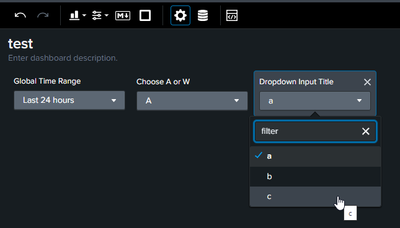
Your example was fairly generic, so your actual use case might be a better fit for a lookup, with Parent / Label / Value fields. Either way, they list can be filtered by the first lookup.
Here's the Dashboard code for you to try out:
{"visualizations":{},
"dataSources":{"ds_gKyzOqv5":{"type":"ds.search","options":{"query":"|  makeresults\n|  eval parent=\"a;w\"\n|  makemv parent delim=\";\"\n|  mvexpand parent\n|  eval options=case(parent=\"a\", \"a;b;c\",parent=\"w\", \"x;y;z\")\n|  makemv options delim=\";\"\n| mvexpand options\n|  search parent=\"$A_or_W$\"\n|  table options"},"name":"dropdown"}},
"defaults":{"dataSources":{"ds.search":{"options":{"queryParameters":{"latest":"$global_time.latest$","earliest":"$global_time.earliest$"}}}}},
"inputs":{"input_global_trp":{"type":"input.timerange","options":{"token":"global_time","defaultValue":"-24h@h,now"},"title":"Global Time Range"},"input_gkLCoAVl":{"options":{"items":[],"token":"dd_7gHCFird","selectFirstSearchResult":true},"title":"Dropdown Input Title","type":"input.dropdown","dataSources":{"primary":"ds_gKyzOqv5"}},"input_VpWiOave":{"options":{"items":[{"label":"All","value":"*"},{"label":"A","value":"a"},{"label":"W","value":"w"}],"token":"A_or_W","defaultValue":"*"},"title":"Choose A or W","type":"input.dropdown"}},
"layout":{"type":"grid","options":{"width":1440,"height":960},
"structure":[],"globalInputs":["input_global_trp","input_VpWiOave","input_gkLCoAVl"]},
"description":"",
"title":"test"}
Hopefully that helps.


Join the Splunk Community Slack to learn, troubleshoot, and make connections with fellow Splunk practitioners in real time!
Join Splunk User Groups to connect and learn in-person by region or remotely by topic or industry.
A Four-Part Event Series: Full Stack Observability For the AI Era
SOC4Kafka - New Kafka Connector Powered by OpenTelemetry
Event Series: Level up your SOC: Advancing with Splunk Enterprise Security
