
Join the Conversation
- Find Answers
- :
- Using Splunk
- :
- Dashboards & Visualizations
- :
- Re: How to apply dynamic visibility for table colu...
- Subscribe to RSS Feed
- Mark Topic as New
- Mark Topic as Read
- Float this Topic for Current User
- Bookmark Topic
- Subscribe to Topic
- Mute Topic
- Printer Friendly Page
- Mark as New
- Bookmark Message
- Subscribe to Message
- Mute Message
- Subscribe to RSS Feed
- Permalink
- Report Inappropriate Content
How to apply dynamic visibility for table columns in splunk dashboards?

Hi,
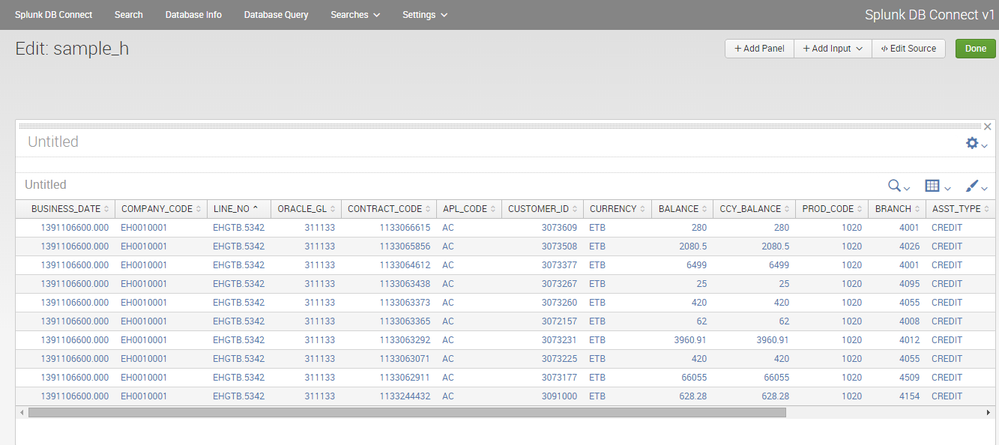
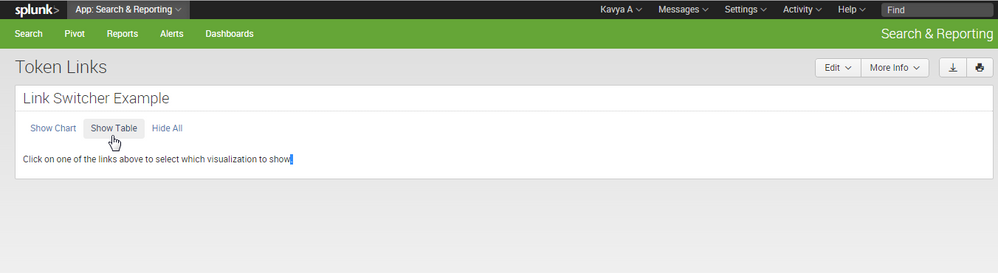
I have created sample dashboard . In that 14 columns there. I want hide last 5 cloumns dynamically and I want show 5 cloumns dynamically. Is it possible?. How it will work?. My idea is same as below 2nd image . Please check it once. Please help me. Thanks in advance.
The query as follows
**| dbquery "WHCMB" "SELECT *business_date, company code , line_no , oracle_gl, contract_code, apl_code, customer_id, currency, balance,ccy_balance,product code, branch, asset_type from EFZ_VIEW_DWT__GL_BAL" limit=10**


- Mark as New
- Bookmark Message
- Subscribe to Message
- Mute Message
- Subscribe to RSS Feed
- Permalink
- Report Inappropriate Content

go to dashboard examples and find dashboard"multiple check box". there you will get code and using appropriate modifications in fields you can randomly hide/show columns in dashboard.
for your reference , find code below:
<form>
      <label>Check Box Input</label>
      <description/>
      <row>
        <panel>
          <!-- New in Splunk 6.1 use the checkbox input -->
          <input type="checkbox" token="sourcetype_token" searchWhenChanged="true">
            <choice value="*">ANY</choice>
            <default>*</default>
            <!-- The final value will be surrounded by prefix and suffix -->
            <prefix>(</prefix>
            <suffix>)</suffix>
            <!-- Each value will be surrounded by the valuePrefix and valueSuffix -->
            <valuePrefix>sourcetype="</valuePrefix>
            <valueSuffix>"</valueSuffix>
            <!-- All the values and their valuePrefix and valueSuffix will be concatenated together with the delimiter between them -->
            <delimiter> OR </delimiter>
            <populatingSearch earliest="-60m@m" latest="now" fieldForLabel="sourcetype" fieldForValue="sourcetype">index=_internal | stats count by sourcetype</populatingSearch>
          </input>
          <chart>
            <title>Multi Value Search</title>
            <searchString>index=_internal $sourcetype_token$ | stats count by sourcetype</searchString>
            <earliestTime>-60m@m</earliestTime>
            <latestTime>now</latestTime>
          </chart>
        </panel>
      </row>
    </form>
in above code, "sourcetype" is vary ( we can select sourcetype dynamically). change sourcetype to your required field.
- Mark as New
- Bookmark Message
- Subscribe to Message
- Mute Message
- Subscribe to RSS Feed
- Permalink
- Report Inappropriate Content
I have seen previously. In that dashboard examples, hide/ show selection option for number of rows for single column(source type)... Idid that one. My requirement is selection option for Table column names. not for rows. My query is
***| dbquery "WHCMB" "SELECT *business_date, company code , line_no , oracle_gl, contract_code, apl_code, customer_id, currency, balance,ccy_balance,product code, branch, asset_type from EFZ_VIEW_DWT__GL_BAL" limit=10****
I want to put check boxes for **business_date, company code , line_no , oracle_gl, contract_code, apl_code, customer_id, currency, balance,ccy_balance,product code, branch, asset_type** 13 column names . see above posted image. Please help me. Thanks in advance. A.kavya
- Mark as New
- Bookmark Message
- Subscribe to Message
- Mute Message
- Subscribe to RSS Feed
- Permalink
- Report Inappropriate Content
elaborate your question please.
As per my view, you can use check boxes (or) drop-down boxes to show/hide columns dynamically.
- Mark as New
- Bookmark Message
- Subscribe to Message
- Mute Message
- Subscribe to RSS Feed
- Permalink
- Report Inappropriate Content
As your wish, either dropdown or checkbox. But I want to hide& show cloumns dynamically . Please help me.

Join the Splunk Community Slack to learn, troubleshoot, and make connections with fellow Splunk practitioners in real time!
Join Splunk User Groups to connect and learn in-person by region or remotely by topic or industry.
[Puzzles] Solve, Learn, Repeat: Matching cron expressions
Design, Compete, Win: Submit Your Best Splunk Dashboards for a .conf26 Pass
May 2026 Splunk Expert Sessions: Security & Observability
