
Join the Conversation
- Find Answers
- :
- Using Splunk
- :
- Dashboards & Visualizations
- :
- Re: How to add upper and lower boundaries to a spa...
- Subscribe to RSS Feed
- Mark Topic as New
- Mark Topic as Read
- Float this Topic for Current User
- Bookmark Topic
- Subscribe to Topic
- Mute Topic
- Printer Friendly Page
- Mark as New
- Bookmark Message
- Subscribe to Message
- Mute Message
- Subscribe to RSS Feed
- Permalink
- Report Inappropriate Content

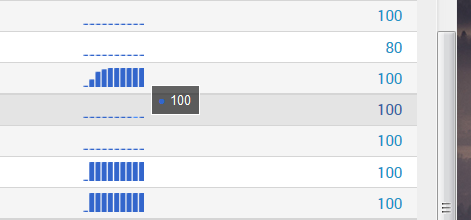
I am using a sparkline to display a bar-graph in my search results, the values displayed are percentage values, however due to the default behaviour of sparklines in splunk, a constant value of 100 is shown as a 0 line since there are no changes by which to determine the range. Is there any way to set fixed upper and lower boundaries for a sparkline?
Attached picture illustrates problem:
I tried this sort of thing:
 <format field="Verlauf" type="sparkline">
      <option name="type">bar</option>
      <option name="min">0</option>
      <option name="max">100</option>
 </format>
doesn't work though 😞
- Mark as New
- Bookmark Message
- Subscribe to Message
- Mute Message
- Subscribe to RSS Feed
- Permalink
- Report Inappropriate Content
So I finally figured it out... There is an option to set the chartRange, that is not listed in Splunks documentation but works anyways.
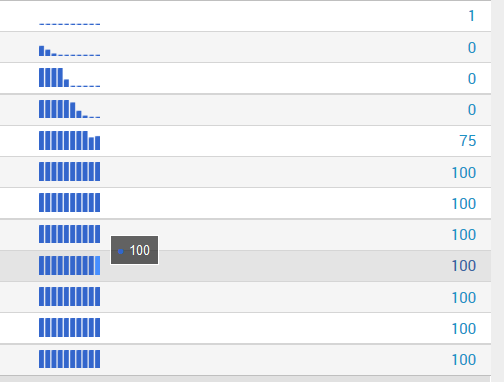

<format field="Verlauf" type="sparkline">
      <option name="type">bar</option>
      <option name="chartRangeMin">0</option>
      <option name="chartRangeMax">100</option>
</format>
Just in case anybody else runs into this.

- Mark as New
- Bookmark Message
- Subscribe to Message
- Mute Message
- Subscribe to RSS Feed
- Permalink
- Report Inappropriate Content
So I finally figured it out... There is an option to set the chartRange, that is not listed in Splunks documentation but works anyways.
<format field="Verlauf" type="sparkline">
      <option name="type">bar</option>
      <option name="chartRangeMin">0</option>
      <option name="chartRangeMax">100</option>
</format>
Just in case anybody else runs into this.
- Mark as New
- Bookmark Message
- Subscribe to Message
- Mute Message
- Subscribe to RSS Feed
- Permalink
- Report Inappropriate Content


Hi, @Dohrendorf_Consist,
Thanks for your notes and example. As a follow-up to you and anyone else who finds this post, I wanted to let you know that I've added the two configuration options to our documentation.
http://docs.splunk.com/Documentation/Splunk/6.4.1/Viz/PanelreferenceforSimplifiedXML#Common_options
Thanks!
- Mark as New
- Bookmark Message
- Subscribe to Message
- Mute Message
- Subscribe to RSS Feed
- Permalink
- Report Inappropriate Content

Is there anyway to specify the same range when using the sparkline function in a search? We are embedding the report, so I can't use a dashboard. Thanks!
- Mark as New
- Bookmark Message
- Subscribe to Message
- Mute Message
- Subscribe to RSS Feed
- Permalink
- Report Inappropriate Content


Hi Dohrendorf_Consist,
take a look at the dashboard examples app https://splunkbase.splunk.com/app/1603/ where you can find exactly this example - sorry I don't have it handy right now.
cheers, MuS
- Mark as New
- Bookmark Message
- Subscribe to Message
- Mute Message
- Subscribe to RSS Feed
- Permalink
- Report Inappropriate Content
Actually I already looked at the examples, and yes there are nice ones for sparklines... However I can't find one that does anything with the sparklines boundaries. There is one in there, that uses JS to create a single progress-bar-like indicator, which is not what I am looking for.

Join the Splunk Community Slack to learn, troubleshoot, and make connections with fellow Splunk practitioners in real time!
Join Splunk User Groups to connect and learn in-person by region or remotely by topic or industry.
[Puzzles] Solve, Learn, Repeat: Matching cron expressions
Design, Compete, Win: Submit Your Best Splunk Dashboards for a .conf26 Pass
May 2026 Splunk Expert Sessions: Security & Observability
