
Join the Conversation
- Find Answers
- :
- Using Splunk
- :
- Dashboards & Visualizations
- :
- Re: How to Rename event in a field
- Subscribe to RSS Feed
- Mark Topic as New
- Mark Topic as Read
- Float this Topic for Current User
- Bookmark Topic
- Subscribe to Topic
- Mute Topic
- Printer Friendly Page
- Mark as New
- Bookmark Message
- Subscribe to Message
- Mute Message
- Subscribe to RSS Feed
- Permalink
- Report Inappropriate Content

Hi
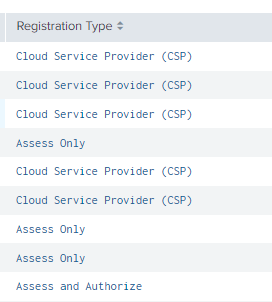
Am trying to change the "Cloud Service Provider (CSP)" to "CSP". The field name is "Registration Type"

Thanks
- Mark as New
- Bookmark Message
- Subscribe to Message
- Mute Message
- Subscribe to RSS Feed
- Permalink
- Report Inappropriate Content
Thank you so much it worked. This was the result much appreciated.
| eval "Registration Type"=if('Registration Type'=="Cloud Service Provider (CSP)","CSP",'Registration Type')
| eval "Registration Type"=if('Registration Type'=="Assess Only","AO",'Registration Type')
| eval "Registration Type"=if('Registration Type'=="Assess and Authorize","AA",'Registration Type')
- Mark as New
- Bookmark Message
- Subscribe to Message
- Mute Message
- Subscribe to RSS Feed
- Permalink
- Report Inappropriate Content


| eval "Registration Type"=if('Registration Type'=="Cloud Service Provider (CSP)","CSP",'Registration Type')- Mark as New
- Bookmark Message
- Subscribe to Message
- Mute Message
- Subscribe to RSS Feed
- Permalink
- Report Inappropriate Content
@ITWhisperer Thanks but am getting an error msg. It seems am missing something.

- Mark as New
- Bookmark Message
- Subscribe to Message
- Mute Message
- Subscribe to RSS Feed
- Permalink
- Report Inappropriate Content
The if function has only 3 parameters, the comparison, the result if true, and the result if false. You could split what you have over a number of eval commands, comparing the field to the different strings you want to change, or you can replace the if function with a case function.
https://docs.splunk.com/Documentation/Splunk/latest/SearchReference/ConditionalFunctions
- Mark as New
- Bookmark Message
- Subscribe to Message
- Mute Message
- Subscribe to RSS Feed
- Permalink
- Report Inappropriate Content
Thank you so much it worked. This was the result much appreciated.
| eval "Registration Type"=if('Registration Type'=="Cloud Service Provider (CSP)","CSP",'Registration Type')
| eval "Registration Type"=if('Registration Type'=="Assess Only","AO",'Registration Type')
| eval "Registration Type"=if('Registration Type'=="Assess and Authorize","AA",'Registration Type')


Join the Splunk Community Slack to learn, troubleshoot, and make connections with fellow Splunk practitioners in real time!
Join Splunk User Groups to connect and learn in-person by region or remotely by topic or industry.
Painting a Clearer Picture: Unifying Your Investigations with Cisco AI Canvas
Hello POJO, meet nocode
Announcing Modern Navigation: A New Era of Splunk User Experience
