
Join the Conversation
- Find Answers
- :
- Using Splunk
- :
- Dashboards & Visualizations
- :
- How do I display tab spaces in a table?
- Subscribe to RSS Feed
- Mark Topic as New
- Mark Topic as Read
- Float this Topic for Current User
- Bookmark Topic
- Subscribe to Topic
- Mute Topic
- Printer Friendly Page
- Mark as New
- Bookmark Message
- Subscribe to Message
- Mute Message
- Subscribe to RSS Feed
- Permalink
- Report Inappropriate Content
How do I display tab spaces in a table?

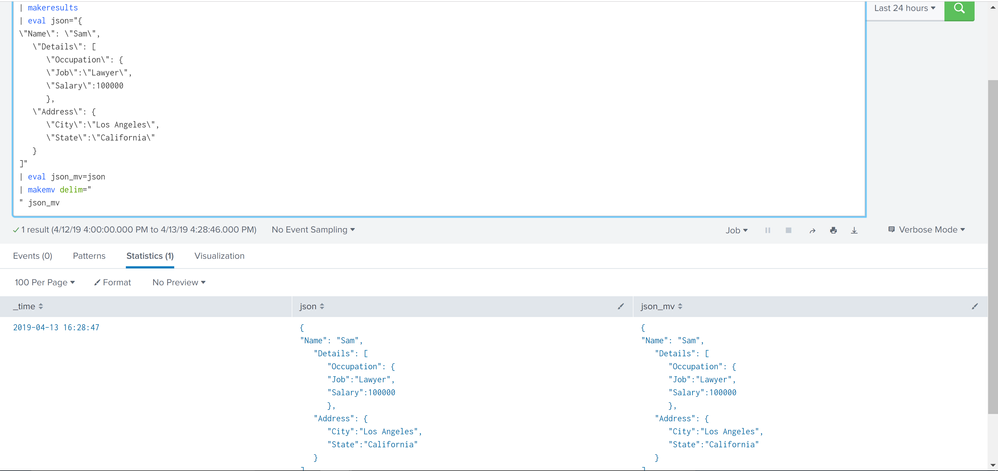
Take for example the following query:
| makeresults
| eval json="{
 \"Name\": \"Sam\",
 \"Details\": [
    \"Occupation\": {
        \"Job\":\"Lawyer\",
        \"Salary\":100000
    },
    \"Address\": {
        \"City\":\"Los Angeles\",
        \"State\":\"California\"
    }
 ]"
I can get the field "json" to appear in a table with line breaks by adding:
| makemv delim="
 " json
| table json
But the results look like this:
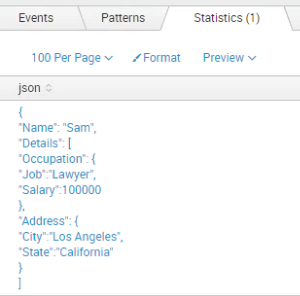
How do I get the table output to include the tab spaces so the fields are lined up properly in the eval statement?
So for example, the table output should like:
"Name": "Sam",
    "Details": [
        "Occupation": {
        "Job":"Lawyer",
        "Salary":100000
        },
    "Address": {
        "City":"Los Angeles",
        "State":"California"
    }
]
Basically I'd like all of the information indented nicely.
Thanks!
- Mark as New
- Bookmark Message
- Subscribe to Message
- Mute Message
- Subscribe to RSS Feed
- Permalink
- Report Inappropriate Content



- Mark as New
- Bookmark Message
- Subscribe to Message
- Mute Message
- Subscribe to RSS Feed
- Permalink
- Report Inappropriate Content
Thanks. In my particular case, I work for a larger organization and use Splunk just as a user, so upgrading isn't as easy for me. Are there any work-arounds for older versions?
- Mark as New
- Bookmark Message
- Subscribe to Message
- Mute Message
- Subscribe to RSS Feed
- Permalink
- Report Inappropriate Content

@BearMormont is your search query showing JSON data from _raw event or are you showing it through statistical command?
You can change visualization from Table View to Event View to have proper JSON data formatting. Please refer to one of my older answers where I had added a EventView to Table View drilldown where Table View displayed JSON data as table columns and Event View displayed JSON payload as Event Viewer
https://answers.splunk.com/answers/587044/can-i-custom-code-a-splunk-table-to-include-json-i-1.html
| makeresults | eval message= "Happy Splunking!!!"
- Mark as New
- Bookmark Message
- Subscribe to Message
- Mute Message
- Subscribe to RSS Feed
- Permalink
- Report Inappropriate Content
Hi! Thanks. I did play around with the event view and setting _raw to the json field, and it does format it properly, with a very big "but...".
First, it always has a column for Event Time, which isn't the end of the world but doesn't need to be there and I'd like to remove it. But that's just my pet peeve.
My real issue is the event is by default collapsed, and for larger events I have to click "Show all 47 lines" or however many it has. That is a killer from a usability perspective.
Is there anyway to address those two issues?
- Mark as New
- Bookmark Message
- Subscribe to Message
- Mute Message
- Subscribe to RSS Feed
- Permalink
- Report Inappropriate Content
Have you tried making your json field a Selected Field? Does this change anything?

Join the Splunk Community Slack to learn, troubleshoot, and make connections with fellow Splunk practitioners in real time!
Join Splunk User Groups to connect and learn in-person by region or remotely by topic or industry.
Index This | What travels the world but is also stuck in place?
Discover New Use Cases: Unlock Greater Value from Your Existing Splunk Data
Continue Your Journey: Join Session 2 of the Data Management and Federation Bootcamp ...
