
Join the Conversation
- Find Answers
- :
- Using Splunk
- :
- Dashboards & Visualizations
- :
- Re: How do I add User Time parameter to the panel ...
- Subscribe to RSS Feed
- Mark Topic as New
- Mark Topic as Read
- Float this Topic for Current User
- Bookmark Topic
- Subscribe to Topic
- Mute Topic
- Printer Friendly Page
- Mark as New
- Bookmark Message
- Subscribe to Message
- Mute Message
- Subscribe to RSS Feed
- Permalink
- Report Inappropriate Content
How do I add User Time parameter to the panel header?

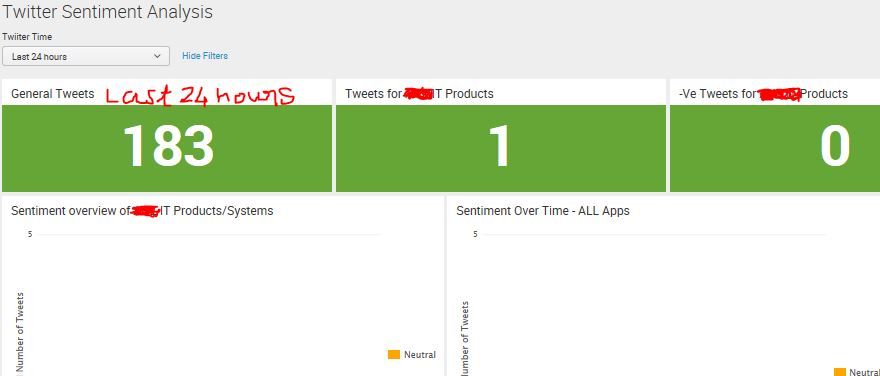
Dear All,
I have a time parameter on my dashboard. The user can change this parameter for their requirement to see the dashboard. For example. the Last 24 hours or Today or Last 7 days etc.
I want to display this field along with the title as shown in the below diagram. I have Total Tweets as heading of a panel. I want this to be "Total Tweets + user Time Parameter". How this can be done? Please advise. Thanks in advance.
- Mark as New
- Bookmark Message
- Subscribe to Message
- Mute Message
- Subscribe to RSS Feed
- Permalink
- Report Inappropriate Content

@aravindpadmin refer to one of my older answers for the same: https://answers.splunk.com/answers/633356/whats-the-token-name-for-the-time-pickers-display.html
Please try out and confirm!
| makeresults | eval message= "Happy Splunking!!!"
- Mark as New
- Bookmark Message
- Subscribe to Message
- Mute Message
- Subscribe to RSS Feed
- Permalink
- Report Inappropriate Content
typo in above last 2 lines..please read as
"I want to display this field along with Title as shown in above diagram. I have "General Tweets" as heading of a panel. I want this to be "GeneralTweets + user Time Parameter". In above case it is "General Tweets - Last 24 hours".. How this can be done? Please advise. Thanks in advance"



Join the Splunk Community Slack to learn, troubleshoot, and make connections with fellow Splunk practitioners in real time!
Join Splunk User Groups to connect and learn in-person by region or remotely by topic or industry.
Persistent Queue at TcpOut — One of Splunk's Most Practical Features
Skip the Awkward Silence: Have a .conf-ersation at .conf26
Rethinking Zero Trust: From Product Purchases to Logical Control Evidence
