
Join the Conversation
- Find Answers
- :
- Using Splunk
- :
- Dashboards & Visualizations
- :
- How do I access data in Splunk via PowerBi?
- Subscribe to RSS Feed
- Mark Topic as New
- Mark Topic as Read
- Float this Topic for Current User
- Bookmark Topic
- Subscribe to Topic
- Mute Topic
- Printer Friendly Page
- Mark as New
- Bookmark Message
- Subscribe to Message
- Mute Message
- Subscribe to RSS Feed
- Permalink
- Report Inappropriate Content

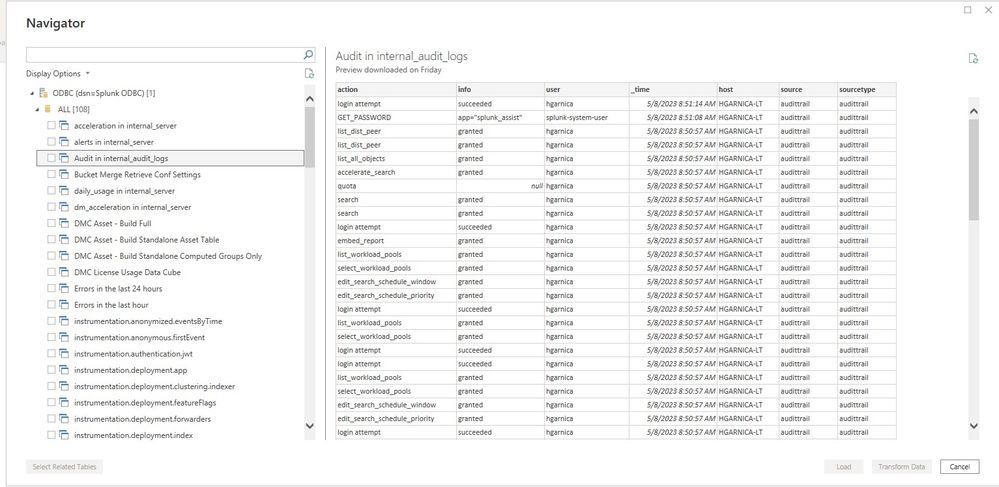
I have a local install of SPlunk Enterprise 9.0.4.1 64bit, I installed the 64bit ODBC Driver and configured the data source.
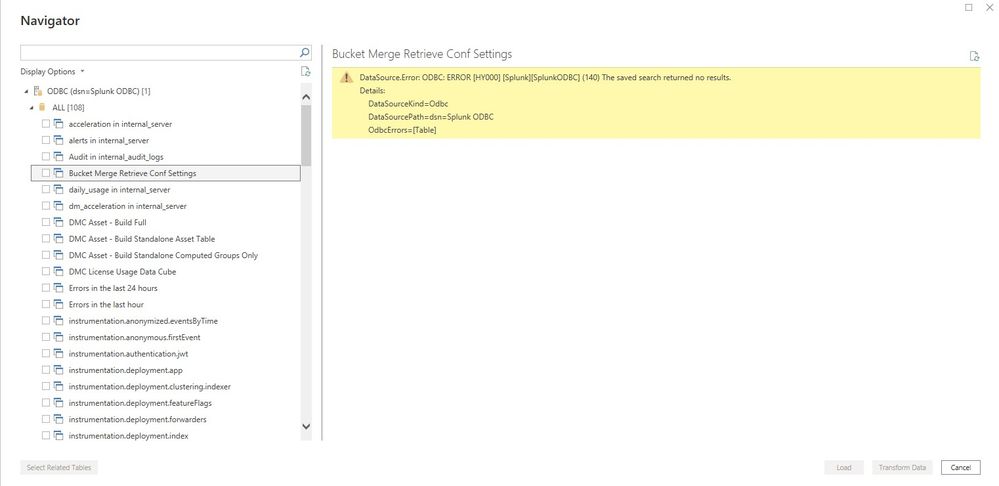
I then go to PowerBi to GetData via ODBC, I get a list of tables. When I select a table some data visible while some tables generate an error as follows:
DataSource.Error: ODBC: ERROR [HY000] [Splunk][SplunkODBC] (140) The saved search returned no results.
Details:
DataSourceKind=Odbc
DataSourcePath=dsn=Splunk ODBC
OdbcErrors=[Table]
I do not see find my data or field extractions from Splunk. Any ideas?
- Mark as New
- Bookmark Message
- Subscribe to Message
- Mute Message
- Subscribe to RSS Feed
- Permalink
- Report Inappropriate Content
You were correct, my search report needed modification in Splunk. Thereafter I was able to see the Table in PowerBi that was named the same as my Saved Search Report.
Thanks again, Hector
- Mark as New
- Bookmark Message
- Subscribe to Message
- Mute Message
- Subscribe to RSS Feed
- Permalink
- Report Inappropriate Content


Sometimes it's normal for a search to return no results. It may be that there is no data that meets the search criteria. This is especially true for searches that look for error conditions.
Have you tried running the search within Splunk to see what it returns?
If this reply helps you, Karma would be appreciated.
- Mark as New
- Bookmark Message
- Subscribe to Message
- Mute Message
- Subscribe to RSS Feed
- Permalink
- Report Inappropriate Content
You were correct, my search report needed modification in Splunk. Thereafter I was able to see the Table in PowerBi that was named the same as my Saved Search Report.
Thanks again, Hector
- Mark as New
- Bookmark Message
- Subscribe to Message
- Mute Message
- Subscribe to RSS Feed
- Permalink
- Report Inappropriate Content
Hey hgarnica,
i have the same issue, like i was not able to run the search from powerbi, what type of modifications or permissions i need to provide and how will be the sample url for connecting the splunk as i was using it with https://hostname:8089 --> do we need to give any specific app names like that.
Thanks in-advance for awaiting for your response.

Join the Splunk Community Slack to learn, troubleshoot, and make connections with fellow Splunk practitioners in real time!
Join Splunk User Groups to connect and learn in-person by region or remotely by topic or industry.
May 2026 Splunk Expert Sessions: Security & Observability
Network to App: Observability Unlocked [May & June Series]
SPL2 Deep Dives, AppDynamics Integrations, SAML Made Simple and Much More on Splunk ...
