
Join the Conversation
- Find Answers
- :
- Using Splunk
- :
- Dashboards & Visualizations
- :
- Re: How can I use the color input from the Single ...
- Subscribe to RSS Feed
- Mark Topic as New
- Mark Topic as Read
- Float this Topic for Current User
- Bookmark Topic
- Subscribe to Topic
- Mute Topic
- Printer Friendly Page
- Mark as New
- Bookmark Message
- Subscribe to Message
- Mute Message
- Subscribe to RSS Feed
- Permalink
- Report Inappropriate Content


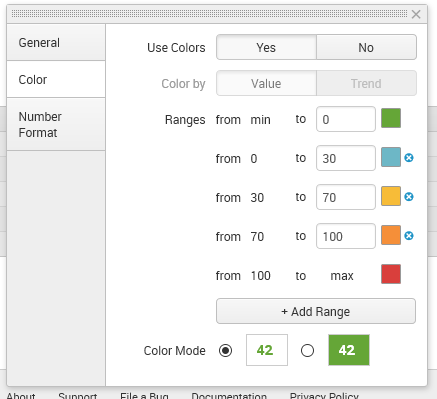
I've seen this input in the Single Value visualization:
I would like to use it in my own visualization, but the documentation doesn't seem to cover that, all I see there are radio, text and color picker inputs. Anyone with any experience on this?

- Mark as New
- Bookmark Message
- Subscribe to Message
- Mute Message
- Subscribe to RSS Feed
- Permalink
- Report Inappropriate Content


Hi @jeffland,
Unfortunately, the current custom visualization framework does not support dynamic formatter options. You can set it up to have a set number of ranges that get colors, but you can't make the number of ranges variable. For an example of a basic set up, see the horseshoe meter custom viz (https://splunkbase.splunk.com/app/3166/). Dynamic formatter options are something we are looking at for the future.
- Mark as New
- Bookmark Message
- Subscribe to Message
- Mute Message
- Subscribe to RSS Feed
- Permalink
- Report Inappropriate Content
Hi @jeffland,
Unfortunately, the current custom visualization framework does not support dynamic formatter options. You can set it up to have a set number of ranges that get colors, but you can't make the number of ranges variable. For an example of a basic set up, see the horseshoe meter custom viz (https://splunkbase.splunk.com/app/3166/). Dynamic formatter options are something we are looking at for the future.
- Mark as New
- Bookmark Message
- Subscribe to Message
- Mute Message
- Subscribe to RSS Feed
- Permalink
- Report Inappropriate Content
Glad to hear some "official" thoughts on that, I appreciate your input.
I was wondering if maybe I could just use plain HTML and js in the format menu, but that seems like monkeypatching and I don't really want to go that way. It's comforting to know that the format menu will/might see some more features in the future.

Data Management Digest – December 2025
Index This | What is broken 80% of the time by February?
Unlock Faster Time-to-Value on Edge and Ingest Processor with New SPL2 Pipeline ...
