
Join the Conversation
- Find Answers
- :
- Using Splunk
- :
- Dashboards & Visualizations
- :
- Re: How can I display hidden fields in a tooltip?
- Subscribe to RSS Feed
- Mark Topic as New
- Mark Topic as Read
- Float this Topic for Current User
- Bookmark Topic
- Subscribe to Topic
- Mute Topic
- Printer Friendly Page
- Mark as New
- Bookmark Message
- Subscribe to Message
- Mute Message
- Subscribe to RSS Feed
- Permalink
- Report Inappropriate Content

Hi,
I'd like to display a tooltip when someone hover the values of the first column of my table. This tooltip would display values taken from 3 hidden fields.
My table looks like that :
<table id="tblTooltip">
        <search base="fullKpi">
          <query>
                 table reference,referenceOrder,validation_status
                 </query>
                 <preview>
                   <set token="refOrder">$result.referenceOrder$</set>
                 </preview>
        </search>

        <fields>reference,validation_status</fields>
        <option name="count">10</option>
        <option name="drilldown">none</option>
      </table>
and my JS looks like that:
require([
    'underscore',
    'jquery',
    'splunkjs/mvc',
    'splunkjs/mvc/tableview',
    'splunkjs/mvc/simplexml/ready!'
], function(_, $, mvc, TableView) {

    var CustomTooltipRenderer = TableView.BaseCellRenderer.extend({
        canRender: function(cell) {
            return cell.field === 'Reference';
        },
        render: function($td, cell) {
            var defaultTokenModel=mvc.Components.get("default");
            var tokenValue = defaultTokenmodel.get("refOrder");
            var message = cell.value;
            var tip = tokenValue;


            $td.html(_.template('<a href="#" data-toggle="tooltip" data-placement="left" title="<%- tip%>"><%- message%></a>', {
                tip: tip,
                message: message
            }));

            // This line wires up the Bootstrap tooltip to the cell markup
            $td.children('[data-toggle="tooltip"]').tooltip();
        }
    });

    mvc.Components.get('tblTooltip').getVisualization(function(tableView) {

        // Register custom cell renderer
        tableView.table.addCellRenderer(new CustomTooltipRenderer());

        // Force the table to re-render
        tableView.table.render();
    });

});
I'm trying to display the value of the field referenceOrder when hovering the reference field, however it displays "$result.referenceOrder$ in plain text
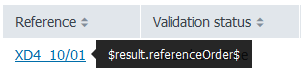
I saw another response (https://answers.splunk.com/answers/495575/how-to-show-a-hidden-field-in-a-tooltip-when-i-hov.html) with a workaround by combining hidden fields into a visible field and then splitting the values inside it, but I'd like to know if there's a way to do it properly ? Another token use or something maybe ?
Any idea is welcome ! 😄

- Mark as New
- Bookmark Message
- Subscribe to Message
- Mute Message
- Subscribe to RSS Feed
- Permalink
- Report Inappropriate Content


@mattysherve
For your requirement we can use a trick. 🙂
Can you please try below XML and js code?
XML:
<dashboard script="tooltip.js">
  <label>table tooltip</label>
  <row>
    <panel>
      <table id="tblTooltip">
        <search>
          <query>| makeresults | eval reference="12345",referenceOrder="67890",validation_status="test" |  eval reference=reference."|".referenceOrder | table reference,validation_status</query>
          <earliest>-24h@h</earliest>
          <latest>now</latest>
          <sampleRatio>1</sampleRatio>
        </search>
        <option name="count">20</option>
        <option name="dataOverlayMode">none</option>
        <option name="drilldown">none</option>
        <option name="percentagesRow">false</option>
        <option name="refresh.display">progressbar</option>
        <option name="rowNumbers">false</option>
        <option name="totalsRow">false</option>
        <option name="wrap">true</option>
      </table>
    </panel>
  </row>
</dashboard>
tooltip.js
require([
    'underscore',
    'jquery',
    'splunkjs/mvc',
    'splunkjs/mvc/tableview',
    'splunkjs/mvc/simplexml/ready!'
], function(_, $, mvc, TableView) {

    var CustomTooltipRenderer = TableView.BaseCellRenderer.extend({
        canRender: function(cell) {
            return cell.field === 'reference';
        },
        render: function($td, cell) {
            var message = cell.value.split("|")[0];
            var tip = cell.value.split("|")[1];


            $td.html(_.template('<a href="#" data-toggle="tooltip" data-placement="right" title="<%- tip%>"><%- message%></a>', {
                tip: tip,
                message: message
            }));

            // This line wires up the Bootstrap tooltip to the cell markup
            $td.children('[data-toggle="tooltip"]').tooltip();
        }
    });

    mvc.Components.get('tblTooltip').getVisualization(function(tableView) {

        // Register custom cell renderer
        tableView.table.addCellRenderer(new CustomTooltipRenderer());

        // Force the table to re-render
        tableView.table.render();
    });

});
Thanks
- Mark as New
- Bookmark Message
- Subscribe to Message
- Mute Message
- Subscribe to RSS Feed
- Permalink
- Report Inappropriate Content
@mattysherve
For your requirement we can use a trick. 🙂
Can you please try below XML and js code?
XML:
<dashboard script="tooltip.js">
  <label>table tooltip</label>
  <row>
    <panel>
      <table id="tblTooltip">
        <search>
          <query>| makeresults | eval reference="12345",referenceOrder="67890",validation_status="test" |  eval reference=reference."|".referenceOrder | table reference,validation_status</query>
          <earliest>-24h@h</earliest>
          <latest>now</latest>
          <sampleRatio>1</sampleRatio>
        </search>
        <option name="count">20</option>
        <option name="dataOverlayMode">none</option>
        <option name="drilldown">none</option>
        <option name="percentagesRow">false</option>
        <option name="refresh.display">progressbar</option>
        <option name="rowNumbers">false</option>
        <option name="totalsRow">false</option>
        <option name="wrap">true</option>
      </table>
    </panel>
  </row>
</dashboard>
tooltip.js
require([
    'underscore',
    'jquery',
    'splunkjs/mvc',
    'splunkjs/mvc/tableview',
    'splunkjs/mvc/simplexml/ready!'
], function(_, $, mvc, TableView) {

    var CustomTooltipRenderer = TableView.BaseCellRenderer.extend({
        canRender: function(cell) {
            return cell.field === 'reference';
        },
        render: function($td, cell) {
            var message = cell.value.split("|")[0];
            var tip = cell.value.split("|")[1];


            $td.html(_.template('<a href="#" data-toggle="tooltip" data-placement="right" title="<%- tip%>"><%- message%></a>', {
                tip: tip,
                message: message
            }));

            // This line wires up the Bootstrap tooltip to the cell markup
            $td.children('[data-toggle="tooltip"]').tooltip();
        }
    });

    mvc.Components.get('tblTooltip').getVisualization(function(tableView) {

        // Register custom cell renderer
        tableView.table.addCellRenderer(new CustomTooltipRenderer());

        // Force the table to re-render
        tableView.table.render();
    });

});
Thanks
- Mark as New
- Bookmark Message
- Subscribe to Message
- Mute Message
- Subscribe to RSS Feed
- Permalink
- Report Inappropriate Content

Thanks Kamlesh,
Nice solution and it does work for me ever.
But this time when I try to reproduce it, it does not work.
I have checked the code and xml both are copied directly from you but really do not work.
Any experience with this issue? or what setting can I configure, many thanks!
- Mark as New
- Bookmark Message
- Subscribe to Message
- Mute Message
- Subscribe to RSS Feed
- Permalink
- Report Inappropriate Content
Would this work for a timechart? I need to display the value for a field that isn't in the timechart.
- Mark as New
- Bookmark Message
- Subscribe to Message
- Mute Message
- Subscribe to RSS Feed
- Permalink
- Report Inappropriate Content
Thanks for the answer, that's what I went with. Even though it feels like a cheap trick, it seems to be the only way to do it !

Join the Splunk Community Slack to learn, troubleshoot, and make connections with fellow Splunk practitioners in real time!
Join Splunk User Groups to connect and learn in-person by region or remotely by topic or industry.
[Puzzles] Solve, Learn, Repeat: Matching cron expressions
Design, Compete, Win: Submit Your Best Splunk Dashboards for a .conf26 Pass
May 2026 Splunk Expert Sessions: Security & Observability
