
Join the Conversation
- Find Answers
- :
- Using Splunk
- :
- Dashboards & Visualizations
- :
- Re: How can I create a drop-down for panel for dif...
- Subscribe to RSS Feed
- Mark Topic as New
- Mark Topic as Read
- Float this Topic for Current User
- Bookmark Topic
- Subscribe to Topic
- Mute Topic
- Printer Friendly Page
- Mark as New
- Bookmark Message
- Subscribe to Message
- Mute Message
- Subscribe to RSS Feed
- Permalink
- Report Inappropriate Content

Hi,
i want to show my dash board as day wise report. If i click on particular date field, it has to display that date results only.
My drop-down should be like this .It has to take last 7 days date automatically. When i click on particular date, it should display that date result only.
My xml file looks like this
  <form>
      <label>All servers metrics</label>
      <fieldset submitButton="false">
        <input type="dropdown" token="field2">
          <label>field2</label>
        </input>
      </fieldset>
      <row>
        <panel>
          <title>Servers metrics</title>
          <table>
            <title>Servers metrics</title>
            <search>
              <query>source="C:\\mypath\\*" host="something" index="main"  | rex "^\s*(?<Type>[^,]+),\s*(?<Category>[^,]+),\s*(?<date>\d{4}-\d{2}-\d{2}),\s*(?<time>\d{2}\:\d{2}),\s*(?<Count>\d+),\s*(?<Cpu_Usage_Percentage>[^,]+),\s*(?<Total_Disk_TB>[^,]+),\s*(?<Used_Disk_TB>[^,]+),\s*(?<Total_Memory_GB>[^,]+),\s*(?<Used_Memory_GB>\S+)"
    | table  _time Type Category  Count Cpu_Usage_Percentage Total_Disk_TB Used_Disk_TB Total_Memory_GB Used_Memory_GB</query>
              <earliest>-7d@d</earliest>
              <latest></latest>
              <sampleRatio>1</sampleRatio>
            </search>
            <option name="count">20</option>
            <option name="dataOverlayMode">none</option>
            <option name="drilldown">none</option>
            <option name="percentagesRow">false</option>
            <option name="rowNumbers">false</option>
            <option name="totalsRow">false</option>
            <option name="wrap">true</option>
          </table>
        </panel>
      </row>
    </form>
Can anyone help on this?
Thanks in advance
- Mark as New
- Bookmark Message
- Subscribe to Message
- Mute Message
- Subscribe to RSS Feed
- Permalink
- Report Inappropriate Content

hello there,
plenty of ways to accomplish the task you have. i choose the simpler (in my mind), hard coded the search time criteria to the drop down. used simple time modifiers as described in this doc:
https://docs.splunk.com/Documentation/SplunkCloud/6.6.0/SearchReference/SearchTimeModifiers
here is a screenshot:
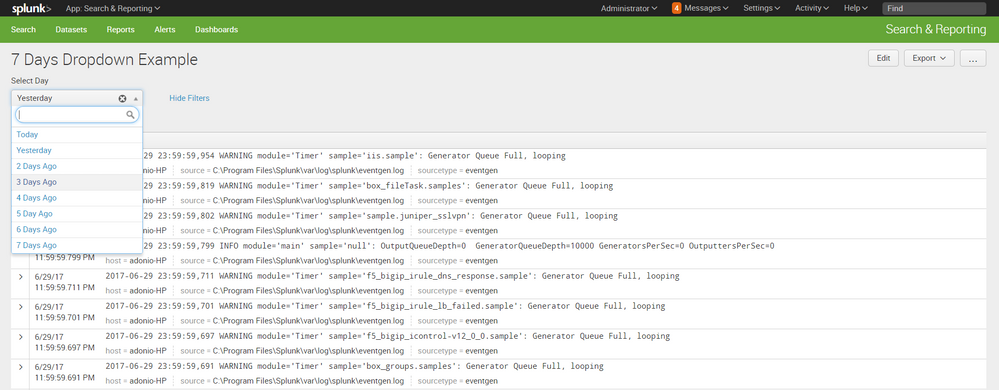
here is the code:
<form>
  <label>7 Days Dropdown Example</label>
  <fieldset submitButton="false">
    <input type="dropdown" token="TIME_STRING" searchWhenChanged="true">
      <label>Select Day</label>
      <choice value="earliest=@d latest=now">Today</choice>
      <choice value="earliest=-d@d latest=@d">Yesterday</choice>
      <choice value="earliest=-2d@d latest=-d@d">2 Days Ago</choice>
      <choice value="earliest=-3d@d latest=-2d@d">3 Days Ago</choice>
      <choice value="earliest=-4d@d latest=-3d@d">4 Days Ago</choice>
      <choice value="earliest=-5d@d latest=-4d@d">5 Day Ago</choice>
      <choice value="earliest=-6d@d latest=-5d@d">6 Days Ago</choice>
      <choice value="eariiest=-7d@d latest=-6d@d">7 Days Ago</choice>
      <default>earliest=@d latest=now</default>
    </input>
  </fieldset>
  <row>
    <panel>
      <event>
        <search>
          <query>$TIME_STRING$ index = _internal | head 10</query>
          <earliest>-15m</earliest>
          <latest>now</latest>
          <sampleRatio>1</sampleRatio>
        </search>
        <option name="count">20</option>
        <option name="list.drilldown">none</option>
        <option name="list.wrap">1</option>
        <option name="maxLines">5</option>
        <option name="raw.drilldown">full</option>
        <option name="rowNumbers">0</option>
        <option name="table.drilldown">all</option>
        <option name="table.sortDirection">asc</option>
        <option name="table.wrap">1</option>
        <option name="type">list</option>
      </event>
    </panel>
  </row>
</form>
hope it helps

- Mark as New
- Bookmark Message
- Subscribe to Message
- Mute Message
- Subscribe to RSS Feed
- Permalink
- Report Inappropriate Content
hello there,
plenty of ways to accomplish the task you have. i choose the simpler (in my mind), hard coded the search time criteria to the drop down. used simple time modifiers as described in this doc:
https://docs.splunk.com/Documentation/SplunkCloud/6.6.0/SearchReference/SearchTimeModifiers
here is a screenshot:
here is the code:
<form>
  <label>7 Days Dropdown Example</label>
  <fieldset submitButton="false">
    <input type="dropdown" token="TIME_STRING" searchWhenChanged="true">
      <label>Select Day</label>
      <choice value="earliest=@d latest=now">Today</choice>
      <choice value="earliest=-d@d latest=@d">Yesterday</choice>
      <choice value="earliest=-2d@d latest=-d@d">2 Days Ago</choice>
      <choice value="earliest=-3d@d latest=-2d@d">3 Days Ago</choice>
      <choice value="earliest=-4d@d latest=-3d@d">4 Days Ago</choice>
      <choice value="earliest=-5d@d latest=-4d@d">5 Day Ago</choice>
      <choice value="earliest=-6d@d latest=-5d@d">6 Days Ago</choice>
      <choice value="eariiest=-7d@d latest=-6d@d">7 Days Ago</choice>
      <default>earliest=@d latest=now</default>
    </input>
  </fieldset>
  <row>
    <panel>
      <event>
        <search>
          <query>$TIME_STRING$ index = _internal | head 10</query>
          <earliest>-15m</earliest>
          <latest>now</latest>
          <sampleRatio>1</sampleRatio>
        </search>
        <option name="count">20</option>
        <option name="list.drilldown">none</option>
        <option name="list.wrap">1</option>
        <option name="maxLines">5</option>
        <option name="raw.drilldown">full</option>
        <option name="rowNumbers">0</option>
        <option name="table.drilldown">all</option>
        <option name="table.sortDirection">asc</option>
        <option name="table.wrap">1</option>
        <option name="type">list</option>
      </event>
    </panel>
  </row>
</form>
hope it helps
- Mark as New
- Bookmark Message
- Subscribe to Message
- Mute Message
- Subscribe to RSS Feed
- Permalink
- Report Inappropriate Content
I made the changes
  <form>
      <label>7 days metrics</label>
      <fieldset submitButton="false">
        <input type="dropdown"  token="TIME_STRING" searchWhenChanged="true">
          <label>Select Day</label>
              <choice value="earliest=@d latest=now">Today</choice>
           <choice value="earliest=-d@d latest=@d">Yesterday</choice>
           <choice value="earliest=-2d@d latest=-d@d">2 Days Ago</choice>
           <choice value="earliest=-3d@d latest=-2d@d">3 Days Ago</choice>
           <choice value="earliest=-4d@d latest=-3d@d">4 Days Ago</choice>
           <choice value="earliest=-5d@d latest=-4d@d">5 Day Ago</choice>
           <choice value="earliest=-6d@d latest=-5d@d">6 Days Ago</choice>
           <choice value="eariiest=-7d@d latest=-6d@d">7 Days Ago</choice>
           <default>earliest=@d latest=now</default>
         </input>
      </fieldset>
      <row>
        <panel>
         <event>
            <search>
              <query>>$TIME_STRING$index = main | head 10</query>
              <earliest>-15m</earliest>
              <latest>now</latest>
              <sampleRatio>1</sampleRatio>
            </search>
               <option name="count">20</option>
               <option name="list.drilldown">none</option>
               <option name="list.wrap">1</option>
               <option name="maxLines">5</option>
               <option name="raw.drilldown">full</option>
               <option name="rowNumbers">0</option>
               <option name="table.drilldown">all</option>
               <option name="table.sortDirection">asc</option>
               <option name="table.wrap">1</option>
               <option name="type">list</option>
        </event>
        </panel>
      </row>
    </form>
But, I am getting this error
Error in 'search' command: Unable to parse the search: Comparator '>' is missing a term on the left hand side
I don't know the reason
This is my search
 source="path\\to\\the\\files\\*" host="my" index="main"  | rex "^\s*(?<Type>[^,]+),\s*(?<Category>[^,]+),\s*(?<date>\d{4}-\d{2}-\d{2}),\s*(?<time>\d{2}\:\d{2}),\s*(?<Count>\d+),\s*(?<Cpu_Usage_Percentage>[^,]+),\s*(?<Total_Disk_TB>[^,]+),\s*(?<Used_Disk_TB>[^,]+),\s*(?<Total_Memory_GB>[^,]+),\s*(?<Used_Memory_GB>\S+)"
    | table  _time Type Category  Count Cpu_Usage_Percentage Total_Disk_TB Used_Disk_TB Total_Memory_GB Used_Memory_GB
- Mark as New
- Bookmark Message
- Subscribe to Message
- Mute Message
- Subscribe to RSS Feed
- Permalink
- Report Inappropriate Content
the only thing you need to add is the dropdown (form input) xml code and then add the token to your search
7 Days Dropdown Example
 <input type="dropdown" token="TIME_STRING" searchWhenChanged="true">
   <label>Select Day</label>
   <choice value="earliest=@d latest=now">Today</choice>
   <choice value="earliest=-d@d latest=@d">Yesterday</choice>
   <choice value="earliest=-2d@d latest=-d@d">2 Days Ago</choice>
   <choice value="earliest=-3d@d latest=-2d@d">3 Days Ago</choice>
   <choice value="earliest=-4d@d latest=-3d@d">4 Days Ago</choice>
   <choice value="earliest=-5d@d latest=-4d@d">5 Day Ago</choice>
   <choice value="earliest=-6d@d latest=-5d@d">6 Days Ago</choice>
   <choice value="eariiest=-7d@d latest=-6d@d">7 Days Ago</choice>
   <default>earliest=@d latest=now</default>
 </input>


 <panel>
   <event>
     <search>
       <query>$TIME_STRING$ source="path\\to\\the\\files\\*" host="my" index="main"  | rex "^\s*(?<Type>[^,]+),\s*(?<Category>[^,]+),\s*(?<date>\d{4}-\d{2}-\d{2}),\s*(?<time>\d{2}\:\d{2}),\s*(?<Count>\d+),\s*(?<Cpu_Usage_Percentage>[^,]+),\s*(?<Total_Disk_TB>[^,]+),\s*(?<Used_Disk_TB>[^,]+),\s*(?<Total_Memory_GB>[^,]+),\s*(?<Used_Memory_GB>\S+)"
 | table  _time Type Category  Count Cpu_Usage_Percentage Total_Disk_TB Used_Disk_TB Total_Memory_GB Used_Memory_GB</query>
       <earliest>-15m</earliest>
       <latest>now</latest>
       <sampleRatio>1</sampleRatio>
     </search>
     <option name="count">20</option>
     <option name="list.drilldown">none</option>
     <option name="list.wrap">1</option>
     <option name="maxLines">5</option>
     <option name="raw.drilldown">full</option>
     <option name="rowNumbers">0</option>
     <option name="table.drilldown">all</option>
     <option name="table.sortDirection">asc</option>
     <option name="table.wrap">1</option>
     <option name="type">list</option>
   </event>
 </panel>
- Mark as New
- Bookmark Message
- Subscribe to Message
- Mute Message
- Subscribe to RSS Feed
- Permalink
- Report Inappropriate Content
Its giving unexpected close tag error at this below line
- Mark as New
- Bookmark Message
- Subscribe to Message
- Mute Message
- Subscribe to RSS Feed
- Permalink
- Report Inappropriate Content
Its working now. I placed the entire query inside the CDATA section. Thank you

Join the Splunk Community Slack to learn, troubleshoot, and make connections with fellow Splunk practitioners in real time!
Join Splunk User Groups to connect and learn in-person by region or remotely by topic or industry.
[Puzzles] Solve, Learn, Repeat: Character substitutions with Regular Expressions
Splunk Community Badges!
[Puzzles] Solve, Learn, Repeat: Matching cron expressions
