
Join the Conversation
- Find Answers
- :
- Using Splunk
- :
- Dashboards & Visualizations
- :
- Re: High end Google maps viz
- Subscribe to RSS Feed
- Mark Topic as New
- Mark Topic as Read
- Float this Topic for Current User
- Bookmark Topic
- Subscribe to Topic
- Mute Topic
- Printer Friendly Page
- Mark as New
- Bookmark Message
- Subscribe to Message
- Mute Message
- Subscribe to RSS Feed
- Permalink
- Report Inappropriate Content
High end Google maps viz

HI Team,
I have been using maps within Splunk from good time. By default it always shows white background if any country/place is not highlighted. Is there any way we can change the background color of the map before working on it. Something like this.
https://csaladenes.wordpress.com/2018/02/18/motorsports-asian-pull-and-release/
OR
https://danielmiessler.com/blog/visualizing-interesting-log-events-using-splunks-google-maps-applica...
(Note that , I am good till the country type view, I dont need state/city view)
Thanks in advance
- Mark as New
- Bookmark Message
- Subscribe to Message
- Mute Message
- Subscribe to RSS Feed
- Permalink
- Report Inappropriate Content


Hi nadlurinadluri,
you can configure the maps viz using format :
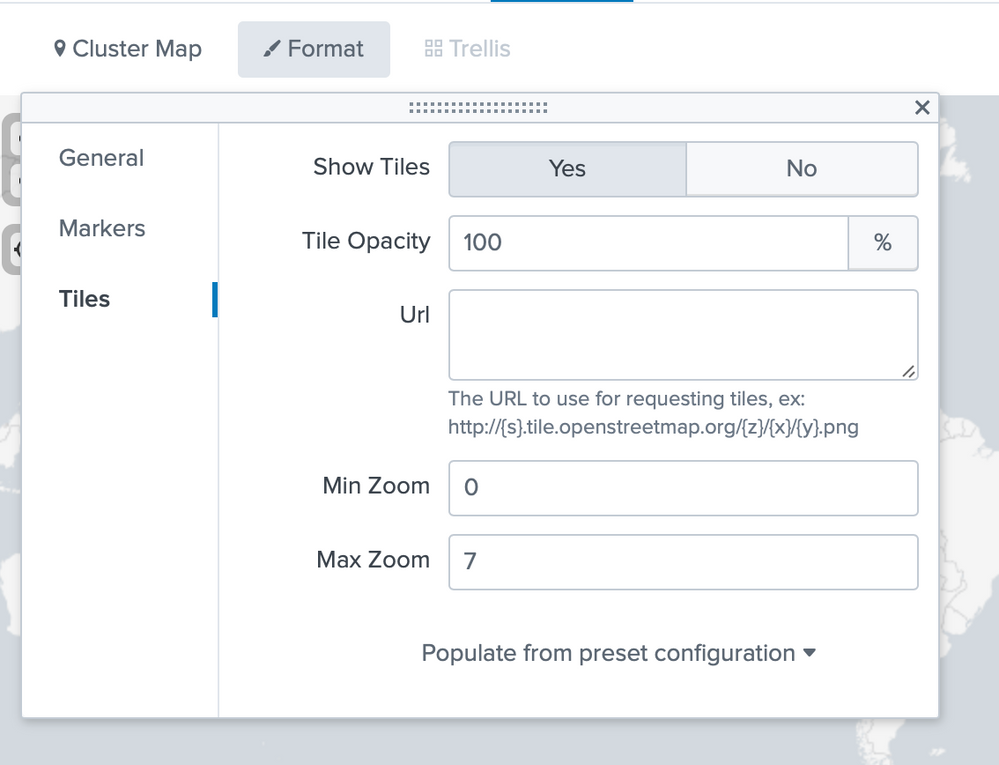
Also you can use other maps, like a Choropleth maps https://docs.splunk.com/Documentation/Splunk/latest/Viz/choroplethmaps or any other map tiles like in this example https://answers.splunk.com/answers/368073/how-to-use-custom-tiles-in-splunk-maps-offline-wit.html#an... or in this one https://sideviewapps.com/2871/custom-maps/?cn-reloaded=1
Hope this helps to get you started ...
cheers, MuS



Join the Splunk Community Slack to learn, troubleshoot, and make connections with fellow Splunk practitioners in real time!
Join Splunk User Groups to connect and learn in-person by region or remotely by topic or industry.
A Four-Part Event Series: Full Stack Observability For the AI Era
SOC4Kafka - New Kafka Connector Powered by OpenTelemetry
Event Series: Level up your SOC: Advancing with Splunk Enterprise Security
