
Join the Conversation
- Find Answers
- :
- Using Splunk
- :
- Dashboards & Visualizations
- :
- Re: Hide dashboard source code in a view
- Subscribe to RSS Feed
- Mark Topic as New
- Mark Topic as Read
- Float this Topic for Current User
- Bookmark Topic
- Subscribe to Topic
- Mute Topic
- Printer Friendly Page
- Mark as New
- Bookmark Message
- Subscribe to Message
- Mute Message
- Subscribe to RSS Feed
- Permalink
- Report Inappropriate Content

Hello
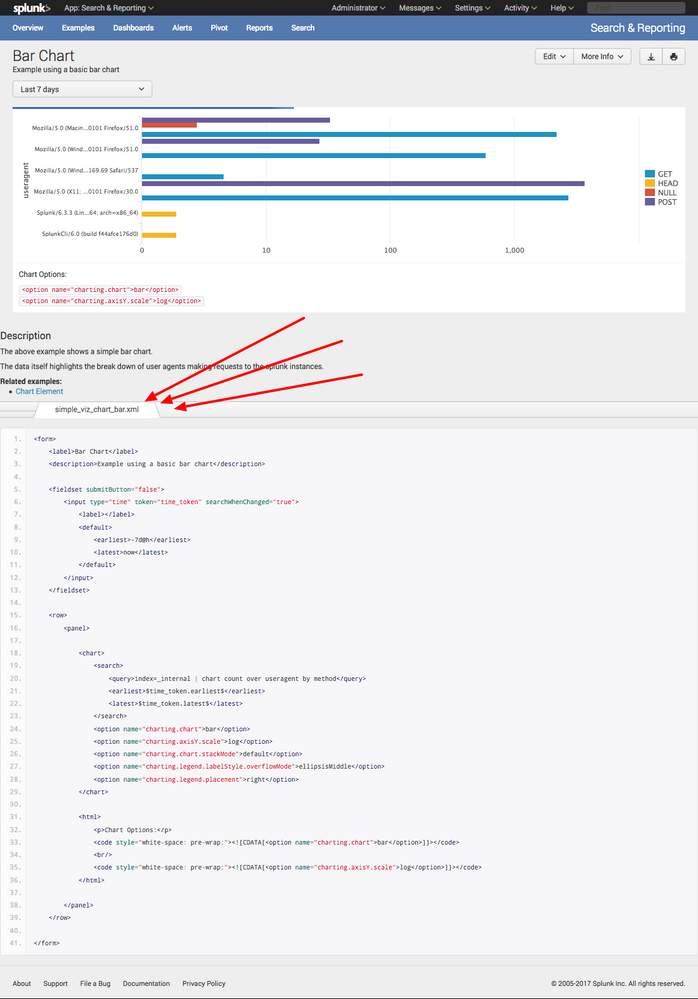
All my dashboards show their raw xml source code in the footer. I do not remember how is enabled this, but I know Splunk does not do this out-of -the-box. Can you tell me how to disable this feature. I have attached one of my dashboards to show this occurance.
Thank you in advance.
Lovemore Nalube

- Mark as New
- Bookmark Message
- Subscribe to Message
- Mute Message
- Subscribe to RSS Feed
- Permalink
- Report Inappropriate Content


This looks a lot like you somehow merged the Search & Reporting app with the Dashboard Examples app... likely there's a dashboard.js or application.js sitting in etc/apps/search/appserver/static that's taking Dashboard Examples functionality and adding it to your S&R app.
- Mark as New
- Bookmark Message
- Subscribe to Message
- Mute Message
- Subscribe to RSS Feed
- Permalink
- Report Inappropriate Content
This looks a lot like you somehow merged the Search & Reporting app with the Dashboard Examples app... likely there's a dashboard.js or application.js sitting in etc/apps/search/appserver/static that's taking Dashboard Examples functionality and adding it to your S&R app.
- Mark as New
- Bookmark Message
- Subscribe to Message
- Mute Message
- Subscribe to RSS Feed
- Permalink
- Report Inappropriate Content
Thank you! That was the correct cause of this issue. I replaced the etc/apps/search folder with the one from the original installation files, restarted Splunk, and that solved the issue!

[Puzzles] Solve, Learn, Repeat: Reprocessing XML into Fixed-Length Events
Data Management Digest – December 2025
Index This | What is broken 80% of the time by February?
