
Join the Conversation
- Find Answers
- :
- Using Splunk
- :
- Dashboards & Visualizations
- :
- Hide dashboard source code in a view
- Subscribe to RSS Feed
- Mark Topic as New
- Mark Topic as Read
- Float this Topic for Current User
- Bookmark Topic
- Subscribe to Topic
- Mute Topic
- Printer Friendly Page
- Mark as New
- Bookmark Message
- Subscribe to Message
- Mute Message
- Subscribe to RSS Feed
- Permalink
- Report Inappropriate Content

Hello
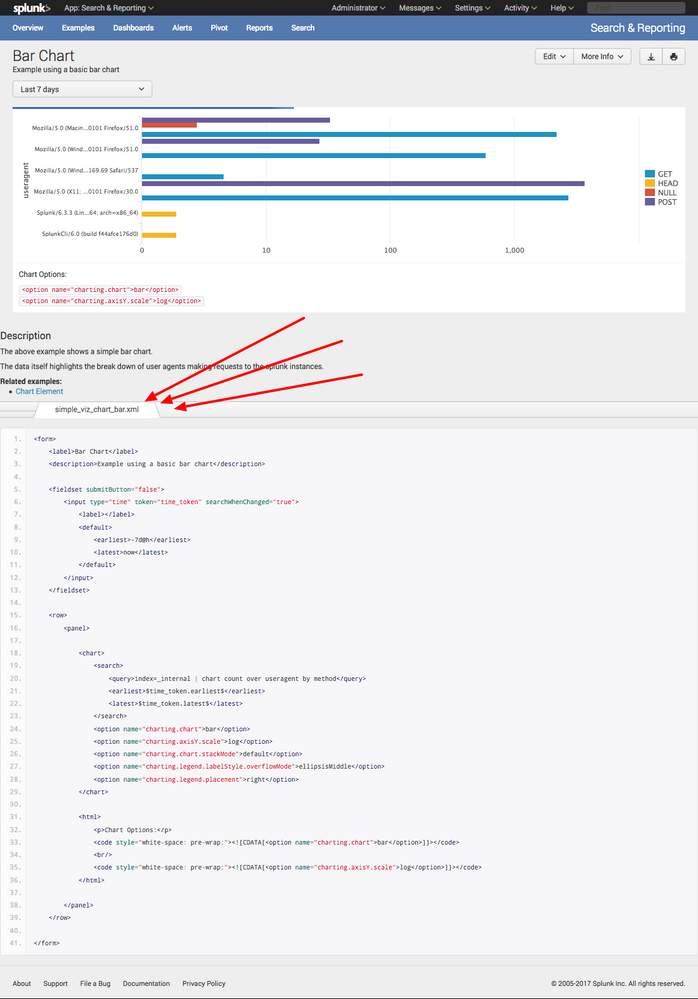
All my dashboards show their raw xml source code in the footer. I do not remember how is enabled this, but I know Splunk does not do this out-of -the-box. Can you tell me how to disable this feature. I have attached one of my dashboards to show this occurance.
Thank you in advance.
Lovemore Nalube
- Mark as New
- Bookmark Message
- Subscribe to Message
- Mute Message
- Subscribe to RSS Feed
- Permalink
- Report Inappropriate Content


This looks a lot like you somehow merged the Search & Reporting app with the Dashboard Examples app... likely there's a dashboard.js or application.js sitting in etc/apps/search/appserver/static that's taking Dashboard Examples functionality and adding it to your S&R app.
- Mark as New
- Bookmark Message
- Subscribe to Message
- Mute Message
- Subscribe to RSS Feed
- Permalink
- Report Inappropriate Content
This looks a lot like you somehow merged the Search & Reporting app with the Dashboard Examples app... likely there's a dashboard.js or application.js sitting in etc/apps/search/appserver/static that's taking Dashboard Examples functionality and adding it to your S&R app.
- Mark as New
- Bookmark Message
- Subscribe to Message
- Mute Message
- Subscribe to RSS Feed
- Permalink
- Report Inappropriate Content
Thank you! That was the correct cause of this issue. I replaced the etc/apps/search folder with the one from the original installation files, restarted Splunk, and that solved the issue!



Join the Splunk Community Slack to learn, troubleshoot, and make connections with fellow Splunk practitioners in real time!
Join Splunk User Groups to connect and learn in-person by region or remotely by topic or industry.
Painting a Clearer Picture: Unifying Your Investigations with Cisco AI Canvas
Hello POJO, meet nocode
Announcing Modern Navigation: A New Era of Splunk User Experience
