
Join the Conversation
- Find Answers
- :
- Using Splunk
- :
- Dashboards & Visualizations
- :
- Re: Extracted fields are not shown in dashboards o...
- Subscribe to RSS Feed
- Mark Topic as New
- Mark Topic as Read
- Float this Topic for Current User
- Bookmark Topic
- Subscribe to Topic
- Mute Topic
- Printer Friendly Page
- Mark as New
- Bookmark Message
- Subscribe to Message
- Mute Message
- Subscribe to RSS Feed
- Permalink
- Report Inappropriate Content

I have some extracted fields and I do see them while searching. In smart mode I select interesting fields and hit "Save as report", everything is OK:

But when I schedule this report and it runs, my fields don't show up! I can see only _time left in this scheduled report:
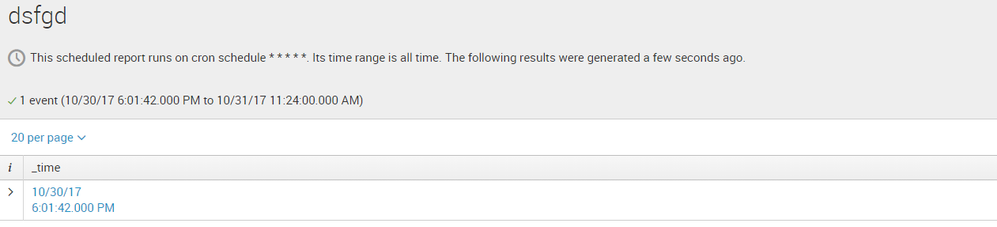
And if I hit "Open in Search..." my extracted fields are here again.
Same thing when trying to save my search as s dashboard pane: no extracted fields, even if using "fields" command.
All permissions on extracted fields are Global: I checked twice. This is a demo instance, so I use only one user for creating fields and reports.
What am I missing? Any privacy settings?


- Mark as New
- Bookmark Message
- Subscribe to Message
- Mute Message
- Subscribe to RSS Feed
- Permalink
- Report Inappropriate Content
Can you please send through your query.
You might want to add
Your base search | table _time, ru_event_type, description, sender, atom
To see if it helps.
- Mark as New
- Bookmark Message
- Subscribe to Message
- Mute Message
- Subscribe to RSS Feed
- Permalink
- Report Inappropriate Content
Can you please send through your query.
You might want to add
Your base search | table _time, ru_event_type, description, sender, atom
To see if it helps.

Upcoming Webinar: Unmasking Insider Threats with Slunk Enterprise Security’s UEBA
.conf25 technical session recap of Observability for Gen AI: Monitoring LLM ...
A Season of Skills: New Splunk Courses to Light Up Your Learning Journey
