
Join the Conversation
- Find Answers
- :
- Using Splunk
- :
- Dashboards & Visualizations
- :
- Empty string token causing multiselect box visual ...
- Subscribe to RSS Feed
- Mark Topic as New
- Mark Topic as Read
- Float this Topic for Current User
- Bookmark Topic
- Subscribe to Topic
- Mute Topic
- Printer Friendly Page
- Mark as New
- Bookmark Message
- Subscribe to Message
- Mute Message
- Subscribe to RSS Feed
- Permalink
- Report Inappropriate Content
Empty string token causing multiselect box visual bug

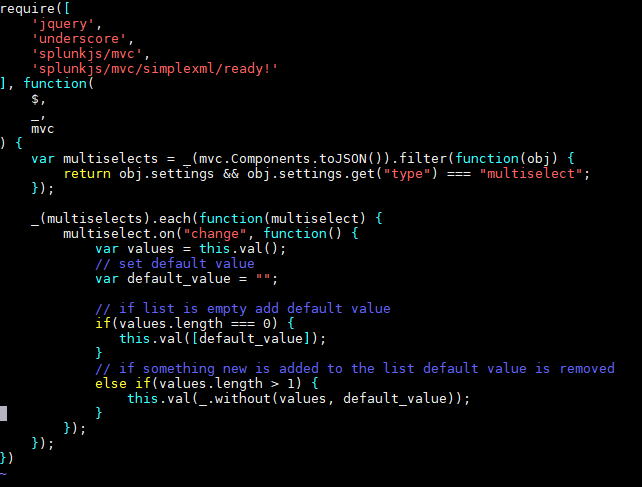
I am using multiselect boxes to select which search results i want to exclude and include, and when the boxes are cleared, i have some javascript running that sets the tokens to empty strings so that the search can still run without waiting for the tokens to be set again.
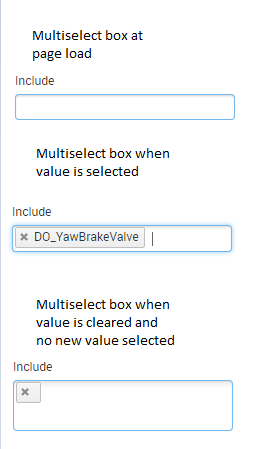
However when the tokens are set to empty string by the javascript the multiselect box suddenly becoms twice as big without anything in it.
Hopefully this picture shows the problem, the empty x i can somewhat live with, but the box suddenly doubling in size is what i would like to avoid since it seems like a bug.
Here is the javascript i use to set to token to "" (empty string)
Mostly i just wanna avoid the Multiselect Box doubling in size, but alternate solutions to defaulting the tokens to empty values and still allowing the searches to run are also welcome.
- Mark as New
- Bookmark Message
- Subscribe to Message
- Mute Message
- Subscribe to RSS Feed
- Permalink
- Report Inappropriate Content


I'd suggest using something other than an empty string, maybe giving it a label saying "None" in the Input and a value that does nothing in the search. A value that does nothing in the search could be a comment makro saying "Empty Input Selection". This would not only solve the issue of your unnecessarily large multiselect, it would also be more transparent to both users of the dashboard and someone looking at the search.




Join the Splunk Community Slack to learn, troubleshoot, and make connections with fellow Splunk practitioners in real time!
Join Splunk User Groups to connect and learn in-person by region or remotely by topic or industry.
Analytics Workspace removal in Splunk 10.6
Vibe-coding, AI, and Splunkcraft: Highlights from the .conf26 Builder Bar
Thanks for the Memories: .conf26 Took Learning to New Heights
