
Join the Conversation
- Find Answers
- :
- Using Splunk
- :
- Dashboards & Visualizations
- :
- Edit Search String Not Available On Dashboard
- Subscribe to RSS Feed
- Mark Topic as New
- Mark Topic as Read
- Float this Topic for Current User
- Bookmark Topic
- Subscribe to Topic
- Mute Topic
- Printer Friendly Page
- Mark as New
- Bookmark Message
- Subscribe to Message
- Mute Message
- Subscribe to RSS Feed
- Permalink
- Report Inappropriate Content

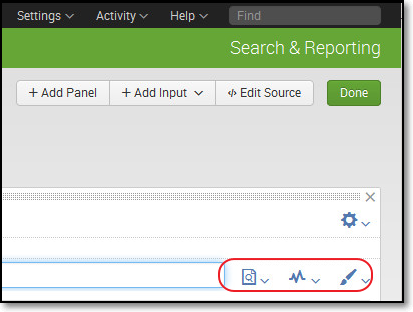
Edit Search String Not Available On Dashboard. I am trying to add a time selector input to my dashboard following the steps from here:http://docs.splunk.com/Documentation/Splunk/6.2.3/SearchTutorial/Createnewdashboard. I have attempted adjusting the permissions and restarting the services and results remain the same. Thank you in advance for your time.
- Mark as New
- Bookmark Message
- Subscribe to Message
- Mute Message
- Subscribe to RSS Feed
- Permalink
- Report Inappropriate Content


It looks as if you've added a report to that panel, not an inline search. To edit the search string in that report, hit the left button of those three circled, click the report name, and click open in search. Make your changes, test them, and hit save in the top right corner above the search bar.
Note: This will change the report, so changes will propagate to everyone and everything using that report.
- Mark as New
- Bookmark Message
- Subscribe to Message
- Mute Message
- Subscribe to RSS Feed
- Permalink
- Report Inappropriate Content
It looks as if you've added a report to that panel, not an inline search. To edit the search string in that report, hit the left button of those three circled, click the report name, and click open in search. Make your changes, test them, and hit save in the top right corner above the search bar.
Note: This will change the report, so changes will propagate to everyone and everything using that report.
- Mark as New
- Bookmark Message
- Subscribe to Message
- Mute Message
- Subscribe to RSS Feed
- Permalink
- Report Inappropriate Content
Martin,
Thank you for the information. Yes, I used reports for the dashboard. I have changed the way I had the panels to inline search. All is functioning as I wanted.



Join the Splunk Community Slack to learn, troubleshoot, and make connections with fellow Splunk practitioners in real time!
Join Splunk User Groups to connect and learn in-person by region or remotely by topic or industry.
SOC4Kafka - New Kafka Connector Powered by OpenTelemetry
Rounding off the Splunk Dashboard Contest
A Four Part Event Series: AI + Observability: AI Agents, LLMs, Apps, & Infrastructure
