
Join the Conversation
- Find Answers
- :
- Using Splunk
- :
- Dashboards & Visualizations
- :
- Re: Dynamic Text on Dashboard description Area.
- Subscribe to RSS Feed
- Mark Topic as New
- Mark Topic as Read
- Float this Topic for Current User
- Bookmark Topic
- Subscribe to Topic
- Mute Topic
- Printer Friendly Page
- Mark as New
- Bookmark Message
- Subscribe to Message
- Mute Message
- Subscribe to RSS Feed
- Permalink
- Report Inappropriate Content
Dynamic Text on Dashboard description Area.

Is it possible to have some dynamic text in Dashboard description area, like current system time?
I am attaching the screen shot.
I am very new to Splunk ,it is my learning journey. Thank you for your help. 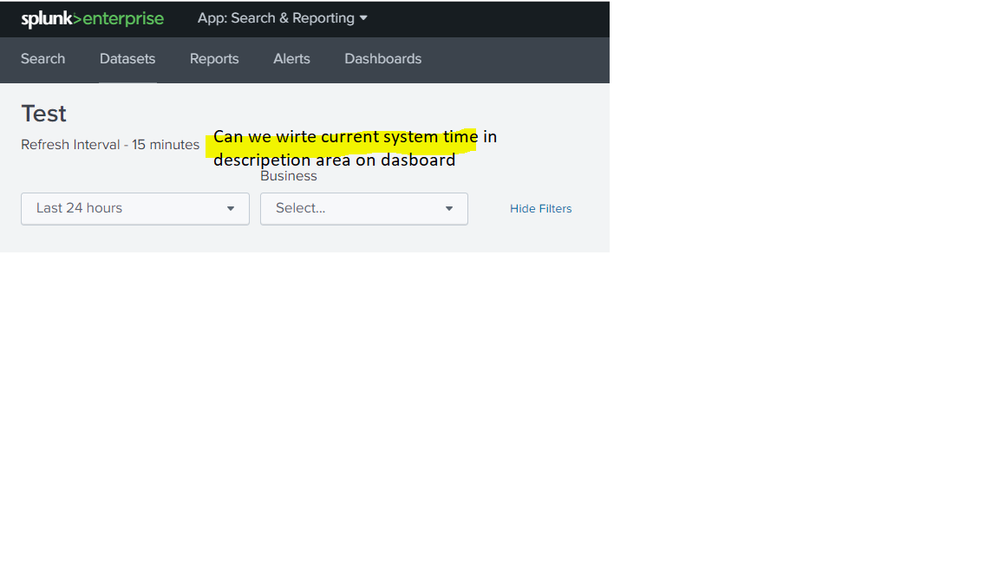

- Mark as New
- Bookmark Message
- Subscribe to Message
- Mute Message
- Subscribe to RSS Feed
- Permalink
- Report Inappropriate Content

@nilanjankc try the following Run anywhere example.
1) You can use hideTitle="true" to hide the Splunk dashboard title.
2) Then use <html> panel to build your own dashboard header.
3) In another row add the inputs.
4) Create an independent search to find the current time and set it to token to be used to display the current time in the html panel.
PS: You can type /edit or /editxml after the dashboard title in the URL to bring up Dashboard UI Edit or Dashboard Edit XML respectively since the Edit button will also not show.
<form hideTitle="true">
  <label>Test</label>
  <description>Refresh Interval 15 Minutes</description>
  <search>
    <query>| makeresults
    | eval CurrentTime=strftime(_time,"%Y/%m/%d %H:%M:%S %p")
    </query>
    <earliest>-1s</earliest>
    <latest>now</latest>
    <progress>
      <set token="tokCurrentTime">$result.CurrentTime$</set>
    </progress>
  </search>
  <fieldset submitButton="false"></fieldset>
  <row>
    <panel>
      <html>
        <div>
          <h1>Test</h1>
          <p class="dashboard-header-description">Refresh Interval 15 Minutes - $tokCurrentTime$</p>
        </div>
      </html>
    </panel>
  </row>
  <row>
    <panel>
      <input type="time" token="field1">
        <label></label>
        <default>
          <earliest>-24h@h</earliest>
          <latest>now</latest>
        </default>
      </input>
      <input type="dropdown" token="field2">
        <label>Business</label>
      </input>
    </panel>
  </row>
</form>
| makeresults | eval message= "Happy Splunking!!!"
- Mark as New
- Bookmark Message
- Subscribe to Message
- Mute Message
- Subscribe to RSS Feed
- Permalink
- Report Inappropriate Content

@niketnilay Thank you for the answer above. I am in a similar situation, and can't figure out how to use your answer to display last months name in the description. I.E. I run a report on may 1 for totals for April. I want to display April, 2019 in the description. I can't figure out how to get the previous months value.
Thanks,
John
- Mark as New
- Bookmark Message
- Subscribe to Message
- Mute Message
- Subscribe to RSS Feed
- Permalink
- Report Inappropriate Content
Hi @john.glasscock I am glad you found the answer useful. Do up-vote the answer/comment if it helped 🙂
As per you issue description you need to display Month name using token through an independent search. Please try out the following and use tokPreviousMonth for your dynamic description.
   <search>
     <query>| makeresults
| eval PreviousMonth=strftime(relative_time(_time,"-1mon@mon"),"%B")
     </query>
     <earliest>-1s</earliest>
     <latest>now</latest>
     <progress>
       <set token="tokPreviousMonth">$result.PreviousMonth$</set>
     </progress>
   </search>
| makeresults | eval message= "Happy Splunking!!!"

Join the Splunk Community Slack to learn, troubleshoot, and make connections with fellow Splunk practitioners in real time!
Join Splunk User Groups to connect and learn in-person by region or remotely by topic or industry.
Persistent Queue at TcpOut — One of Splunk's Most Practical Features
Catalog Is Now Generally Available on Splunk Cloud Platform
Your Path to AgenticOps: AI Experiences for Every Splunk Practitioner
