
Join the Conversation
- Find Answers
- :
- Using Splunk
- :
- Dashboards & Visualizations
- :
- Re: Dropdown to another dashboard
- Subscribe to RSS Feed
- Mark Topic as New
- Mark Topic as Read
- Float this Topic for Current User
- Bookmark Topic
- Subscribe to Topic
- Mute Topic
- Printer Friendly Page
- Mark as New
- Bookmark Message
- Subscribe to Message
- Mute Message
- Subscribe to RSS Feed
- Permalink
- Report Inappropriate Content

Hi Splunkers,
I am currently trying to create a dropdown box that will let you select a value, and then redirect you to a new dashboard.
<input type="dropdown" token="OperatingSystems" searchWhenChanged="true">
<label>OS</label>
<choice value="">Overview</choice>
<choice value="Windows">Windows</choice>
<choice value="Linux">Linux</choice>
<choice value="MacOS">MacOS</choice>
<change>
<condition field="Overview">
<link target="_blank">app/VAA/Overview_aa1</link>
</condition>
<condition field="Windows">
<link target="_blank">app/VAA/Windows_aa1</link>
</condition>
<condition field="Linux">
<link target="_blank">app/VAA/Linux_aa1</link>
</condition>
<condition field="MacOS">
<link target="_blank">app/VAA/MacOS_aa1</link>
</condition>
</change>
</input>
When I change the value in the dropdown box nothing happens.
Ideally, what I am trying to do is when a user changes the OS it takes them to that dashboard.
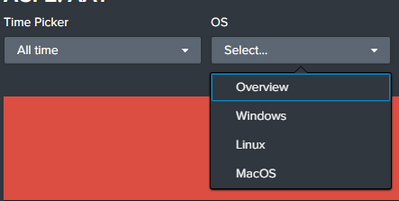
Any Suggestions?.
Thank you,
Marco
- Mark as New
- Bookmark Message
- Subscribe to Message
- Mute Message
- Subscribe to RSS Feed
- Permalink
- Report Inappropriate Content


Your condition is wrong, you are checking 'field=' and in <input> elements you have no fields. Correct usage is value="..."
- Mark as New
- Bookmark Message
- Subscribe to Message
- Mute Message
- Subscribe to RSS Feed
- Permalink
- Report Inappropriate Content
Your condition is wrong, you are checking 'field=' and in <input> elements you have no fields. Correct usage is value="..."
- Mark as New
- Bookmark Message
- Subscribe to Message
- Mute Message
- Subscribe to RSS Feed
- Permalink
- Report Inappropriate Content
@bowesmana Thank bro, that worked !


Join the Splunk Community Slack to learn, troubleshoot, and make connections with fellow Splunk practitioners in real time!
Join Splunk User Groups to connect and learn in-person by region or remotely by topic or industry.
A Four-Part Event Series: Full Stack Observability For the AI Era
SOC4Kafka - New Kafka Connector Powered by OpenTelemetry
Event Series: Level up your SOC: Advancing with Splunk Enterprise Security
