
Join the Conversation
- Find Answers
- :
- Using Splunk
- :
- Dashboards & Visualizations
- :
- Re: Dependent Dropdowns - Single selection from Dr...
- Subscribe to RSS Feed
- Mark Topic as New
- Mark Topic as Read
- Float this Topic for Current User
- Bookmark Topic
- Subscribe to Topic
- Mute Topic
- Printer Friendly Page
- Mark as New
- Bookmark Message
- Subscribe to Message
- Mute Message
- Subscribe to RSS Feed
- Permalink
- Report Inappropriate Content
Dependent Dropdowns - Single selection from Dropdown 1 to select multiple values in Dropdown 2 and 3

I have multiple dropdowns with numerous (some 40+) selections per dropdown. What I would like to do is create a "Common KPI" dropdown with 3 choices to drive selections in the other dropdowns. I can make this work for a single value but not when there are multi-select values.
For example:
Common KPI dropdown - Choice "1" would select the following:
Dropdown 2 selections: Apple, Banana
Dropdown 3 selection: Golf

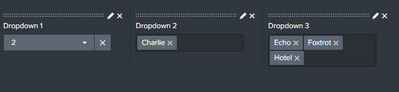
Common KPI dropdown - Choice "2" would select the following:
Dropdown 2 selection: Charlie
Dropdown 3 selections: Echo, Foxtrot, Hotel
 <fieldset submitButton="false">
    <input type="dropdown" searchWhenChanged="true">
      <label>Dropdown 1</label>
      <choice value="1">1</choice>
      <choice value="2">2</choice>
      <default></default>
    </input>
    <input type="multiselect" searchWhenChanged="true" token="bar">
      <label>Dropdown 2</label>
      <choice value="a">Alpha</choice>
      <choice value="b">Bravo</choice>
      <choice value="c">Charlie</choice>
      <choice value="d">Delta</choice>
      <default></default>
    </input>
    <input type="multiselect" searchWhenChanged="true" token="foo">
      <label>Dropdown 3</label>
      <choice value="e">Echo</choice>
      <choice value="f">Foxtrot</choice>
      <choice value="g">Golf</choice>
      <choice value="h">Hotel</choice>
    </input>
  </fieldset>
- Mark as New
- Bookmark Message
- Subscribe to Message
- Mute Message
- Subscribe to RSS Feed
- Permalink
- Report Inappropriate Content


@ssroyer - You can have a common KPI input in simple XML like this:
<fieldset submitButton="false">
    <input type="dropdown" searchWhenChanged="true">
      <label>Common KPI Dropdown 1</label>
      <choice value="1">Alpha - Echo</choice>
      <choice value="2">Delta - Hotel</choice>
      <default></default>
      <change>
        <condition label="Alpha - Echo">
          <set token="bar">Alpha</set>
          <set token="foo">Echo</set>
        </condition>
        <condition label="Delta - Hotel">
          <set token="bar">Delta</set>
          <set token="foo">Hotel</set>
        </condition>
      </change>
    </input>
    <input type="multiselect" searchWhenChanged="true" token="bar">
      <label>Dropdown 2</label>
      <choice value="a">Alpha</choice>
      <choice value="b">Bravo</choice>
      <choice value="c">Charlie</choice>
      <choice value="d">Delta</choice>
      <default></default>
    </input>
    <input type="multiselect" searchWhenChanged="true" token="foo">
      <label>Dropdown 3</label>
      <choice value="e">Echo</choice>
      <choice value="f">Foxtrot</choice>
      <choice value="g">Golf</choice>
      <choice value="h">Hotel</choice>
    </input>
  </fieldset>
FYI, you can use <eval> instead of <set>, if you have dynamic values instead of static values.
I hope this helps!!!
- Mark as New
- Bookmark Message
- Subscribe to Message
- Mute Message
- Subscribe to RSS Feed
- Permalink
- Report Inappropriate Content
@VatsalJagani Thank you for the response. Your suggestion is working when only one value per dropdown needs to be selected. The part I'm having trouble with is when I need to select two or more options per dropdown. Example:
Common KPI - Option 1
Dropdown 1 - Alpha and Bravo <---- how do I get both options to set using the same token?
Dropdown 2 - Echo
- Mark as New
- Bookmark Message
- Subscribe to Message
- Mute Message
- Subscribe to RSS Feed
- Permalink
- Report Inappropriate Content
@ssroyer - The multiselect inputs generally have the following 5 properties defined, which tell what will be the value of the input.
            <prefix>(</prefix>
            <suffix>)</suffix>
            <valuePrefix>"</valuePrefix>
            <valueSuffix>"</valueSuffix>
            <delimiter>, </delimiter>
(I've just assumed the values here, but you could put them as per your use-cases.)
And then you can update your inputs to something like this.
<fieldset submitButton="false">
    <input type="dropdown" searchWhenChanged="true">
      <label>Common KPI Dropdown 1</label>
      <choice value="1">Alpha-Bravo - Echo</choice>
      <choice value="2">Delta - Hotel</choice>
      <default></default>
      <change>
        <condition label="Alpha-Bravo - Echo">
          <set token="bar">("Alpha", "Bravo")</set>
          <set token="foo">Echo</set>
        </condition>
        <condition label="Delta - Hotel">
          <set token="bar">Delta</set>
          <set token="foo">Hotel</set>
        </condition>
      </change>
    </input>
    <input type="multiselect" searchWhenChanged="true" token="bar">
      <label>Dropdown 2</label>
      <choice value="a">Alpha</choice>
      <choice value="b">Bravo</choice>
      <choice value="c">Charlie</choice>
      <choice value="d">Delta</choice>
      <default></default>
      <prefix>(</prefix>
      <suffix>)</suffix>
      <valuePrefix>"</valuePrefix>
      <valueSuffix>"</valueSuffix>
      <delimiter>, </delimiter>
    </input>
    <input type="multiselect" searchWhenChanged="true" token="foo">
      <label>Dropdown 3</label>
      <choice value="e">Echo</choice>
      <choice value="f">Foxtrot</choice>
      <choice value="g">Golf</choice>
      <choice value="h">Hotel</choice>
    </input>
  </fieldset>
You could repeat the same thing if you want for Dropdown 3.
I hope this helps!!!
- Mark as New
- Bookmark Message
- Subscribe to Message
- Mute Message
- Subscribe to RSS Feed
- Permalink
- Report Inappropriate Content
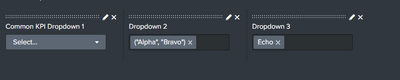
@VatsalJagani I am using a metrics index with mstats. I don't have prefix, suffix, or delimiters set in my multiselect. However, even when I do set them, in your example if I select "Alpha-Bravo - Echo" the selection in Dropdown 2 is all together ("Alpha", "Bravo") vs. two independent selections.
<form theme="dark">
  <label>Dependent Dropdown</label>
  <fieldset submitButton="false">
    <input type="dropdown" searchWhenChanged="true">
      <label>Common KPI Dropdown 1</label>
      <choice value="1">Alpha-Bravo - Echo</choice>
      <choice value="2">Delta - Hotel</choice>
      <default></default>
      <change>
        <condition label="Alpha-Bravo - Echo">
          <set token="form.bar">("Alpha", "Bravo")</set>
          <set token="form.foo">Echo</set>
        </condition>
        <condition label="Delta - Hotel">
          <set token="form.bar">Delta</set>
          <set token="form.foo">Hotel</set>
        </condition>
      </change>
    </input>
    <input type="multiselect" searchWhenChanged="true" token="bar">
      <label>Dropdown 2</label>
      <choice value="a">Alpha</choice>
      <choice value="b">Bravo</choice>
      <choice value="c">Charlie</choice>
      <choice value="d">Delta</choice>
      <prefix>(</prefix>
      <suffix>)</suffix>
      <valuePrefix>"</valuePrefix>
      <valueSuffix>"</valueSuffix>
      <delimiter>, </delimiter>
    </input>
    <input type="multiselect" searchWhenChanged="true" token="foo">
      <label>Dropdown 3</label>
      <choice value="e">Echo</choice>
      <choice value="f">Foxtrot</choice>
      <choice value="g">Golf</choice>
      <choice value="h">Hotel</choice>
    </input>
  </fieldset>
</form>- Mark as New
- Bookmark Message
- Subscribe to Message
- Mute Message
- Subscribe to RSS Feed
- Permalink
- Report Inappropriate Content
@ssroyer - I felt like it used to work but it's not working anymore.
Surely, I gave this answer for the multi-select token in 2019, not sure which Splunk version.
Now your best guess is to use JavaScript to manipulate tokens - https://dev.splunk.com/enterprise/docs/developapps/visualizedata/simplexmlextensions/tokenmanipulati...
- Look for two main things, if you have never explored Splunk JS for tokens:
- token -> on change event (similar to <change> from XML)
- defaultTokenModel.set
- Make sure to set both defaultTokenModel and submittedTokenModel.
- submittedTokenModel
I hope this helps!!!


Join the Splunk Community Slack to learn, troubleshoot, and make connections with fellow Splunk practitioners in real time!
Join Splunk User Groups to connect and learn in-person by region or remotely by topic or industry.
ATTENTION: We’re Moving! (AGAIN!)
Deep Dive: Optimizing Telemetry Pipelines in Splunk Observability Cloud
Announcing Modern Navigation: A New Era of Splunk User Experience
