
Join the Conversation
- Find Answers
- :
- Using Splunk
- :
- Dashboards & Visualizations
- :
- Re: Dashboard Studio Multiselect with dynamic item...
- Subscribe to RSS Feed
- Mark Topic as New
- Mark Topic as Read
- Float this Topic for Current User
- Bookmark Topic
- Subscribe to Topic
- Mute Topic
- Printer Friendly Page
- Mark as New
- Bookmark Message
- Subscribe to Message
- Mute Message
- Subscribe to RSS Feed
- Permalink
- Report Inappropriate Content
Dashboard Studio Multiselect with dynamic items and wrong search pattern / missing quotes?

Hi there,
i'm a new splunk user and try to use the new Dashboard Studio variant of dashboards like the last example described here: https://docs.splunk.com/Documentation/Splunk/8.2.4/DashStudio/inputs#Example:_Search-based_cascading...
My Problem is the values for the dynamic multiselect input have whitespaces in it and as soon as i use the "IN" operator in the search query this retruns no entries. If i manually change the search query and put all the values in quotes it is working as expected. Is there any way to do this in the definition of the input?
I can also append a
eval appDisplayName = \"\\\"\".appDisplayName.\"\\\"\"
to the ds.search query but this also adds the quotes to the display portion.
My complete json looks like this:
{
	"visualizations": {
		"viz_hSyaQ4tf": {
			"type": "splunk.table",
			"options": {},
			"dataSources": {
				"primary": "ds_saMdKSzT"
			}
		}
	},
	"dataSources": {
		"ds_saMdKSzT": {
			"type": "ds.search",
			"options": {
				"query": "sourcetype=\"azure:aad:signin\" userPrincipalName=$userPrincipalName$ AND appDisplayName IN ($appDisplayName$) | table createdDateTime userPrincipalName userId appDisplayName appId resourceDisplayName resourceId conditionalAccessStatus status.errorCode",
				"queryParameters": {
					"latest": "$global_time.latest$",
					"earliest": "$global_time.earliest$"
				}
			},
			"name": "SignIns"
		},
		"ds_XdUxasDT": {
			"type": "ds.search",
			"options": {
				"query": "sourcetype=\"azure:aad:signin\" | stats count by userPrincipalName",
				"queryParameters": {
					"latest": "$global_time.latest$",
					"earliest": "$global_time.earliest$"
				}
			},
			"name": "userPrincipalName-stats"
		},
		"ds_GQslD2fp": {
			"type": "ds.search",
			"options": {
				"query": "sourcetype=\"azure:aad:signin\" userPrincipalName=$userPrincipalName$ | stats count by appDisplayName",
				"queryParameters": {
					"latest": "$global_time.latest$",
					"earliest": "$global_time.earliest$"
				}
			},
			"name": "appDisplayName-stats"
		}
	},
	"defaults": {
		"dataSources": {
			"ds.search": {
				"options": {
					"queryParameters": {
						"latest": "$global_time.latest$",
						"earliest": "$global_time.earliest$"
					}
				}
			}
		}
	},
	"inputs": {
		"input_global_trp": {
			"type": "input.timerange",
			"options": {
				"token": "global_time",
				"defaultValue": "-24h@h,now"
			},
			"title": "Global Time Range"
		},
		"input_hcQWlw8q": {
			"title": "Select App",
			"type": "input.multiselect",
			"options": {
				"items": ">frame(label, value) | prepend(formattedStatics) | objects()",
				"token": "appDisplayName"
			},
			"dataSources": {
				"primary": "ds_GQslD2fp"
			},
			"context": {
				"formattedConfig": {
					"number": {
						"prefix": ""
					}
				},
				"formattedStatics": ">statics | formatByType(formattedConfig)",
				"statics": [
					[
						"All"
					],
					[
						"*"
					]
				],
				"label": ">primary | seriesByName(\"appDisplayName\") | renameSeries(\"label\") | formatByType(formattedConfig)",
				"value": ">primary | seriesByName(\"appDisplayName\") | renameSeries(\"value\") | formatByType(formattedConfig)"
			}
		},
		"input_E26xAMU9": {
			"options": {
				"defaultValue": "[email protected]",
				"token": "userPrincipalName"
			},
			"title": "Select User",
			"type": "input.text"
		}
	},
	"layout": {
		"type": "grid",
		"options": {},
		"structure": [
			{
				"item": "viz_hSyaQ4tf",
				"type": "block",
				"position": {
					"x": 0,
					"y": 0,
					"w": 1200,
					"h": 400
				}
			}
		],
		"globalInputs": [
			"input_global_trp",
			"input_E26xAMU9",
			"input_hcQWlw8q"
		]
	},
	"description": "",
	"title": "Azure AD SignIns"
}
This produces the not working query like this:
sourcetype="azure:aad:signin" [email protected] AND appDisplayName IN (Microsoft Office 365 Portal,Windows Sign In,Office365 Shell WCSS-Client) | table createdDateTime userPrincipalName userId appDisplayName appId resourceDisplayName resourceId conditionalAccessStatus status.errorCode
I want it to be like this:
sourcetype="azure:aad:signin" [email protected] AND appDisplayName IN ("Microsoft Office 365 Portal","Windows Sign In","Office365 Shell WCSS-Client") | table createdDateTime userPrincipalName userId appDisplayName appId resourceDisplayName resourceId conditionalAccessStatus status.errorCode
Thanks for your help.
Greetings
Andreas
- Mark as New
- Bookmark Message
- Subscribe to Message
- Mute Message
- Subscribe to RSS Feed
- Permalink
- Report Inappropriate Content
For whoever else that needs this: your search field IN ... will accept this multivalue token passed to it:
$your_multivalue_select_tokenhere_that_also_accepts_*_as_default|s$
- Mark as New
- Bookmark Message
- Subscribe to Message
- Mute Message
- Subscribe to RSS Feed
- Permalink
- Report Inappropriate Content
I have been unable to find an elegant solution for this issue (it looks like Dashboard Studio is not quite "there" yet) but the following technique does work.
1. Modify data source query by adding a new field:
| eval q_appDisplayName = "\"" . appDisplayName . "\""
2. Modify input definition as follows:
"title": "Select App",
- Mark as New
- Bookmark Message
- Subscribe to Message
- Mute Message
- Subscribe to RSS Feed
- Permalink
- Report Inappropriate Content
Hi,
I had the same problem than you, and fixed it doing a escape of the values in the multiselect.
If you open the multiselect configs, there`s these two fields:
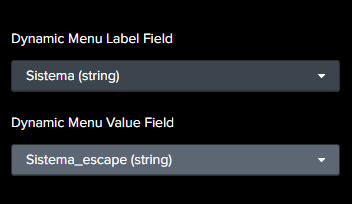
The first one is the value that will be show to the user, and the second one will be the value selected used on the token. With that in mind, I escaped the field that I want to use ("Sistema" ) to another field (Sistema_escape) and select each like the image above.


Join the Splunk Community Slack to learn, troubleshoot, and make connections with fellow Splunk practitioners in real time!
Join Splunk User Groups to connect and learn in-person by region or remotely by topic or industry.
Event Series: Level up your SOC: Advancing with Splunk Enterprise Security
Announcing Modern Navigation: A New Era of Splunk User Experience
SOC4Kafka - New Kafka Connector Powered by OpenTelemetry
