
Join the Conversation
- Find Answers
- :
- Using Splunk
- :
- Dashboards & Visualizations
- :
- Dahboard Studio Time Range Picker date format
- Subscribe to RSS Feed
- Mark Topic as New
- Mark Topic as Read
- Float this Topic for Current User
- Bookmark Topic
- Subscribe to Topic
- Mute Topic
- Printer Friendly Page
- Mark as New
- Bookmark Message
- Subscribe to Message
- Mute Message
- Subscribe to RSS Feed
- Permalink
- Report Inappropriate Content
Dahboard Studio Time Range Picker date format

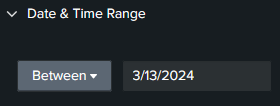
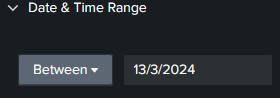
When adding a Time Range Picker on Dashboard Studio the formatting for Date and Time range is month day year, how do I change this formatting to day month year?
How it shows:
How I want it to show:
- Mark as New
- Bookmark Message
- Subscribe to Message
- Mute Message
- Subscribe to RSS Feed
- Permalink
- Report Inappropriate Content
Hi Everyone
I have had confirmation back from Splunk:
Dashboards team have confirmed that this is an expected behavior and it's a known limitation.
I've added as a Feature Request
- Mark as New
- Bookmark Message
- Subscribe to Message
- Mute Message
- Subscribe to RSS Feed
- Permalink
- Report Inappropriate Content
Hi@isoutamo @tscroggins and all
Added as a feature request https://ideas.splunk.com/ideas/PLECID-I-786
- Mark as New
- Bookmark Message
- Subscribe to Message
- Mute Message
- Subscribe to RSS Feed
- Permalink
- Report Inappropriate Content


Ideas votes are a precious resource. As @isoutamo suggested, try bugging the PM periodically through Slack. Hopefully, they'll pick it up without the minimum number of required votes.
- Mark as New
- Bookmark Message
- Subscribe to Message
- Mute Message
- Subscribe to RSS Feed
- Permalink
- Report Inappropriate Content
Hi @dataisbeautiful,
It appears the time picker input ignores the locale and defaults to en_US. Have you contacted support? They can report this internally as a bug.
- Mark as New
- Bookmark Message
- Subscribe to Message
- Mute Message
- Subscribe to RSS Feed
- Permalink
- Report Inappropriate Content
Hi @tscroggins
I've raised it in report and will update when I get a reply
- Mark as New
- Bookmark Message
- Subscribe to Message
- Mute Message
- Subscribe to RSS Feed
- Permalink
- Report Inappropriate Content

Hi
Dashboard Studio's PM are quite active in slack https://splunk-usergroups.slack.com/archives/C2RC5Q17E.
You could also ask this there.
r. Ismo


Join the Splunk Community Slack to learn, troubleshoot, and make connections with fellow Splunk practitioners in real time!
Join Splunk User Groups to connect and learn in-person by region or remotely by topic or industry.
SOC4Kafka - New Kafka Connector Powered by OpenTelemetry
Rounding off the Splunk Dashboard Contest
A Four Part Event Series: AI + Observability: AI Agents, LLMs, Apps, & Infrastructure
