
Join the Conversation
- Find Answers
- :
- Using Splunk
- :
- Dashboards & Visualizations
- :
- Custom Decorations
- Subscribe to RSS Feed
- Mark Topic as New
- Mark Topic as Read
- Float this Topic for Current User
- Bookmark Topic
- Subscribe to Topic
- Mute Topic
- Printer Friendly Page
- Mark as New
- Bookmark Message
- Subscribe to Message
- Mute Message
- Subscribe to RSS Feed
- Permalink
- Report Inappropriate Content

Hi!
I'm trying to edit my source in a dashboard, to do a custom decorations.
This's the query that I'm using:
(index="mysource") OR (index="main") OR (index="logical") mem=* |stats last(mem) as mem by devname|eval value=mem|rangemap field=value low=0-40 high=41-50 elevated=51-100 default=none
So, after that I edited the source from dashboard to add, the custom decorations.
    <label>Custom Decorations</label>
<description>
    This example shows decorations using tokens from search results, HTML panels and some custom CSS. The icon are displayed using the Splunk Icon Font.

</description>

<row>
    <panel>

        <search>
            <query>|(index="bmb_fortigate") OR (index="bmb_juniper") OR (index="bmb_cisco") mem=* |stats last(mem) as mem by devname|eval value=mem|rangemap field=value low=0-40 high=41-50 elevated=51-100 default=none</query>
            <progress>
                <set token="value1">$result.value$</set>
                <set token="range1">$result.range$</set>
            </progress>
        </search>
        <html>
        <div class="custom-result-value $range1$">
            $value1$
        </div>

        </html>
    </panel>
    <panel>
        <search>
            <query>| (index="bmb_fortigate") OR (index="bmb_juniper") OR (index="bmb_cisco") mem=* |stats last(mem) as mem by devname|eval value=mem|rangemap field=value low=0-40 high=41-50 elevated=51-100 default=none</query>
            <progress>
                <set token="value2">$result.value$</set>
                <set token="range2">$result.range$</set>
            </progress>
        </search>
        <html>
        <div class="custom-result-value $range2$">
            $value2$
        </div>

        </html>
    </panel>
    <panel>
        <search>
            <query>| (index="bmb_fortigate") OR (index="bmb_juniper") OR (index="bmb_cisco") mem=* |stats last(mem) as mem by devname|eval value=mem|rangemap field=value low=0-40 high=41-50 elevated=51-100 default=none</query>
            <progress>
                <set token="value3">$result.value$</set>
                <set token="range3">$result.range$</set>
            </progress>
        </search>
        <html>
        <div class="custom-result-value $range3$">
            $value3$
        </div>

        </html>
    </panel>
</row>
<row>
    <panel>
        <html>
        <div class="custom-result-value icon-only $range1$"> </div>

        </html>
    </panel>
    <panel>
        <html>
        <div class="custom-result-value icon-only $range2$"> </div>

        </html>
    </panel>
    <panel>
        <html>
        <div class="custom-result-value icon-only $range3$"> </div>

        </html>
    </panel>
</row>
But, it didan't work out.
Please, can anywone help me?
- Mark as New
- Bookmark Message
- Subscribe to Message
- Mute Message
- Subscribe to RSS Feed
- Permalink
- Report Inappropriate Content

@leticiamartello if you are trying to use the Custom Decorations examples from Splunk Dashboard Examples app, you are missing including the CSS file custom_decorations.css to be included under your Splunk App's appserver/static folder. If you want to try to test out the CSS Style within dashboard you can try out the following example:
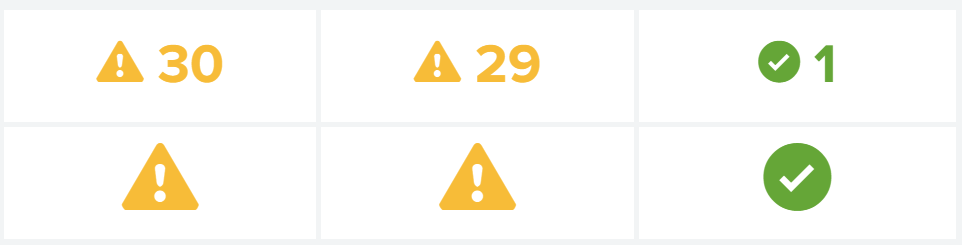
<dashboard>
  <label>Custom Decorations</label>
 <description>
     This example shows decorations using tokens from search results, HTML panels and some custom CSS. The icon are displayed using the Splunk Icon Font.
 </description>
 <row depends="$alwaysHideCSSPanel$">
    <panel>
       <html>
         <style>
            .custom-result-value {
                font-size: 55px;
                margin: 35px auto;
                text-align: center;
                font-weight: bold;
                color: rgb(85, 85, 85);
            }
            .custom-result-value:before {
                font-family: "Splunk Icons";
                font-style: normal;
                font-weight: normal;
                text-decoration: inherit;
                font-size: 110%;
            }
            .severe.custom-result-value:before {
                content: "\2297";
            }
            .severe.custom-result-value {
                color: rgb(217, 63, 60);
            }
            .high.custom-result-value {
                color: rgb(245, 143, 57);
            }
            .high.custom-result-value:before {
                content: "\ECD4";
            }
            .elevated.custom-result-value {
                color: rgb(247, 188, 56);
            }
            .elevated.custom-result-value:before {
                content: "\26A0";
            }
            .low.custom-result-value {
                color: rgb(101, 166, 55);
            }
            .low.custom-result-value:before {
                content: "\ECD3";
            }
            .guarded.custom-result-value {
                color: rgb(109, 183, 198);
            }
            .guarded.custom-result-value:before {
                content: "\0049";
            }
            .custom-result-value.icon-only {
                font-size: 90px;
            }
         </style>
       </html>
    </panel>
 </row>
 <row>
     <panel>
         <search>
             <query>index=_internal sourcetype=splunkd
             | stats avg(date_second) as date_second
             | eval date_second=round(date_second)
             | eval range= case(date_second>=0 AND date_second<=10,"low",
                               date_second>=11 AND date_second<=20,"high",
                               date_second>=21 AND date_second<=60,"elevated",
                               true(),"none")</query>
              <earliest>-1h</earliest>
              <latest>now</latest>
             <done>
                 <set token="value1">$result.date_second$</set>
                 <set token="range1">$result.range$</set>
             </done>
         </search>
         <html>
         <div class="custom-result-value $range1$">
             $value1$
         </div>
         </html>
     </panel>
     <panel>
         <search>
             <query>index=_internal sourcetype=splunkd
             | stats avg(date_minute) as date_minute
             | eval date_minute=round(date_minute)
             | eval range= case(date_minute>=0 AND date_minute<=10,"low",
                               date_minute>=11 AND date_minute<=20,"high",
                               date_minute>=21 AND date_minute<=60,"elevated",
                               true(),"none")</query>
              <earliest>-1h</earliest>
              <latest>now</latest>
             <done>
                 <set token="value2">$result.date_minute$</set>
                 <set token="range2">$result.range$</set>
             </done>
         </search>
         <html>
         <div class="custom-result-value $range2$">
             $value2$
         </div>
         </html>
     </panel>
     <panel>
         <search>
             <query>index=_internal sourcetype=splunkd
             | stats avg(date_hour) as date_hour
             | eval date_hour=round(date_hour)
             | eval range= case(date_hour>=0 AND date_hour<=10,"low",
                               date_hour>=11 AND date_hour<=20,"high",
                               date_hour>=21 AND date_hour<=60,"elevated",
                               true(),"none")</query>
              <earliest>-1h</earliest>
              <latest>now</latest>
             <done>
                 <set token="value3">$result.date_hour$</set>
                 <set token="range3">$result.range$</set>
             </done>
         </search>
         <html>
         <div class="custom-result-value $range3$">
             $value3$
         </div>
         </html>
     </panel>
 </row>
 <row>
     <panel>
         <html>
         <div class="custom-result-value icon-only $range1$"> </div>
         </html>
     </panel>
     <panel>
         <html>
         <div class="custom-result-value icon-only $range2$"> </div>
         </html>
     </panel>
     <panel>
         <html>
         <div class="custom-result-value icon-only $range3$"> </div>
         </html>
     </panel>
 </row>
</dashboard>
| makeresults | eval message= "Happy Splunking!!!"
- Mark as New
- Bookmark Message
- Subscribe to Message
- Mute Message
- Subscribe to RSS Feed
- Permalink
- Report Inappropriate Content
Hi @niketnilay! Thaks for your help!
I did exactly has you told me to do, but it didan't workout.
This is the source that I used:
<dashboard>
    <label>Custom Decorations</label>
   <description>
       This example shows decorations using tokens from search results, HTML panels and some custom CSS. The icon are displayed using the Splunk Icon Font.
   </description>
   <row depends="$alwaysHideCSSPanel$">
      <panel>
         <html>
           <style>
              .custom-result-value {
                  font-size: 55px;
                  margin: 35px auto;
                  text-align: center;
                  font-weight: bold;
                  color: rgb(85, 85, 85);
              }
              .custom-result-value:before {
                  font-family: "Splunk Icons";
                  font-style: normal;
                  font-weight: normal;
                  text-decoration: inherit;
                  font-size: 110%;
              }
              .severe.custom-result-value:before {
                  content: "\2297";
              }
              .severe.custom-result-value {
                  color: rgb(217, 63, 60);
              }
              .high.custom-result-value {
                  color: rgb(245, 143, 57);
              }
              .high.custom-result-value:before {
                  content: "\ECD4";
              }
              .elevated.custom-result-value {
                  color: rgb(247, 188, 56);
              }
              .elevated.custom-result-value:before {
                  content: "\26A0";
              }
              .low.custom-result-value {
                  color: rgb(101, 166, 55);
              }
              .low.custom-result-value:before {
                  content: "\ECD3";
              }
              .guarded.custom-result-value {
                  color: rgb(109, 183, 198);
              }
              .guarded.custom-result-value:before {
                  content: "\0049";
              }
              .custom-result-value.icon-only {
                  font-size: 90px;
              }
           </style>
         </html>
      </panel>
   </row>
   <row>
       <panel>
           <search>
                <query>|(index="bmb_fortigate") OR (index="bmb_juniper") OR (index="bmb_cisco") mem=* |stats last(mem) as mem by devname|eval value=mem|rangemap field=value low=0-40 high=41-50 elevated=51-100 default=none</query>
                <progress>
                        <set token="value1">$result.value$</set>
                        <set token="range1">$result.range$</set>
                    </progress>
            </search>
            <html>
            <div class="custom-result-value $range1$">
                $value1$
            </div>

            </html>
        </panel>
        <panel>
            <search>
                <query>| (index="bmb_fortigate") OR (index="bmb_juniper") OR (index="bmb_cisco") mem=* |stats last(mem) as mem by devname|eval value=mem|rangemap field=value low=0-40 high=41-50 elevated=51-100 default=none</query>
                <progress>
                        <set token="value2">$result.value$</set>
                        <set token="range2">$result.range$</set>
                    </progress>
            </search>
            <html>
            <div class="custom-result-value $range2$">
                $value2$
            </div>

            </html>
        </panel>
        <panel>
            <search>
                <query>| (index="bmb_fortigate") OR (index="bmb_juniper") OR (index="bmb_cisco") mem=* |stats last(mem) as mem by devname|eval value=mem|rangemap field=value low=0-40 high=41-50 elevated=51-100 default=none</query>
                <progress>
                        <set token="value3">$result.value$</set>
                        <set token="range3">$result.range$</set>
                    </progress>
            </search>
            <html>
            <div class="custom-result-value $range3$">
                $value3$
            </div>
            </html>
        </panel>
        <panel>
            <search>
                <query>| (index="bmb_fortigate") OR (index="bmb_juniper") OR (index="bmb_cisco") mem=* |stats last(mem) as mem by devname|eval value=mem|rangemap field=value low=0-40 high=41-50 elevated=51-100 default=none</query>
                <progress>
                        <set token="value4">$result.value$</set>
                        <set token="range4">$result.range$</set>
                    </progress>
            </search>
            <html>
            <div class="custom-result-value $range4$">
                $value4$
            </div>
            </html>
        </panel>
    </row>
    <row>
        <panel>
            <html>
            <div class="custom-result-value icon-only $range1$"> </div>

            </html>
        </panel>
        <panel>
            <html>
            <div class="custom-result-value icon-only $range2$"> </div>

            </html>
        </panel>
        <panel>
            <html>
            <div class="custom-result-value icon-only $range3$"> </div>
            </html>
        </panel>
        <panel>
            <html>
            <div class="custom-result-value icon-only $range4$"> </div>
            </html>
        </panel>
    </row>

</dashboard>
When I saved the source this is what appearce:
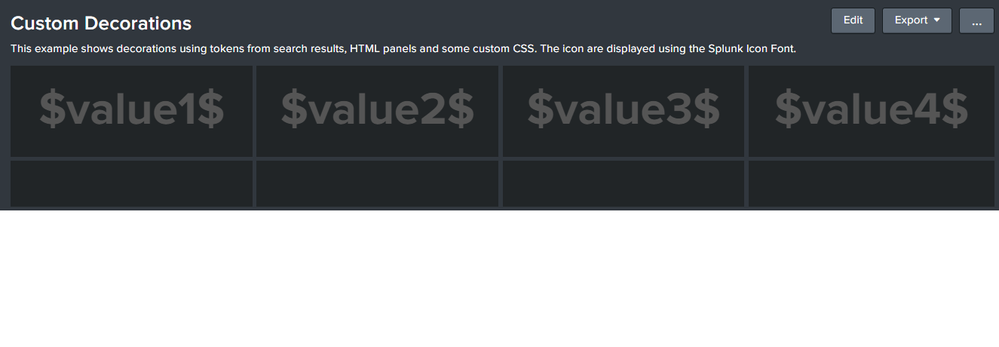
Can you see what I did wrong, please?
Thank you,
- Mark as New
- Bookmark Message
- Subscribe to Message
- Mute Message
- Subscribe to RSS Feed
- Permalink
- Report Inappropriate Content
@leticiamartello if you are trying to use the Custom Decorations examples from Splunk Dashboard Examples app, you are missing including the CSS file custom_decorations.css to be included under your Splunk App's appserver/static folder. If you want to try to test out the CSS Style within dashboard you can try out the following example:
<dashboard>
  <label>Custom Decorations</label>
 <description>
     This example shows decorations using tokens from search results, HTML panels and some custom CSS. The icon are displayed using the Splunk Icon Font.
 </description>
 <row depends="$alwaysHideCSSPanel$">
    <panel>
       <html>
         <style>
            .custom-result-value {
                font-size: 55px;
                margin: 35px auto;
                text-align: center;
                font-weight: bold;
                color: rgb(85, 85, 85);
            }
            .custom-result-value:before {
                font-family: "Splunk Icons";
                font-style: normal;
                font-weight: normal;
                text-decoration: inherit;
                font-size: 110%;
            }
            .severe.custom-result-value:before {
                content: "\2297";
            }
            .severe.custom-result-value {
                color: rgb(217, 63, 60);
            }
            .high.custom-result-value {
                color: rgb(245, 143, 57);
            }
            .high.custom-result-value:before {
                content: "\ECD4";
            }
            .elevated.custom-result-value {
                color: rgb(247, 188, 56);
            }
            .elevated.custom-result-value:before {
                content: "\26A0";
            }
            .low.custom-result-value {
                color: rgb(101, 166, 55);
            }
            .low.custom-result-value:before {
                content: "\ECD3";
            }
            .guarded.custom-result-value {
                color: rgb(109, 183, 198);
            }
            .guarded.custom-result-value:before {
                content: "\0049";
            }
            .custom-result-value.icon-only {
                font-size: 90px;
            }
         </style>
       </html>
    </panel>
 </row>
 <row>
     <panel>
         <search>
             <query>index=_internal sourcetype=splunkd
             | stats avg(date_second) as date_second
             | eval date_second=round(date_second)
             | eval range= case(date_second>=0 AND date_second<=10,"low",
                               date_second>=11 AND date_second<=20,"high",
                               date_second>=21 AND date_second<=60,"elevated",
                               true(),"none")</query>
              <earliest>-1h</earliest>
              <latest>now</latest>
             <done>
                 <set token="value1">$result.date_second$</set>
                 <set token="range1">$result.range$</set>
             </done>
         </search>
         <html>
         <div class="custom-result-value $range1$">
             $value1$
         </div>
         </html>
     </panel>
     <panel>
         <search>
             <query>index=_internal sourcetype=splunkd
             | stats avg(date_minute) as date_minute
             | eval date_minute=round(date_minute)
             | eval range= case(date_minute>=0 AND date_minute<=10,"low",
                               date_minute>=11 AND date_minute<=20,"high",
                               date_minute>=21 AND date_minute<=60,"elevated",
                               true(),"none")</query>
              <earliest>-1h</earliest>
              <latest>now</latest>
             <done>
                 <set token="value2">$result.date_minute$</set>
                 <set token="range2">$result.range$</set>
             </done>
         </search>
         <html>
         <div class="custom-result-value $range2$">
             $value2$
         </div>
         </html>
     </panel>
     <panel>
         <search>
             <query>index=_internal sourcetype=splunkd
             | stats avg(date_hour) as date_hour
             | eval date_hour=round(date_hour)
             | eval range= case(date_hour>=0 AND date_hour<=10,"low",
                               date_hour>=11 AND date_hour<=20,"high",
                               date_hour>=21 AND date_hour<=60,"elevated",
                               true(),"none")</query>
              <earliest>-1h</earliest>
              <latest>now</latest>
             <done>
                 <set token="value3">$result.date_hour$</set>
                 <set token="range3">$result.range$</set>
             </done>
         </search>
         <html>
         <div class="custom-result-value $range3$">
             $value3$
         </div>
         </html>
     </panel>
 </row>
 <row>
     <panel>
         <html>
         <div class="custom-result-value icon-only $range1$"> </div>
         </html>
     </panel>
     <panel>
         <html>
         <div class="custom-result-value icon-only $range2$"> </div>
         </html>
     </panel>
     <panel>
         <html>
         <div class="custom-result-value icon-only $range3$"> </div>
         </html>
     </panel>
 </row>
</dashboard>
| makeresults | eval message= "Happy Splunking!!!"




Join the Splunk Community Slack to learn, troubleshoot, and make connections with fellow Splunk practitioners in real time!
Join Splunk User Groups to connect and learn in-person by region or remotely by topic or industry.
Cisco Data Fabric from Architecture to Investigation, Better SOC Visibility, and More ...
The Trust Gap: Why a Data Foundation is Fundamental to an Agentic Enterprise
Data Management Digest – September 2026
