
Join the Conversation
- Find Answers
- :
- Using Splunk
- :
- Dashboards & Visualizations
- :
- Re: Count searches with results
- Subscribe to RSS Feed
- Mark Topic as New
- Mark Topic as Read
- Float this Topic for Current User
- Bookmark Topic
- Subscribe to Topic
- Mute Topic
- Printer Friendly Page
- Mark as New
- Bookmark Message
- Subscribe to Message
- Mute Message
- Subscribe to RSS Feed
- Permalink
- Report Inappropriate Content
Count searches with results

Hey there,
I just started with splunk. Currently I'm testing the new dashboard studio feature.
I would like to count all searches with 1 or more found events on my dashboard.
In case of the attached picture, I would like to display 3 in the upper SingleValue field. If the search for Event 2 has 0 results, i would like to display a 2, and so on.
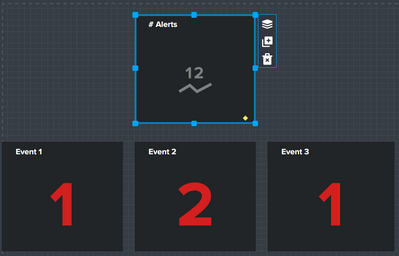
Is there a simple and scalable solution to this, if I want to add more searches to the dashboard later on?
Thank you in advance!
- Mark as New
- Bookmark Message
- Subscribe to Message
- Mute Message
- Subscribe to RSS Feed
- Permalink
- Report Inappropriate Content
@Coffeebean
Can you try the below solution?
<form>
  <init><set token="total_count">0</set></init>
  <search id="base">
    <query>index="_internal" | dedup host, source, sourcetype | table host, source, sourcetype</query>
    <earliest>$time_token.earliest$</earliest>
    <latest>$time_token.latest$</latest>
  </search>
  <label>Test Dashboard</label>
  <fieldset submitButton="false">
    <input type="time" token="time_token" searchWhenChanged="true">
      <label>Time Range</label>
      <default>
        <earliest>-4h@h</earliest>
        <latest>now</latest>
      </default>
    </input>
  </fieldset>
  <row depends="$never_show_this_panel$">
    <panel>
      <table>
        <title>Table</title>
        <search base="base">
          <query>| table source, sourcetype, host</query>
          <done>
            <condition match="isnotnull($result.source$) AND isnotnull($result.sourcetype$) AND isnotnull($result.host$)">
              <set token="total_count">3</set>
            </condition>
            <condition match="(isnotnull($result.source$) AND isnotnull($result.sourcetype$)) OR (isnotnull($result.source$) AND isnotnull($result.host$)) OR  (isnotnull($result.sourcetype$) AND isnotnull($result.host$))">
              <set token="total_count">2</set>
            </condition>
            <condition match="isnotnull($result.source$) OR isnotnull($result.sourcetype$) OR isnotnull($result.host$)">
              <set token="total_count">1</set>
            </condition>
        </done>
      </search>
        <option name="drilldown">none</option>
      </table>
    </panel>
  </row>
  <row>
    <panel>
      <single>
        <title>Panels Populated</title>
        <search>
          <query>| makeresults | eval total=$total_count$ </query>
        </search>
        <option name="drilldown">none</option>
      </single>
    </panel>
  </row>
  <row>
    <panel>
      <single>
        <title>Host</title>
        <search base="base">
          <query>| stats dc(host)</query>
        </search>
        <option name="drilldown">none</option>
        <option name="refresh.display">progressbar</option>
      </single>
    </panel>
    <panel>
      <single>
        <title>Source Type</title>
        <search base="base">
          <query>| stats dc(sourcetype)</query>
        </search>
        <option name="drilldown">none</option>
        <option name="refresh.display">progressbar</option>
      </single>
    </panel>
    <panel>
      <single>
        <title>Source</title>
        <search base="base">
          <query>| stats dc(source)</query>
        </search>
        <option name="drilldown">none</option>
      </single>
    </panel>
  </row>
</form>
If you find a solution fruitful, then an upvote and acceptance of the answer would be appreciated.
- Mark as New
- Bookmark Message
- Subscribe to Message
- Mute Message
- Subscribe to RSS Feed
- Permalink
- Report Inappropriate Content
@jhanvidattani
Thanks for the answer, but that looks like a XML solution.
As i tried this method with Dashboard Studio, which doesn't support XML, this will probably not work.
I will try to redesign my project with the old Dashboard builder.
- Mark as New
- Bookmark Message
- Subscribe to Message
- Mute Message
- Subscribe to RSS Feed
- Permalink
- Report Inappropriate Content

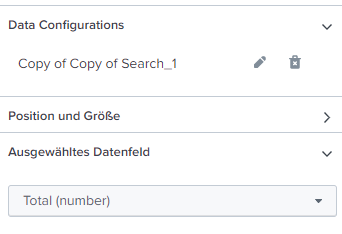
Sure, it can be done but you have to do it in one query and then select the fields in the field selector. Try this:

Join the Splunk Community Slack to learn, troubleshoot, and make connections with fellow Splunk practitioners in real time!
Join Splunk User Groups to connect and learn in-person by region or remotely by topic or industry.
Index This | What travels the world but is also stuck in place?
Discover New Use Cases: Unlock Greater Value from Your Existing Splunk Data
Continue Your Journey: Join Session 2 of the Data Management and Federation Bootcamp ...
