
Join the Conversation
- Find Answers
- :
- Using Splunk
- :
- Dashboards & Visualizations
- :
- Re: Choropleth Zero Count Should Always be Gray
- Subscribe to RSS Feed
- Mark Topic as New
- Mark Topic as Read
- Float this Topic for Current User
- Bookmark Topic
- Subscribe to Topic
- Mute Topic
- Printer Friendly Page
- Mark as New
- Bookmark Message
- Subscribe to Message
- Mute Message
- Subscribe to RSS Feed
- Permalink
- Report Inappropriate Content

Hello,
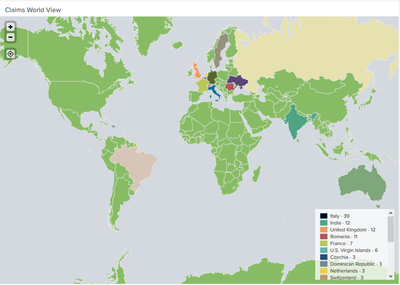
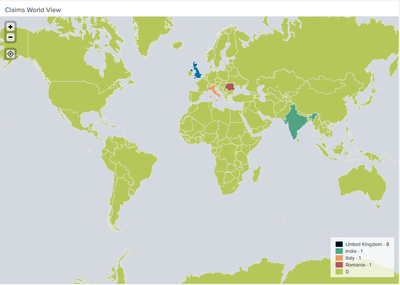
I created a choropleth map. As the map is being rendered the color for the field-value count=0 continually changes until the rendering ends. Depending on the time picker, the zero value color will be different.
How can I hardcode the color for count=0 to gray? Preferably throughout the rendering, it should be gray; but I'll settle for it being gray once rendering is finished.
*Ultimately, I would like to use color ranges.
0 = gray
1-10 = green
11-20 = orange
21-1000=red
<panel id="ipmap">
<title>Claims World View</title>
<map>
<search base="mainSearch">
<query>| search (Country!="1-IP not in DB" AND Country!="2-IP Data N/A")
| rex field=jsessionid "(?<jsession_id>.+)\."
| dedup jsession_id
| stats count(jsession_id) AS count BY Country
| sort -count
| eval count = Country + " - " + count
| geom geo_countries allFeatures=True featureIdField="Country"</query>
</search>
<option name="drilldown">none</option>
<option name="height">625</option>
<option name="mapping.choroplethLayer.colorMode">categorical</option>
<option name="mapping.choroplethLayer.neutralPoint">0</option>
<option name="mapping.choroplethLayer.shapeOpacity">1</option>
<option name="mapping.choroplethLayer.showBorder">1</option>
<option name="mapping.data.maxClusters">100</option>
<option name="mapping.map.center">(0,0)</option>
<option name="mapping.map.panning">0</option>
<option name="mapping.map.scrollZoom">0</option>
<option name="mapping.map.zoom">2</option>
<option name="mapping.markerLayer.markerMaxSize">50</option>
<option name="mapping.markerLayer.markerMinSize">10</option>
<option name="mapping.markerLayer.markerOpacity">0.8</option>
<option name="mapping.showTiles">1</option>
<option name="mapping.tileLayer.maxZoom">7</option>
<option name="mapping.tileLayer.minZoom">0</option>
<option name="mapping.tileLayer.tileOpacity">1</option>
<option name="mapping.type">choropleth</option>
<option name="trellis.enabled">0</option>
<option name="trellis.scales.shared">1</option>
<option name="trellis.size">medium</option>
</map>
</panel>
Thanks in advance for your help.
Stay safe and healthy, you and yours.
God bless,
Genesius
- Mark as New
- Bookmark Message
- Subscribe to Message
- Mute Message
- Subscribe to RSS Feed
- Permalink
- Report Inappropriate Content
niketnilay,
The solution was a lot simpler.
<option name="mapping.fieldColors">{"0":0x808080}</option>This answer is from @sean_aditum
Thanks to both of you for your help.
Stay safe and healthy, you and yours.
God bless,
Genesius
- Mark as New
- Bookmark Message
- Subscribe to Message
- Mute Message
- Subscribe to RSS Feed
- Permalink
- Report Inappropriate Content

@genesiusj try the following CSS override where <map id="chropleth_white_override_with_grey">
      <html depends="$alwaysHideCSSPanel$">
        <style>
          #chropleth_white_override_with_grey .leaflet-overlay-pane svg g path[fill="#ffffff"]{
            fill: #000 !important;
          }
          #chropleth_white_override_with_grey div.legend.leaflet-control svg g.svg-colors rect:first-child{
            fill: #000 !important;
          }
        </style>
</html>| makeresults | eval message= "Happy Splunking!!!"
- Mark as New
- Bookmark Message
- Subscribe to Message
- Mute Message
- Subscribe to RSS Feed
- Permalink
- Report Inappropriate Content
Thanks @niketn
I copied exactly (I'm sure) but it did not work.
  <row depends="$alwaysHideCSSStyle$">
    <panel>
      <html>
        <style>
          #iplocation {width:50% !important;}
          #ipmap {width:50% !important;}
          #noiplocation {width:50% !important;}
          #chropleth_white_override_with_grey .leaflet-overlay-pane svg g path[fill="#ffffff"]{
            fill: #000 !important;
          }
          #chropleth_white_override_with_grey div.legend.leaflet-control svg g.svg-colors rect:first-child{
            fill: #000 !important;
          }
        </style>
      </html>
    </panel>
  </row>
<panel id="ipmap">
<title>Claims World View</title>
<map id="chropleth_white_override_with_grey">
<search base="mainSearch">This is for yesterday’s logs.
This is for the last 60 minutes of logs.
Thanks for your help. Stay safe and healthy, you and yours.
God bless,
Genesius
- Mark as New
- Bookmark Message
- Subscribe to Message
- Mute Message
- Subscribe to RSS Feed
- Permalink
- Report Inappropriate Content
niketnilay,
The solution was a lot simpler.
<option name="mapping.fieldColors">{"0":0x808080}</option>This answer is from @sean_aditum
Thanks to both of you for your help.
Stay safe and healthy, you and yours.
God bless,
Genesius

Join the Splunk Community Slack to learn, troubleshoot, and make connections with fellow Splunk practitioners in real time!
Join Splunk User Groups to connect and learn in-person by region or remotely by topic or industry.
[Puzzles] Solve, Learn, Repeat: Matching cron expressions
Design, Compete, Win: Submit Your Best Splunk Dashboards for a .conf26 Pass
May 2026 Splunk Expert Sessions: Security & Observability
