
Join the Conversation
- Find Answers
- :
- Using Splunk
- :
- Dashboards & Visualizations
- :
- Change hover highlight row table drilldown
- Subscribe to RSS Feed
- Mark Topic as New
- Mark Topic as Read
- Float this Topic for Current User
- Bookmark Topic
- Subscribe to Topic
- Mute Topic
- Printer Friendly Page
- Mark as New
- Bookmark Message
- Subscribe to Message
- Mute Message
- Subscribe to RSS Feed
- Permalink
- Report Inappropriate Content

Hello,
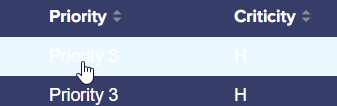
I have a table with background blue, and letter white, this table have a drilldown by row
When I move the mouse in the different rows, It appears with background-color: ECF8FF (attached example)
I have tried with different ways with <html><style> but I was able to fill with a border to the selected row, but I could not change color font, or background color (instead ECF8FF a green for example) of the selected row
I have tried many solutions but It didn't work
Could you help me, please?
Thanks a lot¡¡¡
- Mark as New
- Bookmark Message
- Subscribe to Message
- Mute Message
- Subscribe to RSS Feed
- Permalink
- Report Inappropriate Content


OK you need to qualify the tr class as highlighted and you need to have row level drilldown.
          tr.highlighted td
          {
            color: yellow !important;
            background-color: red !important;
}- Mark as New
- Bookmark Message
- Subscribe to Message
- Mute Message
- Subscribe to RSS Feed
- Permalink
- Report Inappropriate Content
Thanks a lot, with that solution background doesn't work yet, and color of letter works, but only where appears the mouse, I add a new image attached to show It

Any Idea?
- Mark as New
- Bookmark Message
- Subscribe to Message
- Mute Message
- Subscribe to RSS Feed
- Permalink
- Report Inappropriate Content
OK you need to qualify the tr class as highlighted and you need to have row level drilldown.
          tr.highlighted td
          {
            color: yellow !important;
            background-color: red !important;
}- Mark as New
- Bookmark Message
- Subscribe to Message
- Mute Message
- Subscribe to RSS Feed
- Permalink
- Report Inappropriate Content

Greetings,
I hope you all don't mind if I somewhat hijack this message with my question regarding drilldowns. We have a requirement for a dashboard containing multiple lookup files. We're able to reference one drilldown report. How do we reference multiple (total 9) drilldown reports?
Thanks advance for your help.
- Mark as New
- Bookmark Message
- Subscribe to Message
- Mute Message
- Subscribe to RSS Feed
- Permalink
- Report Inappropriate Content
You need something like this in your style block:
          tr td:hover
          {
            color: yellow !important;
            background-color: red !important;
          }
You may want to qualify this with the id of the panel/table so it doesn't get applied to all tables.
- Mark as New
- Bookmark Message
- Subscribe to Message
- Mute Message
- Subscribe to RSS Feed
- Permalink
- Report Inappropriate Content
Replied below, thanks


Join the Splunk Community Slack to learn, troubleshoot, and make connections with fellow Splunk practitioners in real time!
Join Splunk User Groups to connect and learn in-person by region or remotely by topic or industry.
Self-Healing Pipeline Is Now Generally Available: AI-Powered CIM Compliance
Meet Splunk Observability Studio: AI-Assisted OpenTelemetry Instrumentation Without ...
Federated Search for Cisco Security and Analytics Logging (SAL) is now GA on Splunk ...
