
Join the Conversation
- Find Answers
- :
- Using Splunk
- :
- Dashboards & Visualizations
- :
- Re: Can an HTML button with value be done without ...
- Subscribe to RSS Feed
- Mark Topic as New
- Mark Topic as Read
- Float this Topic for Current User
- Bookmark Topic
- Subscribe to Topic
- Mute Topic
- Printer Friendly Page
- Mark as New
- Bookmark Message
- Subscribe to Message
- Mute Message
- Subscribe to RSS Feed
- Permalink
- Report Inappropriate Content

Hi,
I require an HTML button with the value.
Can this be done without using JS and CSS scripts?
Kindly help me.
Thanks!
- Mark as New
- Bookmark Message
- Subscribe to Message
- Mute Message
- Subscribe to RSS Feed
- Permalink
- Report Inappropriate Content

Hi @Deepz2612 ,
Try the below code.
Accept & up-vote the answer if it helps.
<row depends="$hidden$">
    <panel>
      <table>
        <search>
          <query>index=_internal | head 1 |stats latest(_time) as Last_Occurance | convert ctime(Last_Occurance)</query>
          <earliest>-24h@h</earliest>
          <latest>now</latest>
          <done>
            <set token="test">$result.Last_Occurance$</set>
          </done>
        </search>
      </table>
    </panel>
  </row>
  <row>
    <panel>
      <html>
        <input type="button" value="$test$"/>
      </html>
    </panel>>
  <row>
happy splunking.....!!!!
- Mark as New
- Bookmark Message
- Subscribe to Message
- Mute Message
- Subscribe to RSS Feed
- Permalink
- Report Inappropriate Content

@Deepz2612 @prettysunshinez If you want to avoid JS, you can try one of my following workaround which uses table cell values displayed as buttons so that we are allowed to set/unset token as part of table <drilldown> using Simple XML itself.
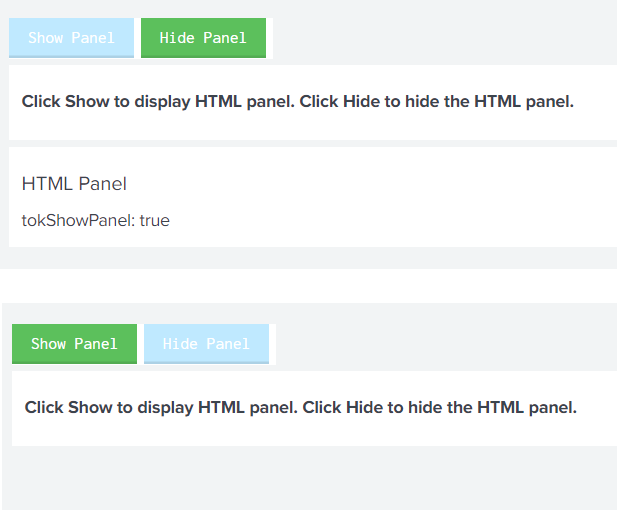
Please try out and confirm. Let me know if you need explanation for any of the section of the run anywhere example:
<dashboard>
  <label>Dashboard with Buttons using Formatted Table without JS based HTML buttons</label>
  <row id="rowPanelTableButtons">
    <panel id="panelTableButtonLeft">
      <html depends="$alwaysHideCSSPanel$">
        <style>
          #rowPanelTableButtons {
            display: inline-flex !important;
          }
          #panelTableButtonLeft .dashboard-panel{
            margin-right: 0px !important;
          }
          #tableWithHideButton table thead,
          #tableWithShowButton table thead{
            display: none !important;
          }
          #tableWithShowButton table tbody tr,
          #tableWithHideButton table tbody tr{
              display: flex;
          }
          #tableWithShowButton .element-footer,
          #tableWithHideButton .element-footer{
            visibility: hidden !important;
          }
          #tableWithShowButton table tbody tr td,
          #tableWithShowButton table tbody tr td:hover,
          #tableWithHideButton table tbody tr td,
          #tableWithHideButton table tbody tr td:hover{
            color: #fff;
            -webkit-box-shadow: inset 0 -2px 0 rgba(0,0,0,.1);
            box-shadow: inset 0 -2px 0 rgba(0,0,0,.1);
            text-decoration: none;
            text-shadow: none;
            -webkit-transition: background .2s,border .2s,-webkit-box-shadow .2s,-webkit-text-decoration .2s;
            transition: background .2s,border .2s,-webkit-box-shadow .2s,-webkit-text-decoration .2s;
            transition: background .2s,border .2s,box-shadow .2s,text-decoration .2s;
            transition: background .2s,border .2s,box-shadow .2s,text-decoration .2s,-webkit-box-shadow .2s,-webkit-text-decoration .2s;
            -webkit-filter: none;
            filter: none;
          }
          #tableWithShowButton table tbody tr td,
          #tableWithHideButton table tbody tr td{
            padding: 6px 15px;
            font-weight: 500;
            background-color: #5cc05c;
            border: transparent;
            margin-right: 5px;
          }
        </style>
      </html>
      <table id="tableWithShowButton">
        <search>
          <query>| makeresults
| fields - _time
| eval buttonShow="Show Panel"</query>
          <earliest>-24h@h</earliest>
          <latest>now</latest>
          <sampleRatio>1</sampleRatio>
        </search>
        <option name="count">20</option>
        <option name="dataOverlayMode">none</option>
        <option name="drilldown">cell</option>
        <option name="percentagesRow">false</option>
        <option name="rowNumbers">false</option>
        <option name="totalsRow">false</option>
        <option name="wrap">true</option>
        <drilldown>
          <set token="tokShowPanel">true</set>
        </drilldown>
      </table>
    </panel>
    <panel id="panelTableButtonRight">
      <table id="tableWithHideButton">
        <search>
          <query>| makeresults
| fields - _time
| eval buttonHide="Hide Panel"</query>
          <earliest>-24h@h</earliest>
          <latest>now</latest>
          <sampleRatio>1</sampleRatio>
        </search>
        <option name="count">20</option>
        <option name="dataOverlayMode">none</option>
        <option name="drilldown">cell</option>
        <option name="percentagesRow">false</option>
        <option name="rowNumbers">false</option>
        <option name="totalsRow">false</option>
        <option name="wrap">true</option>
        <drilldown>
            <unset token="tokShowPanel"></unset>
        </drilldown>
      </table>
    </panel>
  </row>
  <row>
    <panel>
      <html>
        <h3>Click Show to display HTML panel. Click Hide to hide the HTML panel.</h3>
      </html>
    </panel>
  </row>
  <row>
    <panel depends="$tokShowPanel$">
      <html>
        <h2>HTML Panel</h2>
        tokShowPanel: $tokShowPanel$
      </html>
    </panel>
  </row>
</dashboard>
| makeresults | eval message= "Happy Splunking!!!"

- Mark as New
- Bookmark Message
- Subscribe to Message
- Mute Message
- Subscribe to RSS Feed
- Permalink
- Report Inappropriate Content
Hi @Deepz2612 ,
Try the below code.
Accept & up-vote the answer if it helps.
<row depends="$hidden$">
    <panel>
      <table>
        <search>
          <query>index=_internal | head 1 |stats latest(_time) as Last_Occurance | convert ctime(Last_Occurance)</query>
          <earliest>-24h@h</earliest>
          <latest>now</latest>
          <done>
            <set token="test">$result.Last_Occurance$</set>
          </done>
        </search>
      </table>
    </panel>
  </row>
  <row>
    <panel>
      <html>
        <input type="button" value="$test$"/>
      </html>
    </panel>>
  <row>
happy splunking.....!!!!
- Mark as New
- Bookmark Message
- Subscribe to Message
- Mute Message
- Subscribe to RSS Feed
- Permalink
- Report Inappropriate Content


@Deepz2612
Have you tried <html> in panel tag?
<panel>
   <html>
   <input type="button" value="my Button" />
   </html>
 </panel>
You can use any HTML tags over here. Please let us know if you have any issue with this.

Join the Splunk Community Slack to learn, troubleshoot, and make connections with fellow Splunk practitioners in real time!
Join Splunk User Groups to connect and learn in-person by region or remotely by topic or industry.
Persistent Queue at TcpOut — One of Splunk's Most Practical Features
Build resilience for the agentic era: Join us at Splunk Go San Jose
Manage Edge Processor pipelines end to end with APIs
