
Join the Conversation
- Find Answers
- :
- Using Splunk
- :
- Dashboards & Visualizations
- :
- Adding New Field to Dashboard Panel
- Subscribe to RSS Feed
- Mark Topic as New
- Mark Topic as Read
- Float this Topic for Current User
- Bookmark Topic
- Subscribe to Topic
- Mute Topic
- Printer Friendly Page
- Mark as New
- Bookmark Message
- Subscribe to Message
- Mute Message
- Subscribe to RSS Feed
- Permalink
- Report Inappropriate Content
Adding New Field to Dashboard Panel

I have a dashboard panel of survey percentage results over time, divided into separate lines by region:
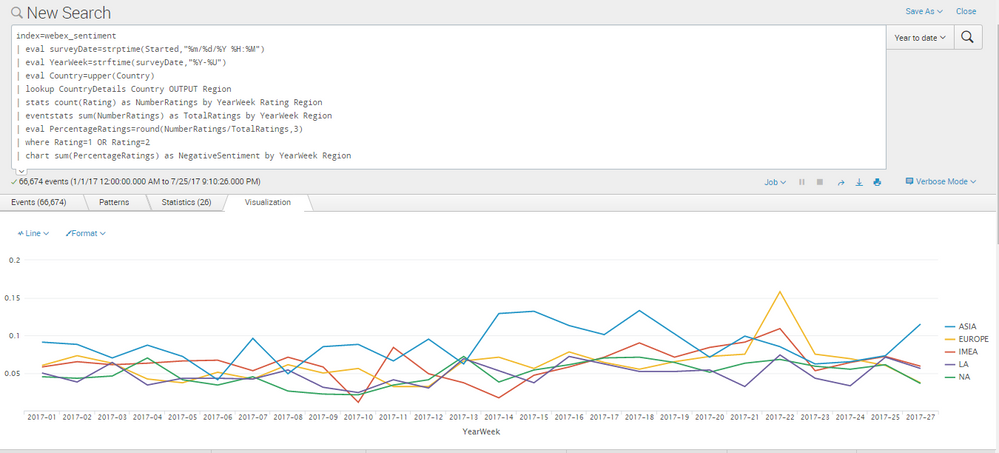
Here is the query:
index=webex_sentiment
| eval surveyDate=strptime(Started,"%m/%d/%Y %H:%M")
| eval YearWeek=strftime(surveyDate,"%Y-%U")
| eval Country=upper(Country)
| lookup CountryDetails Country OUTPUT Region
| stats count(Rating) as NumberRatings by YearWeek Rating Region
| eventstats sum(NumberRatings) as TotalRatings by YearWeek Region
| eval PercentageRatings=round(NumberRatings/TotalRatings,3)
| where Rating=1 OR Rating=2
| chart sum(PercentageRatings) as NegativeSentiment by YearWeek Region
I want to show this same line graph, but only include events that contain the value "A desk or huddle room (9 or fewer seats) phone" for the JoinedFrom field:
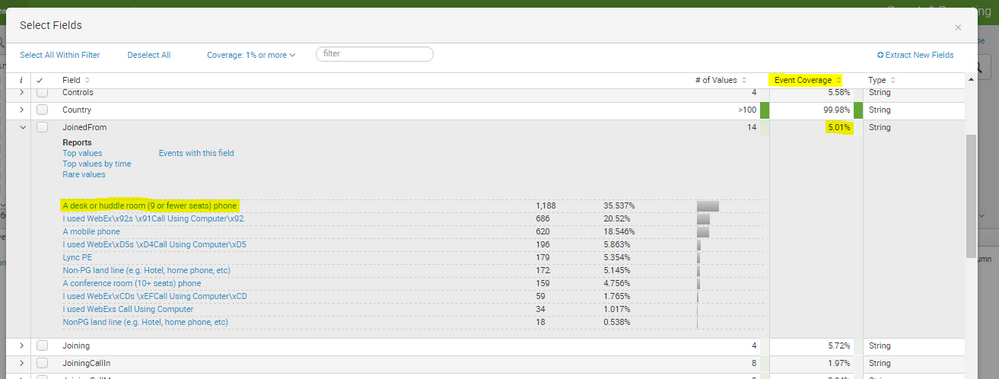
This JoinedFrom field should cover 100% of events, but for some reason it's only showing as covering 5%
This is the query that should work:
index=webex_sentiment
| eval surveyDate=strptime(Started,"%m/%d/%Y %H:%M")
| eval YearWeek=strftime(surveyDate,"%Y-%U")
| eval Country=upper(Country)
| lookup CountryDetails Country OUTPUT Region
| search JoinedFrom="A desk or huddle room (9 or fewer seats) phone"
| stats  count(Rating) as NumberRatings by YearWeek Rating Region
| eventstats  sum(NumberRatings) as TotalRatings by YearWeek Region
| eval  PercentageRatings=round(NumberRatings/TotalRatings,3)
| where  Rating=1 OR Rating=2
| chart  sum(PercentageRatings) as NegativeSentiment by YearWeek Region
However, it's not coming out quite right: http://imgur.com/a/9TbaM
I want a similar line graph to the original, just with only the events where JoinedFrom="A desk or huddle room (9 or fewer seats) phone."
Please advise


- Mark as New
- Bookmark Message
- Subscribe to Message
- Mute Message
- Subscribe to RSS Feed
- Permalink
- Report Inappropriate Content

try this:
 index=webex_sentiment "A desk or huddle room (9 or fewer seats) phone"
 | eval surveyDate=strptime(Started,"%m/%d/%Y %H:%M")
 | eval YearWeek=strftime(surveyDate,"%Y-%U")
 | eval Country=upper(Country)
 | lookup CountryDetails Country OUTPUT Region
 | stats  count(Rating) as NumberRatings by YearWeek Rating Region
 | eventstats  sum(NumberRatings) as TotalRatings by YearWeek Region
 | eval  PercentageRatings=round(NumberRatings/TotalRatings,3)
 | where  Rating=1 OR Rating=2
 | chart  sum(PercentageRatings) as NegativeSentiment by YearWeek Region
that should narrow down your search to what you're looking for before you actually start evaluating anything.
- Mark as New
- Bookmark Message
- Subscribe to Message
- Mute Message
- Subscribe to RSS Feed
- Permalink
- Report Inappropriate Content

@mhtedford, I believe you are getting "A desk or huddle room (9 or fewer seats) phone" from raw events of index=webex_sentiment. In that case you can add this string in your base search. If field extraction is already in place you can put the same with field name.
index=webex_sentiment "A desk or huddle room (9 or fewer seats) phone"
Or
index=webex_sentiment JoinedFrom="A desk or huddle room (9 or fewer seats) phone"
Filtering the results upfront will boost query performance by fetching only required events from Index.
Also refer to lookup command optimization, you should perform stats by country first and then perform lookup to change country to region.
However, ignoring performance, I think above search should also give you only one series for "A desk or huddle room (9 or fewer seats) phone". So can you please illustrate what you are seeing vs what you expect?
| makeresults | eval message= "Happy Splunking!!!"

Join the Splunk Community Slack to learn, troubleshoot, and make connections with fellow Splunk practitioners in real time!
Join Splunk User Groups to connect and learn in-person by region or remotely by topic or industry.
Index This | What travels the world but is also stuck in place?
Discover New Use Cases: Unlock Greater Value from Your Existing Splunk Data
Continue Your Journey: Join Session 2 of the Data Management and Federation Bootcamp ...
