
Join the Conversation
- Find Answers
- :
- Using Splunk
- :
- Dashboards & Visualizations
- :
- Add tool tip to splunk table headers only
- Subscribe to RSS Feed
- Mark Topic as New
- Mark Topic as Read
- Float this Topic for Current User
- Bookmark Topic
- Subscribe to Topic
- Mute Topic
- Printer Friendly Page
- Mark as New
- Bookmark Message
- Subscribe to Message
- Mute Message
- Subscribe to RSS Feed
- Permalink
- Report Inappropriate Content

Hi,
Can anyone tell me how to add tooltip to splunk table headers?
i have headers like header1, header2, header3. i want to show different tooltips for each headers.
i got to know about adding tooltip to table data (https://community.splunk.com/t5/Dashboards-Visualizations/Can-tooltip-be-used-on-Splunk-table-header... ), but using that i am not able to add tooltip to table headers.
Thanks,
- Mark as New
- Bookmark Message
- Subscribe to Message
- Mute Message
- Subscribe to RSS Feed
- Permalink
- Report Inappropriate Content


Can you please try this?
XML:
<dashboard script="table_header_tooltip.js">
  <label>Table Header Tooltip</label>
  <row>
    <panel>
      <table id="tbl1">
        <search>
          <query>| makeresults count=5 |eval a=1 | accum a | eval "Header 1"="Hello "+a</query>
          <earliest>-24h@h</earliest>
          <latest>now</latest>
          <sampleRatio>1</sampleRatio>
        </search>
        <option name="drilldown">none</option>
        <option name="refresh.display">progressbar</option>
      </table>
    </panel>
  </row>
</dashboard>
table_header_tooltip.js
require([
    'underscore',
    'jquery',
    'splunkjs/mvc',
    'splunkjs/mvc/tableview',
    'splunkjs/mvc/simplexml/ready!'
], function(_, $, mvc, TableView) {

    console.log("Hie 1");
    mvc.Components.get('tbl1').getVisualization(function(tableView) {
        tableView.on('rendered', function() {
            console.log("on rendered");
            tableView.$el.find(`[data-sort-key='Header 1']`).find("a").attr({
                "data-toggle": "tooltip",
                "data-placement": "left",
                "title": "My Tool Tip Value 1"
            });
            tableView.$el.children('[data-toggle="tooltip"]').tooltip();
            tableView.table.render();
        });
    });
});
Output:
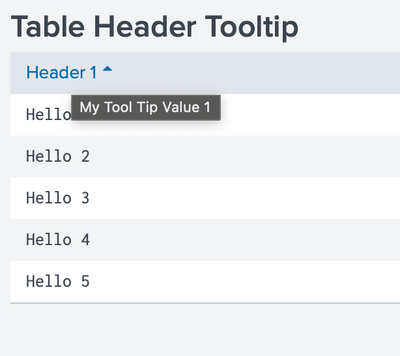
Thanks
KV
▄︻̷̿┻̿═━一
If any of my reply helps you to solve the problem Or gain knowledge, an upvote would be appreciated.
- Mark as New
- Bookmark Message
- Subscribe to Message
- Mute Message
- Subscribe to RSS Feed
- Permalink
- Report Inappropriate Content
Can you please try this?
XML:
<dashboard script="table_header_tooltip.js">
  <label>Table Header Tooltip</label>
  <row>
    <panel>
      <table id="tbl1">
        <search>
          <query>| makeresults count=5 |eval a=1 | accum a | eval "Header 1"="Hello "+a</query>
          <earliest>-24h@h</earliest>
          <latest>now</latest>
          <sampleRatio>1</sampleRatio>
        </search>
        <option name="drilldown">none</option>
        <option name="refresh.display">progressbar</option>
      </table>
    </panel>
  </row>
</dashboard>
table_header_tooltip.js
require([
    'underscore',
    'jquery',
    'splunkjs/mvc',
    'splunkjs/mvc/tableview',
    'splunkjs/mvc/simplexml/ready!'
], function(_, $, mvc, TableView) {

    console.log("Hie 1");
    mvc.Components.get('tbl1').getVisualization(function(tableView) {
        tableView.on('rendered', function() {
            console.log("on rendered");
            tableView.$el.find(`[data-sort-key='Header 1']`).find("a").attr({
                "data-toggle": "tooltip",
                "data-placement": "left",
                "title": "My Tool Tip Value 1"
            });
            tableView.$el.children('[data-toggle="tooltip"]').tooltip();
            tableView.table.render();
        });
    });
});
Output:
Thanks
KV
▄︻̷̿┻̿═━一
If any of my reply helps you to solve the problem Or gain knowledge, an upvote would be appreciated.
- Mark as New
- Bookmark Message
- Subscribe to Message
- Mute Message
- Subscribe to RSS Feed
- Permalink
- Report Inappropriate Content
i added exactly your code to my local splunk. But i am getting 404 not found error. @kamlesh_vaghela

- Mark as New
- Bookmark Message
- Subscribe to Message
- Mute Message
- Subscribe to RSS Feed
- Permalink
- Report Inappropriate Content
- Mark as New
- Bookmark Message
- Subscribe to Message
- Mute Message
- Subscribe to RSS Feed
- Permalink
- Report Inappropriate Content
added by goin to manage apps, edit properties, add file from UI. file will go to appserver/static folder
- Mark as New
- Bookmark Message
- Subscribe to Message
- Mute Message
- Subscribe to RSS Feed
- Permalink
- Report Inappropriate Content

Join the Splunk Community Slack to learn, troubleshoot, and make connections with fellow Splunk practitioners in real time!
Join Splunk User Groups to connect and learn in-person by region or remotely by topic or industry.
How Splunk AI Assistant Is Transforming Investigations: Insights from .conf26
Make Your Machine Data AI-Ready in Splunk
Splunk Asynchronous Forwarding Explained
