
Join the Conversation
- Find Answers
- :
- Using Splunk
- :
- Dashboards & Visualizations
- :
- Add newline into table cell?
- Subscribe to RSS Feed
- Mark Topic as New
- Mark Topic as Read
- Float this Topic for Current User
- Bookmark Topic
- Subscribe to Topic
- Mute Topic
- Printer Friendly Page
- Mark as New
- Bookmark Message
- Subscribe to Message
- Mute Message
- Subscribe to RSS Feed
- Permalink
- Report Inappropriate Content

Hi,
I'm splunking some network traffic and want to generate a table showing the peak hour for different categories of data, for each day through a week. To add some context I'd like to embed more information (e.g. total throughput) into the table cell which I can do using eval to generate a result string.
Is there any way of creating a newline within the result string so that the values wrap onto multiple lines?
Thanks
- Mark as New
- Bookmark Message
- Subscribe to Message
- Mute Message
- Subscribe to RSS Feed
- Permalink
- Report Inappropriate Content
You can do this by tweaking the CSS for the table you want wrapped text in (so you might need to create your own app so your CSS tweak doesn't affect everything else as well...)
To get wrapped text in the results table, define the following CSS in <app_root>/appserver/static/application.css:
.SimpleResultsTable table.simpleResultsTable {
    white-space:pre-line;
}
- Mark as New
- Bookmark Message
- Subscribe to Message
- Mute Message
- Subscribe to RSS Feed
- Permalink
- Report Inappropriate Content
Hi inglisn,
If you want to see the newline inside the table cell.
I tried using [ yoursearch | rex mode=sed field=Category "s/,/\n/g" | .... ], But i see space instead of newline.
Try this if you have a delimiter in the string for a field Category like shown in example : Cat1, Cat2
you can try to use split ( your search |eval Category = split(Category,",")| ....... ) after using all the methods split works fine for my case.
Hope this will help you.
Example :
No Category Count
1 Cat1, Cat2 5
2 Cat5, Cat6 9
Desired output :
No Category Count
1 Cat1 5
Cat2
2 Cat5 9
Cat6
Thanks.
- Mark as New
- Bookmark Message
- Subscribe to Message
- Mute Message
- Subscribe to RSS Feed
- Permalink
- Report Inappropriate Content
thanks! this worked great for me as well. (nagendra008 's split method , not the css way)
(i didnt want to mess with CSS nor make a new app for a quick table).
if this helps others, i used the blank space as the linebreak / replace char;
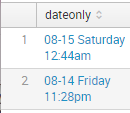
| eval dateonly=strftime(_time, "%m-%d %A %I:%M%P") | eval dateonly= split(dateonly," ")
so i ended up with exactly what i wanted 🙂 -
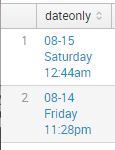
vs this before 😐
(unrelated- what is up with the login process for the forums here? its now login on page 1, pw on page2, which breaks chrome and FF password save/remember. maybe they are doing this to fight off bruteforce/bots? etherway its pretty annoying as i now have to lookup + type both 😞
- Mark as New
- Bookmark Message
- Subscribe to Message
- Mute Message
- Subscribe to RSS Feed
- Permalink
- Report Inappropriate Content
This was extremely useful. I have been looking for this for long.
Thank you @nagendra008
- Mark as New
- Bookmark Message
- Subscribe to Message
- Mute Message
- Subscribe to RSS Feed
- Permalink
- Report Inappropriate Content
Split worked great, just what I was looking for!
- Mark as New
- Bookmark Message
- Subscribe to Message
- Mute Message
- Subscribe to RSS Feed
- Permalink
- Report Inappropriate Content

Using split works for me.
- Mark as New
- Bookmark Message
- Subscribe to Message
- Mute Message
- Subscribe to RSS Feed
- Permalink
- Report Inappropriate Content
Split worked for me as well...!
- Mark as New
- Bookmark Message
- Subscribe to Message
- Mute Message
- Subscribe to RSS Feed
- Permalink
- Report Inappropriate Content
You can do this by tweaking the CSS for the table you want wrapped text in (so you might need to create your own app so your CSS tweak doesn't affect everything else as well...)
To get wrapped text in the results table, define the following CSS in <app_root>/appserver/static/application.css:
.SimpleResultsTable table.simpleResultsTable {
    white-space:pre-line;
}
- Mark as New
- Bookmark Message
- Subscribe to Message
- Mute Message
- Subscribe to RSS Feed
- Permalink
- Report Inappropriate Content
Thanks. Works well, although getting into the guts of CSS is something I was hoping to avoid.


Join the Splunk Community Slack to learn, troubleshoot, and make connections with fellow Splunk practitioners in real time!
Join Splunk User Groups to connect and learn in-person by region or remotely by topic or industry.
Supercharging Windows Security Detection Performance: Introducing Hybrid Field ...
Ditch the Manual Grind: Building AI Agents with Splunk
Cisco Data Fabric from Architecture to Investigation, Better SOC Visibility, and More ...
