
Join the Conversation
- Find Answers
- :
- Using Splunk
- :
- Dashboards & Visualizations
- :
- Re: Accessing Drilldown Editor
- Subscribe to RSS Feed
- Mark Topic as New
- Mark Topic as Read
- Float this Topic for Current User
- Bookmark Topic
- Subscribe to Topic
- Mute Topic
- Printer Friendly Page
- Mark as New
- Bookmark Message
- Subscribe to Message
- Mute Message
- Subscribe to RSS Feed
- Permalink
- Report Inappropriate Content

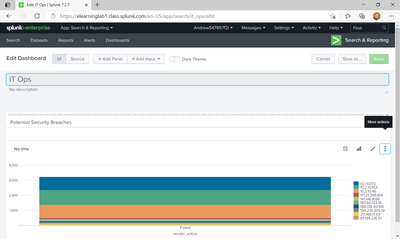
Hello everyone, I'm new here and to Splunk in general. I have completed Fundamentals 1 and am now on the labs of Module 3 in Fundamentals 2. I am running into an issue with the drilldown editor in the edit dashboard page. The lab instructions say for me to click the 3 dots on the right of the screen (also known as the More actions button) but when I do the "More actions" bubble pops up and nothing appears, the more actions bubble then stays frozen on there until I leave the page or refresh it, see below. The other 3 buttons work fine. I am using Microsoft Edge and I tried Chrome but got the same result.
Is there another way to access the Drilldown Editor? I can't progress in the course without actually completing the lab.
- Mark as New
- Bookmark Message
- Subscribe to Message
- Mute Message
- Subscribe to RSS Feed
- Permalink
- Report Inappropriate Content


Older versions of splunk seem to have some issues displaying some panels. You could try upgrading to a later version of splunk - maximising your browser - making you browser window smaller - cancel the edit and try again.
- Mark as New
- Bookmark Message
- Subscribe to Message
- Mute Message
- Subscribe to RSS Feed
- Permalink
- Report Inappropriate Content
Thanks! Canceling the Edit, reducing the size of my window, and then clicking it worked.
- Mark as New
- Bookmark Message
- Subscribe to Message
- Mute Message
- Subscribe to RSS Feed
- Permalink
- Report Inappropriate Content
Older versions of splunk seem to have some issues displaying some panels. You could try upgrading to a later version of splunk - maximising your browser - making you browser window smaller - cancel the edit and try again.


Join the Splunk Community Slack to learn, troubleshoot, and make connections with fellow Splunk practitioners in real time!
Join Splunk User Groups to connect and learn in-person by region or remotely by topic or industry.
SOC4Kafka - New Kafka Connector Powered by OpenTelemetry
Rounding off the Splunk Dashboard Contest
A Four Part Event Series: AI + Observability: AI Agents, LLMs, Apps, & Infrastructure
