
Join the Conversation
- Find Answers
- :
- Apps & Add-ons
- :
- All Apps and Add-ons
- :
- All Apps and Add-ons
- :
- Re: dbxquery not giving data in email alert
- Subscribe to RSS Feed
- Mark Topic as New
- Mark Topic as Read
- Float this Topic for Current User
- Bookmark Topic
- Subscribe to Topic
- Mute Topic
- Printer Friendly Page
- Mark as New
- Bookmark Message
- Subscribe to Message
- Mute Message
- Subscribe to RSS Feed
- Permalink
- Report Inappropriate Content

Hi
I am unable to get dbxquery data out to an alert.
When i run the alert normally i can see that data, when i put it into an alert it also is fine.
But it wont send the data to an email address, i get the following error below.
02-24-2020 11:24:05.142 +0100 ERROR ScriptRunner - stderr from '/hp737srv2/apps/splunk/bin/python /hp737srv2/apps/splunk/etc/apps/search/bin/sendemail.py "results_link=http://hp737srv:8000/app/Murex/@go?sid=scheduler__admin__Murex__RMD53b83008a35dc2834_at_1582539840_32896" "ssname=PAC_PLO_blockedSybProc_TO_BE_DELETED_2" "graceful=True" "trigger_time=1582539844" results_file="/hp737srv2/apps/splunk/var/run/splunk/dispatch/scheduler__admin__Murex__RMD53b83008a35dc2834_at_1582539840_32896/results.csv.gz"': _csv.Error: line contains NULL byte
Below is the query that i am using. I am running it with a cron * * * * * for testing.
| dbxquery query="select  ProcName=program_name,Status=status,
         LoginName=convert(char(12),suser_name(suid)),HostName=hostname,ProcessId=hostprocess,
         Blk=blocked,DBName=convert(char(15),db_name(dbid)),
         Cmd_TransName=rtrim(convert(char(15),cmd))+'/'+rtrim(convert(char(15),tran_name)),
      CPU=cpu,PhyIOCmd=physical_io,TimeBlk=time_blocked,NetWorkPSize=network_pktsz,
      m.SPID,creationTime=s.loggedindatetime,m.CPUTime,m.WaitTime,memUsageKB=m.MemUsageKB,m.LogicalReads,m.PhysicalReads,m.LocksHeld,m.TableAccesses,m.IndexAccesses
from master..sysprocesses s , master.dbo.monProcessActivity m
where m.SPID = s.spid order by DBName" connection="PAC-PLO-ENV"
| eval tmNow=now() | convert ctime(tnow)
| eval timeNow=strftime(tmNow, "%Y-%m-%d %H:%M:%S")
| eval ctime=strptime(creationTime,"%Y-%m-%d %H:%M:%S")
| eval ctime=strptime(creationTime,"%Y-%m-%d %H:%M:%S")
| eval timeDiff=tmNow - ctime
| eval cpuPerc= CPUTime / timeDiff *100
| eval UpTime= tostring(timeDiff,"duration")
| sort -CPUTime | search "SPID"="*"
| table ProcessId, SPID, HostName, ProcName
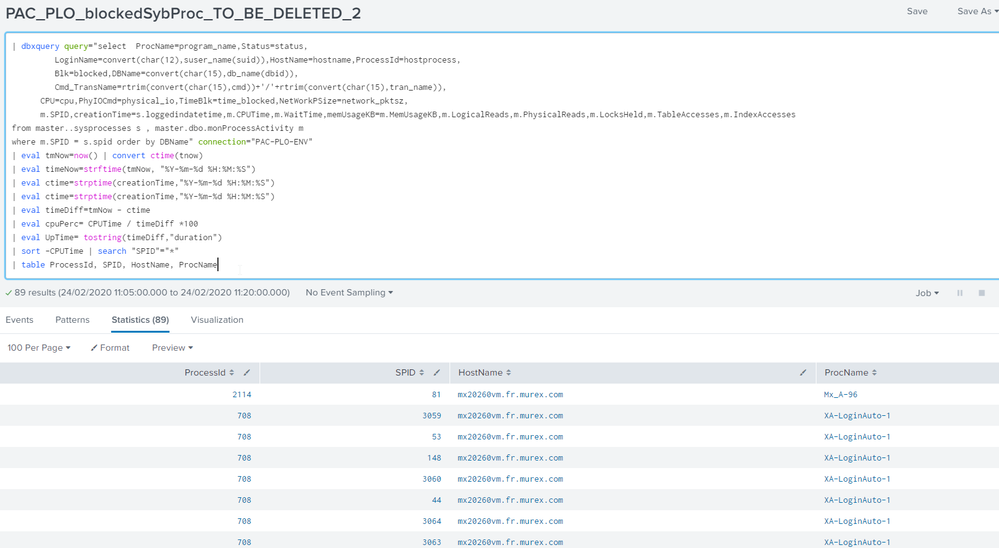
Below is the data i can see, but i just cant get it into a email!! any ideas would be great thanks

- Mark as New
- Bookmark Message
- Subscribe to Message
- Mute Message
- Subscribe to RSS Feed
- Permalink
- Report Inappropriate Content
Hi
To get over this i created a workaround.
In an alert i pushed this data out to an index
|collect index=yourindex source=yoursource
Then in the original Alert i references the index not the | dbxquery data and the alert worked.
So i think there must be a bug in Splunk.
Regards
Robert
- Mark as New
- Bookmark Message
- Subscribe to Message
- Mute Message
- Subscribe to RSS Feed
- Permalink
- Report Inappropriate Content
Hi
To get over this i created a workaround.
In an alert i pushed this data out to an index
|collect index=yourindex source=yoursource
Then in the original Alert i references the index not the | dbxquery data and the alert worked.
So i think there must be a bug in Splunk.
Regards
Robert

Join the Splunk Community Slack to learn, troubleshoot, and make connections with fellow Splunk practitioners in real time!
Join Splunk User Groups to connect and learn in-person by region or remotely by topic or industry.
[Puzzles] Solve, Learn, Repeat: Character substitutions with Regular Expressions
Splunk Community Badges!
[Puzzles] Solve, Learn, Repeat: Matching cron expressions
