
Join the Conversation
- Find Answers
- :
- Apps & Add-ons
- :
- All Apps and Add-ons
- :
- All Apps and Add-ons
- :
- Re: Windows DNS debug logs TA not using CIM fields...
- Subscribe to RSS Feed
- Mark Topic as New
- Mark Topic as Read
- Float this Topic for Current User
- Bookmark Topic
- Subscribe to Topic
- Mute Topic
- Printer Friendly Page
- Mark as New
- Bookmark Message
- Subscribe to Message
- Mute Message
- Subscribe to RSS Feed
- Permalink
- Report Inappropriate Content

I set up a test environment with a Windows 2012 R2 server with the DNS server role, and was able to successfully install TA-DNSServer-NT6 (as per the instructions at http://docs.splunk.com/Documentation/MSApp/1.1.2/MSInfra/DownloadandconfiguretheSplunkAdd-onsforWind... ).
However, I was very surprised to discover two things:
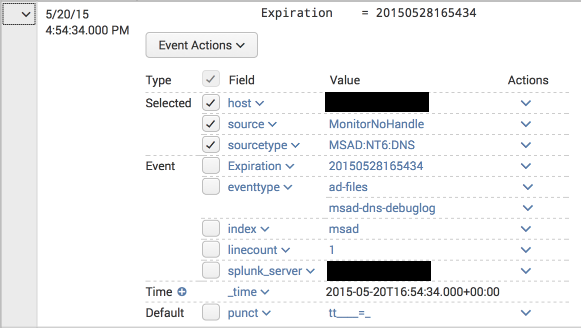
- The DNS packet data (which contains the actual replies, such as the IP addresses a hostname resolved to in a A query) was not being parsed, and in fact generated "incomplete" alerts with each packet line as in this example:
- The summary lines were being correctly parsed, but the corresponding CIM fields (http://docs.splunk.com/Documentation/CIM/4.2.0/User/NetworkResolutionDNS ) were not extracted. For example, a query for
tag=dnscame up empty even though there are DNS events and the Splunk App for Windows Infrastructure "DNS: Top Requested Queries" report is being populated. Here is an example:
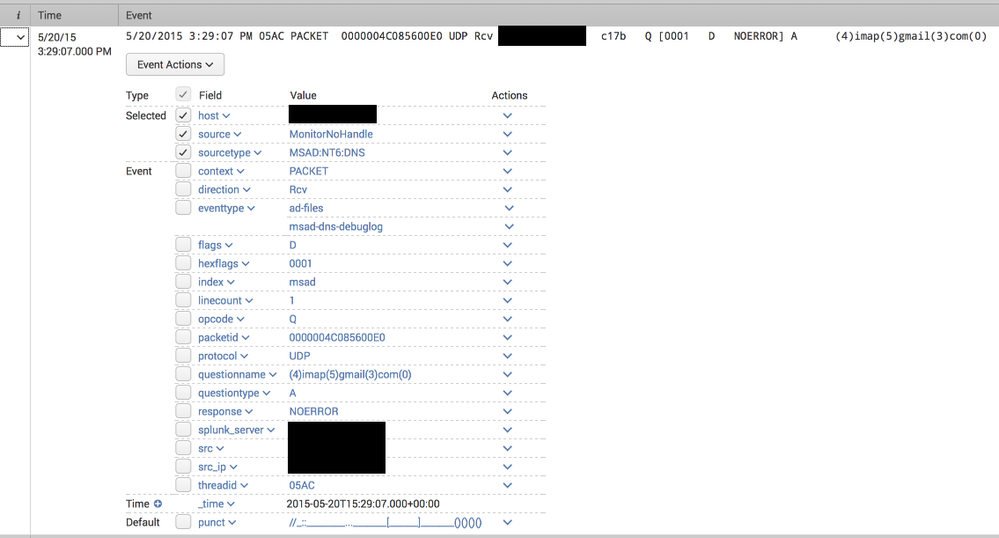
For one, I would have expected to see tags with network, resolution and dns values as per the CIM documentation.
Can anyone else with a working installation of the DNS debug log collection confirm whether this field is populated for them? Did I make some mistake in the setup or is this a limitation of the app?


- Mark as New
- Bookmark Message
- Subscribe to Message
- Mute Message
- Subscribe to RSS Feed
- Permalink
- Report Inappropriate Content
- Mark as New
- Bookmark Message
- Subscribe to Message
- Mute Message
- Subscribe to RSS Feed
- Permalink
- Report Inappropriate Content
That might be an alternative, yes. Just keep in mind it's not using the DNS debug logs though, instead it uses new DNS logging functionality Microsoft introduced in 2012r2.
- Mark as New
- Bookmark Message
- Subscribe to Message
- Mute Message
- Subscribe to RSS Feed
- Permalink
- Report Inappropriate Content
Do you have a link for it? Might be helpful for people that read this thread later on.
- Mark as New
- Bookmark Message
- Subscribe to Message
- Mute Message
- Subscribe to RSS Feed
- Permalink
- Report Inappropriate Content

Bummer. I'd never seen a DNS record with a (null) value before, so discard the SEDCMD-win_dns = s/\(\d+\)/./g attribute from the props.conf. I wonder how Enterprise Security Suite reacts to these funky looking records in Windows DNS logs.
- Mark as New
- Bookmark Message
- Subscribe to Message
- Mute Message
- Subscribe to RSS Feed
- Permalink
- Report Inappropriate Content
- Mark as New
- Bookmark Message
- Subscribe to Message
- Mute Message
- Subscribe to RSS Feed
- Permalink
- Report Inappropriate Content
Perhaps time for someone to update the app ...

Join the Splunk Community Slack to learn, troubleshoot, and make connections with fellow Splunk practitioners in real time!
Join Splunk User Groups to connect and learn in-person by region or remotely by topic or industry.
Index This | What travels the world but is also stuck in place?
Discover New Use Cases: Unlock Greater Value from Your Existing Splunk Data
Continue Your Journey: Join Session 2 of the Data Management and Federation Bootcamp ...
