
Join the Conversation
- Find Answers
- :
- Apps & Add-ons
- :
- All Apps and Add-ons
- :
- All Apps and Add-ons
- :
- TA-Microsoft-Sysmon field extraction issues
- Subscribe to RSS Feed
- Mark Topic as New
- Mark Topic as Read
- Float this Topic for Current User
- Bookmark Topic
- Subscribe to Topic
- Mute Topic
- Printer Friendly Page
- Mark as New
- Bookmark Message
- Subscribe to Message
- Mute Message
- Subscribe to RSS Feed
- Permalink
- Report Inappropriate Content

Gentlemen,
We are using https://splunkbase.splunk.com/app/1914/
Splunk is not extracting all the fields visible in the Windows Sysmon events. It leaves out lot of fields.
This is what i suspect is the cause, but need someone to advise if i am on the right track.
In the events, the SourceType shows as: WinEventLog:Microsoft-Windows-Sysmon/Operational

However, On my Search Head when i go to Settings >> SourceTypes >> ALL , i see a different name: XmlWinEventLog:Microsoft-Windows-Sysmon/Operational
There is no source type here by the name of WinEventLog:Microsoft-Windows-Sysmon/Operational
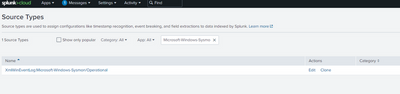
Is the conflict of different sourcetype names causing the issue ? What needs to be done to fix ?
Things i tried...
1. Added the following in inputs.conf to make it format as per XML
[WinEventLog://Microsoft-Windows-Sysmon/Operational]
renderXML=true
sourcetype=XMLWinEventLog:Microsoft-Windows-Sysmon/Operational
This did extract all the fields but ended up showing the events in XML format . How can i keep the default /original format of displaying Windows events yet make it extract all the fields ?
Thanks all
- Mark as New
- Bookmark Message
- Subscribe to Message
- Mute Message
- Subscribe to RSS Feed
- Permalink
- Report Inappropriate Content


You made two changes, renderXML and sourcetype, and got two results - fields extracted and XML format. I believe the field extraction is the result of changing the sourcetype. Changing renderXML back should fix the XML problem.
If this reply helps you, Karma would be appreciated.
- Mark as New
- Bookmark Message
- Subscribe to Message
- Mute Message
- Subscribe to RSS Feed
- Permalink
- Report Inappropriate Content
Thank you. Ended up being as simple as what you suggested 🙂 😀
- Mark as New
- Bookmark Message
- Subscribe to Message
- Mute Message
- Subscribe to RSS Feed
- Permalink
- Report Inappropriate Content
Have you tried setting renderXML = false?
If this reply helps you, Karma would be appreciated.
- Mark as New
- Bookmark Message
- Subscribe to Message
- Mute Message
- Subscribe to RSS Feed
- Permalink
- Report Inappropriate Content
Thanks for responding. Earlier I was trying without mentioning the renderXml parameter at all in my input.conf, as it's default value is false. But that did not solve the original problem.
Meaning it does display the events in regular Windows event format as we are used to but does not extract all fields. About Less than 10 fields are extracted.
On the other hand If we make the events render as xml then all fields get extracted successfully.
Wonder if this is how the TA for sysmon works? Is it by design ?
- Mark as New
- Bookmark Message
- Subscribe to Message
- Mute Message
- Subscribe to RSS Feed
- Permalink
- Report Inappropriate Content
You made two changes, renderXML and sourcetype, and got two results - fields extracted and XML format. I believe the field extraction is the result of changing the sourcetype. Changing renderXML back should fix the XML problem.
If this reply helps you, Karma would be appreciated.

Join the Splunk Community Slack to learn, troubleshoot, and make connections with fellow Splunk practitioners in real time!
Join Splunk User Groups to connect and learn in-person by region or remotely by topic or industry.
Design, Compete, Win: Submit Your Best Splunk Dashboards for a .conf26 Pass
May 2026 Splunk Expert Sessions: Security & Observability
Network to App: Observability Unlocked [May & June Series]
