
Join the Conversation
- Find Answers
- :
- Apps & Add-ons
- :
- All Apps and Add-ons
- :
- All Apps and Add-ons
- :
- Re: Splunk license usage by sourcetype missing dat...
- Subscribe to RSS Feed
- Mark Topic as New
- Mark Topic as Read
- Float this Topic for Current User
- Bookmark Topic
- Subscribe to Topic
- Mute Topic
- Printer Friendly Page
- Mark as New
- Bookmark Message
- Subscribe to Message
- Mute Message
- Subscribe to RSS Feed
- Permalink
- Report Inappropriate Content
Splunk license usage by sourcetype missing data?

Hello,
I am trying to determine why we keep going over our license limit every so often, and pinpoint the sourcetype using up the most GB. However, when I switch the 30 day license usage graph to split by sourcetype, the bars never reach their actual full size.
For example, on June 18th we went over our 30GB limit by about 5GB(so 35GB total), however when I split by sourcetype, the total GB for June 18th is not even 10GB. This is using the manager/search/licenseusage, not the app
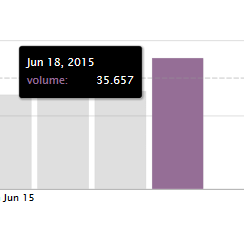
You can see our limit line in both pics(the dotted line). The first solid line in the split graph is 10GB.
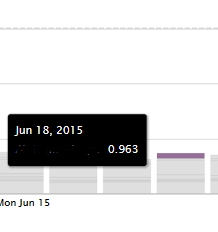
Is this normal? Is there a better way to help figure out sourcetype license usage? I am trying to "clean house" of unneeded indexing, but have been having little luck so far.
Thank you


- Mark as New
- Bookmark Message
- Subscribe to Message
- Mute Message
- Subscribe to RSS Feed
- Permalink
- Report Inappropriate Content

- Mark as New
- Bookmark Message
- Subscribe to Message
- Mute Message
- Subscribe to RSS Feed
- Permalink
- Report Inappropriate Content
Awesome, i will try this out!
- Mark as New
- Bookmark Message
- Subscribe to Message
- Mute Message
- Subscribe to RSS Feed
- Permalink
- Report Inappropriate Content
Just added some drop-downs to the license page so that you can select the sourcetype, so make sure you get v1.6.2. No Splunk restart required.
- Mark as New
- Bookmark Message
- Subscribe to Message
- Mute Message
- Subscribe to RSS Feed
- Permalink
- Report Inappropriate Content


29 is not a large number, I think the logging truncates to the top 100 sourcetypes.
- Mark as New
- Bookmark Message
- Subscribe to Message
- Mute Message
- Subscribe to RSS Feed
- Permalink
- Report Inappropriate Content
Do you have a large number of low-volume sourcetypes making up most of your total volume?
The per-X logging of license info only logs the top Y number of values, so there will be inaccuracies. How large these are depends on your distribution of volume over few large sourcetypes or many small sourcetypes.
- Mark as New
- Bookmark Message
- Subscribe to Message
- Mute Message
- Subscribe to RSS Feed
- Permalink
- Report Inappropriate Content
What is a large number? We have about 29 total different sourcetypes. I thought they got lumped into "other" if they are not in the top 10 or 20?

Join the Splunk Community Slack to learn, troubleshoot, and make connections with fellow Splunk practitioners in real time!
Join Splunk User Groups to connect and learn in-person by region or remotely by topic or industry.
May 2026 Splunk Expert Sessions: Security & Observability
Network to App: Observability Unlocked [May & June Series]
SPL2 Deep Dives, AppDynamics Integrations, SAML Made Simple and Much More on Splunk ...
