
Join the Conversation
- Find Answers
- :
- Apps & Add-ons
- :
- All Apps and Add-ons
- :
- All Apps and Add-ons
- :
- Splunk Add on for Office O365
- Subscribe to RSS Feed
- Mark Topic as New
- Mark Topic as Read
- Float this Topic for Current User
- Bookmark Topic
- Subscribe to Topic
- Mute Topic
- Printer Friendly Page
- Mark as New
- Bookmark Message
- Subscribe to Message
- Mute Message
- Subscribe to RSS Feed
- Permalink
- Report Inappropriate Content
Splunk Add on for Office O365

I've configured Azure integration app for Office 365 add-on. I've created a secret, added rights, and scope for app. I've added the tenant. And when I go to add an input the tenant and content drop downs look correct and populated. But when I go to save the input it returns "! Not Found" Any ideas would be appreciated.
- Mark as New
- Bookmark Message
- Subscribe to Message
- Mute Message
- Subscribe to RSS Feed
- Permalink
- Report Inappropriate Content

Let's try to look at it from scrap.
Step 1:- Configure Tenant.
Step 2:- Configure Proxy if needed.
Step 3:- Create input.
If still, it's not working. Please go to the setting and in logging select log level as DEBUG.
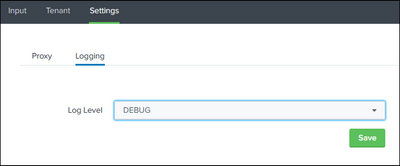
For troubleshooting run index=_internal sourcetype="splunk:ta:o365:log" and check for errors and warnings.
--------------------------------------------------------
If this helps your like will be appreciated 😊
- Mark as New
- Bookmark Message
- Subscribe to Message
- Mute Message
- Subscribe to RSS Feed
- Permalink
- Report Inappropriate Content
Come across this issue today after setting the app up. Haven't found a way to fix it yet.
Anyone able to advise? Documentation isn't really very clear + doesn't offer any troubleshooting assistance.

Join the Splunk Community Slack to learn, troubleshoot, and make connections with fellow Splunk practitioners in real time!
Join Splunk User Groups to connect and learn in-person by region or remotely by topic or industry.
Why Splunk Customers Should Attend Cisco Live 2026 Las Vegas
What Is the Name of the USB Key Inserted by Bob Smith? (BOTS Hint, Not the Answer)
Automating Threat Operations and Threat Hunting with Recorded Future
