
Join the Conversation
- Find Answers
- :
- Apps & Add-ons
- :
- All Apps and Add-ons
- :
- All Apps and Add-ons
- :
- Sourcetype WinEventLog:Security
- Subscribe to RSS Feed
- Mark Topic as New
- Mark Topic as Read
- Float this Topic for Current User
- Bookmark Topic
- Subscribe to Topic
- Mute Topic
- Printer Friendly Page
- Mark as New
- Bookmark Message
- Subscribe to Message
- Mute Message
- Subscribe to RSS Feed
- Permalink
- Report Inappropriate Content

hi team
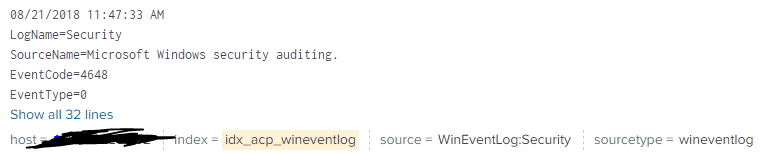
i always work with the Add-On "splunk for windows" for monitoring security events, it always brings me the data with "sourceytpe=WinEventLog:Security", but i don't know if the last version changes the sourcetye by wineventlog, i attached a picture with example, i need to have the "Sourcetype=WinEventLog:Security" with my data
- Mark as New
- Bookmark Message
- Subscribe to Message
- Mute Message
- Subscribe to RSS Feed
- Permalink
- Report Inappropriate Content

I am not sure which version TA you're using. I found below in props.conf in default directory of Splunk_TA_windows version 5.0.0. More about renaming sourcetypes.
## To provide backward compatibility for WinEventLog and XmlWinEventLog data
## These will be deprecated in future
[WinEventLog:Security]
rename = wineventlog
If your props.conf have the above attribute, then comment rename command (and restart splunk) OR try renaming wineventlog to WinEventLog:Security in props.conf under local directory to see if this solves your problem.
- Mark as New
- Bookmark Message
- Subscribe to Message
- Mute Message
- Subscribe to RSS Feed
- Permalink
- Report Inappropriate Content
I am not sure which version TA you're using. I found below in props.conf in default directory of Splunk_TA_windows version 5.0.0. More about renaming sourcetypes.
## To provide backward compatibility for WinEventLog and XmlWinEventLog data
## These will be deprecated in future
[WinEventLog:Security]
rename = wineventlog
If your props.conf have the above attribute, then comment rename command (and restart splunk) OR try renaming wineventlog to WinEventLog:Security in props.conf under local directory to see if this solves your problem.



Join the Splunk Community Slack to learn, troubleshoot, and make connections with fellow Splunk practitioners in real time!
Join Splunk User Groups to connect and learn in-person by region or remotely by topic or industry.
Thanks for the Memories: .conf26 Took Learning to New Heights
Best Practices: Splunk auto adjust pipeline queue
Splunk Auto Ingestion Parallel Pipeline Scaling
