
Join the Conversation
- Find Answers
- :
- Apps & Add-ons
- :
- All Apps and Add-ons
- :
- All Apps and Add-ons
- :
- Re: Qualys Technology Add-on (TA) 1.3.1 Data input...
- Subscribe to RSS Feed
- Mark Topic as New
- Mark Topic as Read
- Float this Topic for Current User
- Bookmark Topic
- Subscribe to Topic
- Mute Topic
- Printer Friendly Page
- Mark as New
- Bookmark Message
- Subscribe to Message
- Mute Message
- Subscribe to RSS Feed
- Permalink
- Report Inappropriate Content

Hello,
We recently updated the Qualys Technology Add-on to version 1.3.1 (published on April 24 on Splunkbase) and we have an issue with Data inputs.
When we try to set up a new input (at Settings -> Data inputs -> TA-QualysCloudPlatform -> Add new) an error occurs: “Encountered the following error while trying to save: Validation for scheme=qualys failed: The script returned with exit status 2.”
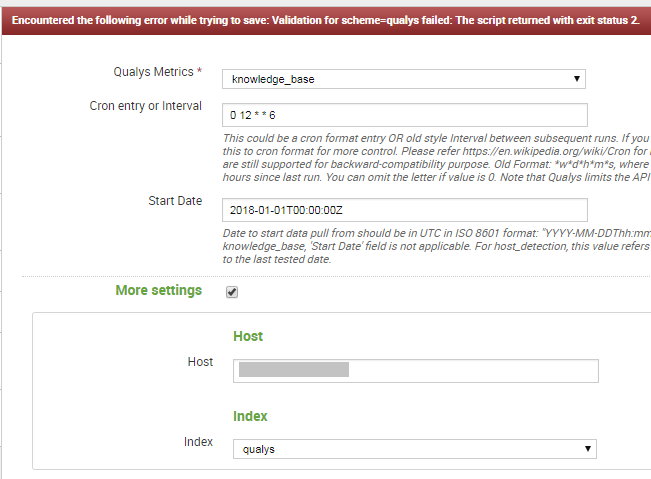
Did anyone have a similar problem?
Thanks for the help.
Regards,
Alexey.

- Mark as New
- Bookmark Message
- Subscribe to Message
- Mute Message
- Subscribe to RSS Feed
- Permalink
- Report Inappropriate Content
Update:
The problem has been solved after version 1.3.2 installation.
- Mark as New
- Bookmark Message
- Subscribe to Message
- Mute Message
- Subscribe to RSS Feed
- Permalink
- Report Inappropriate Content
Update:
The problem has been solved after version 1.3.2 installation.
- Mark as New
- Bookmark Message
- Subscribe to Message
- Mute Message
- Subscribe to RSS Feed
- Permalink
- Report Inappropriate Content

Hi @AlexeySh, do you see any errors in splunkd.log regarding this? If yes, can you post them here?
- Mark as New
- Bookmark Message
- Subscribe to Message
- Mute Message
- Subscribe to RSS Feed
- Permalink
- Report Inappropriate Content
Hello @prabhasgupte,
The only one event in splunkd.log related to that data input is exactly the same as displayed in the web interface:
05-31-2018 14:25:39.889 +0200 WARN ModularInputs - Validation for scheme=qualys failed: The script returned with exit status 2.
Unfortunately, it’s not really helpful.
Regards,

Join the Splunk Community Slack to learn, troubleshoot, and make connections with fellow Splunk practitioners in real time!
Join Splunk User Groups to connect and learn in-person by region or remotely by topic or industry.
Observability Simplified: Combining User Experience, Application Performance & ...
Event Series May & June: From Network Visibility to Service Intelligence
Global Splunk User Group Events: May + June 2026
