
Join the Conversation
- Find Answers
- :
- Apps & Add-ons
- :
- All Apps and Add-ons
- :
- All Apps and Add-ons
- :
- Lookup File Editor Feature Request: Have the app c...
- Subscribe to RSS Feed
- Mark Topic as New
- Mark Topic as Read
- Float this Topic for Current User
- Bookmark Topic
- Subscribe to Topic
- Mute Topic
- Printer Friendly Page
- Mark as New
- Bookmark Message
- Subscribe to Message
- Mute Message
- Subscribe to RSS Feed
- Permalink
- Report Inappropriate Content

Hi Luke, thank you for sharing this app!
I'd like to find out if it is possible to have your app create a backup before modifying the lookup file. Perhaps when user clicks on Save, a backup with the current timestamp is created:
mylookup.csv -> mylookup.csv_20140821
- Mark as New
- Bookmark Message
- Subscribe to Message
- Mute Message
- Subscribe to RSS Feed
- Permalink
- Report Inappropriate Content

Excellent idea! I'm going to look into implementing it. I'll be tracking the work here: http://lukemurphey.net/issues/841.
Update:
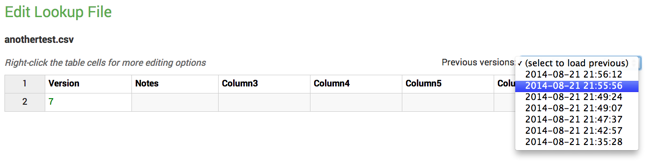
I implemented the feature tonight. The app now keeps backups of old versions and gives you a dropdown in the editor to load the previous version (see dropdown at right side):
I'll be releasing an update to the app soon. If you would be willing to test it, I would appreciate it. You can download the release candidate here.
- Mark as New
- Bookmark Message
- Subscribe to Message
- Mute Message
- Subscribe to RSS Feed
- Permalink
- Report Inappropriate Content
Excellent idea! I'm going to look into implementing it. I'll be tracking the work here: http://lukemurphey.net/issues/841.
Update:
I implemented the feature tonight. The app now keeps backups of old versions and gives you a dropdown in the editor to load the previous version (see dropdown at right side):
I'll be releasing an update to the app soon. If you would be willing to test it, I would appreciate it. You can download the release candidate here.
- Mark as New
- Bookmark Message
- Subscribe to Message
- Mute Message
- Subscribe to RSS Feed
- Permalink
- Report Inappropriate Content
You might need to clear your browser cache first. BTW: it should say that "none available" the first time you view the page. If that still doesn't work, could try opening your browser error console and look for Javascript errors?
- Mark as New
- Bookmark Message
- Subscribe to Message
- Mute Message
- Subscribe to RSS Feed
- Permalink
- Report Inappropriate Content
Hmm, I downloaded and installed the app but I don't see the change in UI after I edit a lookup file. In the area you indicate, there is just "Revision: none available"
- Mark as New
- Bookmark Message
- Subscribe to Message
- Mute Message
- Subscribe to RSS Feed
- Permalink
- Report Inappropriate Content
AWESOME! I will test and provide feedback.


Join the Splunk Community Slack to learn, troubleshoot, and make connections with fellow Splunk practitioners in real time!
Join Splunk User Groups to connect and learn in-person by region or remotely by topic or industry.
Supercharging Windows Security Detection Performance: Introducing Hybrid Field ...
Enriching Signals with the OTel Lookup Processor
Meet the .conf26 AI Agent Buildathon Winners
