
Join the Conversation
- Find Answers
- :
- Apps & Add-ons
- :
- All Apps and Add-ons
- :
- All Apps and Add-ons
- :
- Re: InfoSec app for Splunk - How do you see events...
- Subscribe to RSS Feed
- Mark Topic as New
- Mark Topic as Read
- Float this Topic for Current User
- Bookmark Topic
- Subscribe to Topic
- Mute Topic
- Printer Friendly Page
- Mark as New
- Bookmark Message
- Subscribe to Message
- Mute Message
- Subscribe to RSS Feed
- Permalink
- Report Inappropriate Content

Hello Splunkers,
I have the InfoSec for Splunk App (https://splunkbase.splunk.com/app/4240/#/overview) installed and working. I'm getting data into it and it is using that data. My issue is that when I go to an alert (any alert) it will show me the stats but not any of the actual events. (Yes it is in verbose mode) The events tab shows X number of events but when I click the events tab it says "no results". I think (please correct me if I'm wrong) this is normal behavior if using the tstats command, so how can I look at the actual events the search is finding?
I don't have enough karma points to add screenshots but this is the search the alert is using.
| tstats summariesonly=t allow_old_summaries=t count from datamodel=Authentication by Authentication.action, Authentication.src
| rename Authentication.src as source, Authentication.action as action
| chart last(count) over source by action
| where success>0 and failure>20
| sort -failure
| rename failure as failures
| fields - success, unknown
For my data this returns 2 IPs and the number of failures for each. I think that these are false positives (some app, utility, script, etc. with an old password) but need to see the actual events to be certain.
Thanks for taking the time to read this.
System details
Stand-alone Splunk Enterprise 7.3
InfoSec app version 1.4
CIM version 4.11
- Mark as New
- Bookmark Message
- Subscribe to Message
- Mute Message
- Subscribe to RSS Feed
- Permalink
- Report Inappropriate Content

Hello @eliasit, you are correct - tstats will not show you raw events. That's by design as tstats in this case uses an accelerated data model and does not touch raw events. That lets you report on millions or billions events in seconds.
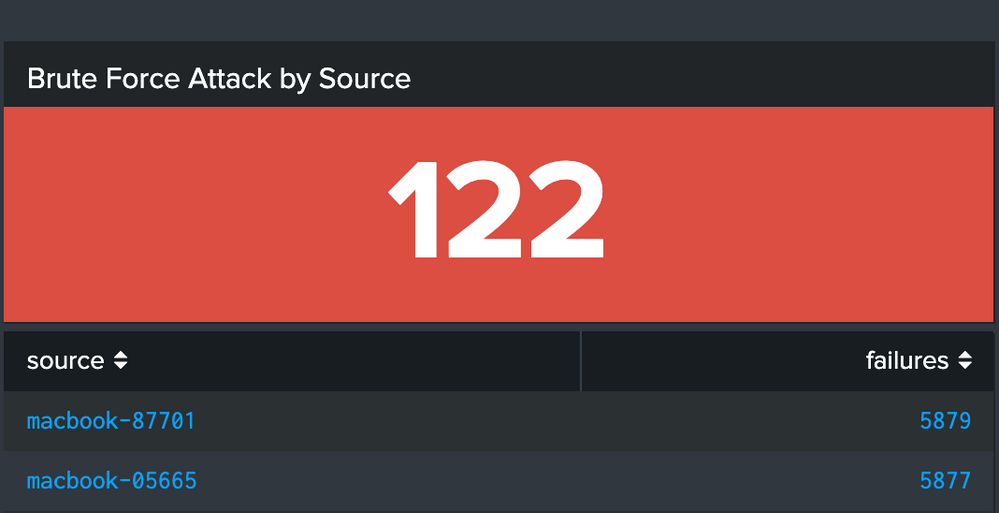
If you are after drilling down into the details of the Brute Force Attack report like the one on the screenshot below
you can do a couple of things:
- Click on the source (IP or hostname). It will take you to the investigation dashboard where you can see the successful and failed authentications charts. Click on an element of a chart to get to the raw events.
Modify the tstats search string to something that does not use tstats:
tag=authentication
| stats count by action, src
| chart last(count) over src by action
| where success>0 and failure>20

- Mark as New
- Bookmark Message
- Subscribe to Message
- Mute Message
- Subscribe to RSS Feed
- Permalink
- Report Inappropriate Content
Hello @eliasit, you are correct - tstats will not show you raw events. That's by design as tstats in this case uses an accelerated data model and does not touch raw events. That lets you report on millions or billions events in seconds.
If you are after drilling down into the details of the Brute Force Attack report like the one on the screenshot below
you can do a couple of things:
- Click on the source (IP or hostname). It will take you to the investigation dashboard where you can see the successful and failed authentications charts. Click on an element of a chart to get to the raw events.
Modify the tstats search string to something that does not use tstats:
tag=authentication
| stats count by action, src
| chart last(count) over src by action
| where success>0 and failure>20

Join the Splunk Community Slack to learn, troubleshoot, and make connections with fellow Splunk practitioners in real time!
Join Splunk User Groups to connect and learn in-person by region or remotely by topic or industry.
Observability Simplified: Combining User Experience, Application Performance & ...
Event Series May & June: From Network Visibility to Service Intelligence
Global Splunk User Group Events: May + June 2026
