
Join the Conversation
- Find Answers
- :
- Apps & Add-ons
- :
- All Apps and Add-ons
- :
- All Apps and Add-ons
- :
- Re: How to write a search to display data from my ...
- Subscribe to RSS Feed
- Mark Topic as New
- Mark Topic as Read
- Float this Topic for Current User
- Bookmark Topic
- Subscribe to Topic
- Mute Topic
- Printer Friendly Page
- Mark as New
- Bookmark Message
- Subscribe to Message
- Mute Message
- Subscribe to RSS Feed
- Permalink
- Report Inappropriate Content

Hi everybody!
I have got my Database like that :
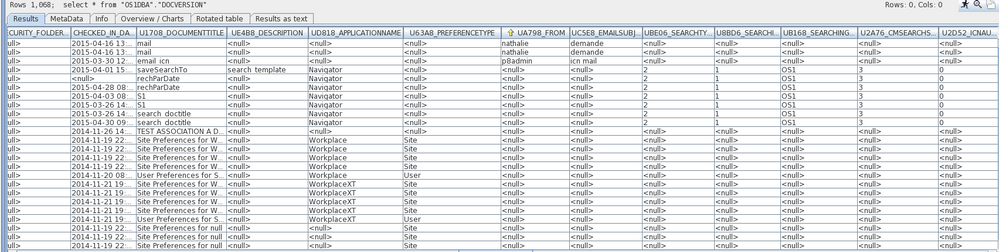
And I would like to do a "Statistics Table" in my Dashboard like that :
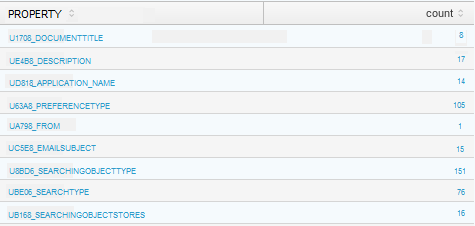
So I would like to :
1) Use only all property who start with the "U" letter
2) Count only when it's different of "null" or "" values
Can you help me ? I am trying to do that but it's so hard for me...
Thanx
- Mark as New
- Bookmark Message
- Subscribe to Message
- Mute Message
- Subscribe to RSS Feed
- Permalink
- Report Inappropriate Content

Try this
your base search | stats count(U*) as U* | transpose | rename column AS Property row1 AS count
- Mark as New
- Bookmark Message
- Subscribe to Message
- Mute Message
- Subscribe to RSS Feed
- Permalink
- Report Inappropriate Content

Give this a try
your base search | table U* | eval temp=1 | untable temp Property value | where isnotnull(value) AND value!="" | stats count by Property
- Mark as New
- Bookmark Message
- Subscribe to Message
- Mute Message
- Subscribe to RSS Feed
- Permalink
- Report Inappropriate Content
Hi Somesoni2!
Thanx for your answer 😉
- Mark as New
- Bookmark Message
- Subscribe to Message
- Mute Message
- Subscribe to RSS Feed
- Permalink
- Report Inappropriate Content
Try this
your base search | stats count(U*) as U* | transpose | rename column AS Property row1 AS count
- Mark as New
- Bookmark Message
- Subscribe to Message
- Mute Message
- Subscribe to RSS Feed
- Permalink
- Report Inappropriate Content
Thank you a lot to you three!
Sundareshr your answer works perfectly! @somesoni2, your answer works too! Splunk only accepts one accepted answer for the forum, but your two ways work as I want!
Have a good day !
- Mark as New
- Bookmark Message
- Subscribe to Message
- Mute Message
- Subscribe to RSS Feed
- Permalink
- Report Inappropriate Content


You may have to modify it slightly to fit your exact needs, but try something like
... PROPERTY=U* | stats count by PROPERTY
Where ... is your other base search filtering, like on index or whatever that gets you your screenshot.
PROPERTY=U* will include only your ones starting with U (which obviously makes the null ones go away). For "empty" values, well, it really depends on exactly what you are doing calculation-wise. Can you confirm they're an actual problem once you do the above, and if so include a few rows that should be not included and what your search is?
- Mark as New
- Bookmark Message
- Subscribe to Message
- Mute Message
- Subscribe to RSS Feed
- Permalink
- Report Inappropriate Content
Hi rich7177! Thanx for your answer!
I tried your code like that but it doesn't work :
* | PROPERTY=U* | stats count by PROPERTY
I also tried to modify it but it doesn't work too :
* | PROPERTY=UD818_APPLICATIONNAME | stats count by PROPERTY
I don't understand why Splunk doesn't want to add the PROPERTY because that works (but this is not what I want...) :
* | stats count by UD818_APPLICATIONNAME



Do you have an other idea?
Thanx a lot!

- Mark as New
- Bookmark Message
- Subscribe to Message
- Mute Message
- Subscribe to RSS Feed
- Permalink
- Report Inappropriate Content
No pipe before it. I didn't know your base search so I just put elipses there. To that just add the rest.

Join the Splunk Community Slack to learn, troubleshoot, and make connections with fellow Splunk practitioners in real time!
Join Splunk User Groups to connect and learn in-person by region or remotely by topic or industry.
May 2026 Splunk Expert Sessions: Security & Observability
Network to App: Observability Unlocked [May & June Series]
SPL2 Deep Dives, AppDynamics Integrations, SAML Made Simple and Much More on Splunk ...
