
Join the Conversation
- Find Answers
- :
- Apps & Add-ons
- :
- All Apps and Add-ons
- :
- All Apps and Add-ons
- :
- How to utilize Google API key for Maps+
- Subscribe to RSS Feed
- Mark Topic as New
- Mark Topic as Read
- Float this Topic for Current User
- Bookmark Topic
- Subscribe to Topic
- Mute Topic
- Printer Friendly Page
- Mark as New
- Bookmark Message
- Subscribe to Message
- Mute Message
- Subscribe to RSS Feed
- Permalink
- Report Inappropriate Content

This may be a simple question, but I have been unable to find an answer as of yet. I need to know how to use a Google API key in Maps+. Currently, when I try to do something like Street View, I get a pop-up saying :
API Key Failure
Failed to get API key for user: , realm: undefined - Verify credentials and try again.
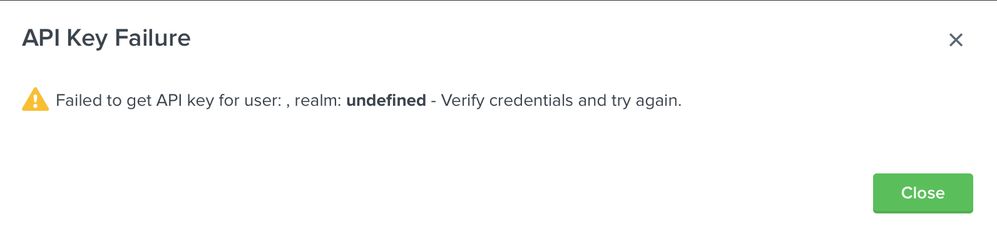
I have a API key; I just need to know where to put the information so I can get it to work. Any assistance would be appreciated.
- Mark as New
- Bookmark Message
- Subscribe to Message
- Mute Message
- Subscribe to RSS Feed
- Permalink
- Report Inappropriate Content


As previously stated, just download - https://splunkbase.splunk.com/app/4013.
Create a username that will be the API Key User and enter the API Key as the password. From there, just reference the API Key User in the format menu of the viz.
Format Menu -> Google Places -> API Key User
Optionally, you can specify a realm when creating the API Key User with the REST storage/passwords Manager for Splunk. You don't need a realm, but if you specify one, you'll need to put it in the API Key Realm field. The realm is only needed for storing multiple passwords with the same username so they don't collide.
- Mark as New
- Bookmark Message
- Subscribe to Message
- Mute Message
- Subscribe to RSS Feed
- Permalink
- Report Inappropriate Content
As previously stated, just download - https://splunkbase.splunk.com/app/4013.
Create a username that will be the API Key User and enter the API Key as the password. From there, just reference the API Key User in the format menu of the viz.
Format Menu -> Google Places -> API Key User
Optionally, you can specify a realm when creating the API Key User with the REST storage/passwords Manager for Splunk. You don't need a realm, but if you specify one, you'll need to put it in the API Key Realm field. The realm is only needed for storing multiple passwords with the same username so they don't collide.
- Mark as New
- Bookmark Message
- Subscribe to Message
- Mute Message
- Subscribe to RSS Feed
- Permalink
- Report Inappropriate Content
Format Menu -> Google Places -> API Key User
This was what I was looking for. I had everything else in place; just didn't know where to put the API Key User. Thanks for the assistance on this. I appreciate it.
- Mark as New
- Bookmark Message
- Subscribe to Message
- Mute Message
- Subscribe to RSS Feed
- Permalink
- Report Inappropriate Content

Hello @kiddsupreme
https://github.com/sghaskell/maps-plus/blob/master/README.md
API Key Storage
API keys for use with Google Places search, Bing Maps and the Google Streetview comapnion viz must be stored in Splunk's storage/passwords REST endpoint. Every user who needs access to a key must have the list_storage_passwords capability enabled for their role. Set ACL's on credentials to narrow the scope of who can access them. Download and install my REST storage/passwords Manager for Splunk to make this process painless.
https://docs.splunk.com/Documentation/Splunk/8.0.3/RESTREF/RESTaccess#storage.2Fpasswords
https://splunkbase.splunk.com/app/4013/ REST storage/passwords Manager for Splunk
- Mark as New
- Bookmark Message
- Subscribe to Message
- Mute Message
- Subscribe to RSS Feed
- Permalink
- Report Inappropriate Content
I read that as well; however, I find the documentation lacking. What information goes where? At the very least, is there an example of what information goes where?
- Mark as New
- Bookmark Message
- Subscribe to Message
- Mute Message
- Subscribe to RSS Feed
- Permalink
- Report Inappropriate Content
@kiddsupreme
the step by step configuration is on the github page: https://github.com/sghaskell/rest-storage-passwords-manager and here http://www.georgestarcher.com/splunk-stored-encrypted-credentials/



Join the Splunk Community Slack to learn, troubleshoot, and make connections with fellow Splunk practitioners in real time!
Join Splunk User Groups to connect and learn in-person by region or remotely by topic or industry.
Data Management Digest – September 2026
Federated Search for CloudWatch Unified Data Store Is Generally Available
Announcing Modern Navigation: A New Era of Splunk User Experience
