
Join the Conversation
- Find Answers
- :
- Apps & Add-ons
- :
- All Apps and Add-ons
- :
- All Apps and Add-ons
- :
- Re: How to fix External search command 'ldapsearch...
- Subscribe to RSS Feed
- Mark Topic as New
- Mark Topic as Read
- Float this Topic for Current User
- Bookmark Topic
- Subscribe to Topic
- Mute Topic
- Printer Friendly Page
- Mark as New
- Bookmark Message
- Subscribe to Message
- Mute Message
- Subscribe to RSS Feed
- Permalink
- Report Inappropriate Content

I am running the ldapsearch in scheduled report which initially runs outputlookup and getting the below error message
the ldapsearch returns 250 results and working properly once I am running it manually
- app = amdocscybermain
- component = SearchMessages
- date_zone = 180
- eventtype = err0r error
- host = illinissplnksh01
- index = _internal
- log_level = ERROR
- message = External search command 'ldapsearch' returned error code 15. .
- sid = scheduler__odeliab__amdocscybermain__RMD59063549f9a2aae97_at_1653527160_38496
- source = /opt/splunk/var/log/splunk/search_messages.log
- sourcetype = splunk_search_messages
- Mark as New
- Bookmark Message
- Subscribe to Message
- Mute Message
- Subscribe to RSS Feed
- Permalink
- Report Inappropriate Content
@rayar anddddd if nothing works, just update the ADD-ON to its latest version 3.0.4
I used this version and got the scheduled report on email
and tell me if its fixed
- Mark as New
- Bookmark Message
- Subscribe to Message
- Mute Message
- Subscribe to RSS Feed
- Permalink
- Report Inappropriate Content
@rayar Kindly check firewall settings of both client machines and ADMIN/ AD server machine
check authentication as well as try to ping (run ping command from AD server to ensure a stable connection)
- Mark as New
- Bookmark Message
- Subscribe to Message
- Mute Message
- Subscribe to RSS Feed
- Permalink
- Report Inappropriate Content
the same query is running from same machine properly
we are getting this issue for scheduled report only , so I don't think its related to the Firewall
- Mark as New
- Bookmark Message
- Subscribe to Message
- Mute Message
- Subscribe to RSS Feed
- Permalink
- Report Inappropriate Content
- Mark as New
- Bookmark Message
- Subscribe to Message
- Mute Message
- Subscribe to RSS Feed
- Permalink
- Report Inappropriate Content
@rayar hey buddy
1. So u are getting events upon maunally searching the command
and for the same events u had created a report using (cron ) I guess every 5 minutes ?
2. which version of this add on,
as well as splunk are u on ?
3. have u recently upgraded anything (add on / splunk) had u created this report u are talking about in some previous version (add on / splunk)
ps I am intrested in ur case and want to help
- Mark as New
- Bookmark Message
- Subscribe to Message
- Mute Message
- Subscribe to RSS Feed
- Permalink
- Report Inappropriate Content
Hi
The steps are correct
We have upgraded from Splunk 7.XX to Splunk 8.2.5 with PS
I think the issue started after few days
| Splunk Supporting Add-on for Active Directory | SA-ldapsearch | 3.0.1 |
- Mark as New
- Bookmark Message
- Subscribe to Message
- Mute Message
- Subscribe to RSS Feed
- Permalink
- Report Inappropriate Content
@rayar anddddd if nothing works, just update the ADD-ON to its latest version 3.0.4
I used this version and got the scheduled report on email
and tell me if its fixed
- Mark as New
- Bookmark Message
- Subscribe to Message
- Mute Message
- Subscribe to RSS Feed
- Permalink
- Report Inappropriate Content
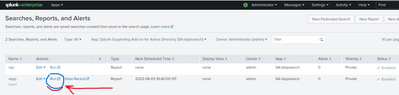
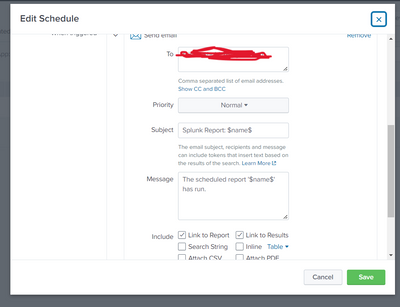
Check the configuration and try clicking on "Run" I received the report on email after I clicked the "Run " button I have scribbled Above
Also see screenshots , if u are missing something

CHECK your email ID too
A simple letter could be capitalized and your whole email would be considered wrong

- Mark as New
- Bookmark Message
- Subscribe to Message
- Mute Message
- Subscribe to RSS Feed
- Permalink
- Report Inappropriate Content
“Error code 15: This request was blocked by the security rules”
Check if your server is allowed to get data from other machines from which you are fetching the data
Also check DATE and TIME settings


Join the Splunk Community Slack to learn, troubleshoot, and make connections with fellow Splunk practitioners in real time!
Join Splunk User Groups to connect and learn in-person by region or remotely by topic or industry.
Where Innovation Takes Flight: The Splunk4Aviation Flight Sim Lands at .conf26
Turn Cisco Telemetry Into Action with Cisco Data Fabric, powered by the Splunk ...
Persistent Queue at TcpOut — One of Splunk's Most Practical Features
