
Are you a member of the Splunk Community?
- Find Answers
- :
- Apps & Add-ons
- :
- All Apps and Add-ons
- :
- How to fix CPU=all Unix field not being retrieved?
- Subscribe to RSS Feed
- Mark Topic as New
- Mark Topic as Read
- Float this Topic for Current User
- Bookmark Topic
- Subscribe to Topic
- Mute Topic
- Printer Friendly Page
- Mark as New
- Bookmark Message
- Subscribe to Message
- Mute Message
- Subscribe to RSS Feed
- Permalink
- Report Inappropriate Content
How to fix CPU=all Unix field not being retrieved?

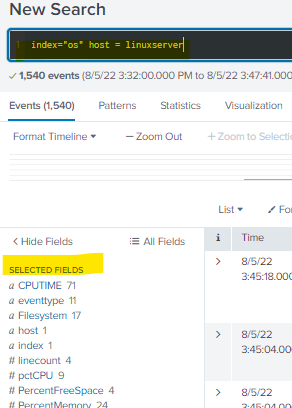
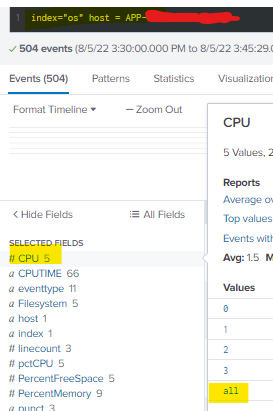
Hello Community.
Can you please tell me how to fix this, I don't understand why this is happening. I have explored various topics but have not been able to find a solution.
I have an application which is configured by Splunk_TA_nix on remote servers.
But not all servers are getting the CPU=all field
I first encountered this when a team with their dashboard contacted me. They had 2 lonely servers. On one of them the CPU field was extracted and the dashboard worked. On the other one it didn't work anymore.
I have set up a new server to forward the logs. But there was no CPU field on that one either.
I even installed the sysstat utility. But I can't figure it out yet. Thus I am asking for help. Regards to everyone
- Mark as New
- Bookmark Message
- Subscribe to Message
- Mute Message
- Subscribe to RSS Feed
- Permalink
- Report Inappropriate Content


Hi @igor04653,
in addition to the question of @richgalloway, could you check if the version of installed Splunk_TA_nix is the same of the other servers?
Ciao.
Giuseppe
- Mark as New
- Bookmark Message
- Subscribe to Message
- Mute Message
- Subscribe to RSS Feed
- Permalink
- Report Inappropriate Content
Thank you for responding to my question. I checked the Splunk_TA_nix version. On the working server and on the new one where it doesn't work - they are the same.
In the inputs.conf settings the same parameters are included.
But I noticed a difference in the versions of the Universal Forwarder agent
On the working server, version 7.3.3 is used
I installed 8.2.6
There is also a difference in operating system versions.
The working one uses Oracle Linux. And I do the setup on Ubuntu server 20.04.
- Mark as New
- Bookmark Message
- Subscribe to Message
- Mute Message
- Subscribe to RSS Feed
- Permalink
- Report Inappropriate Content
Hi @igor04653,
after UF upgrade is the problem still present?
The operative system version shouldn't be so relevant, to be sure, try to manually run scripts in that UF.
Ciao.
Giuseppe
- Mark as New
- Bookmark Message
- Subscribe to Message
- Mute Message
- Subscribe to RSS Feed
- Permalink
- Report Inappropriate Content

Is the TA installed on all servers and is the cpu_metric.sh input enabled on them all?
If this reply helps you, Karma would be appreciated.
- Mark as New
- Bookmark Message
- Subscribe to Message
- Mute Message
- Subscribe to RSS Feed
- Permalink
- Report Inappropriate Content
Thank you for responding to my question. I checked the parameters of the inputs.conf file
They are configured like this on both servers
# Shows stats per CPU (useful for SMP machines)
[script://./bin/cpu.sh]
sourcecetype = cpu
source = cpu
interval = 300
index = os
disabled = 0

Splunk Observability for AI
[Puzzles] Solve, Learn, Repeat: Dereferencing XML to Fixed-length events
Stay Connected: Your Guide to December Tech Talks, Office Hours, and Webinars!
