
Join the Conversation
- Find Answers
- :
- Apps & Add-ons
- :
- All Apps and Add-ons
- :
- All Apps and Add-ons
- :
- Re: How to change Status Indicator size
- Subscribe to RSS Feed
- Mark Topic as New
- Mark Topic as Read
- Float this Topic for Current User
- Bookmark Topic
- Subscribe to Topic
- Mute Topic
- Printer Friendly Page
- Mark as New
- Bookmark Message
- Subscribe to Message
- Mute Message
- Subscribe to RSS Feed
- Permalink
- Report Inappropriate Content

Hello Splunkers.
I have 2 questions about Status Indicator Viz and believe you guys can help me.
1) Is it possible to limit the size of the icon?
I know that with Single Value I can resize it using
<option name="height">300px</option>
Do I need a CSS to do that? What I have is on figure 1 and what I want is on figure 2:
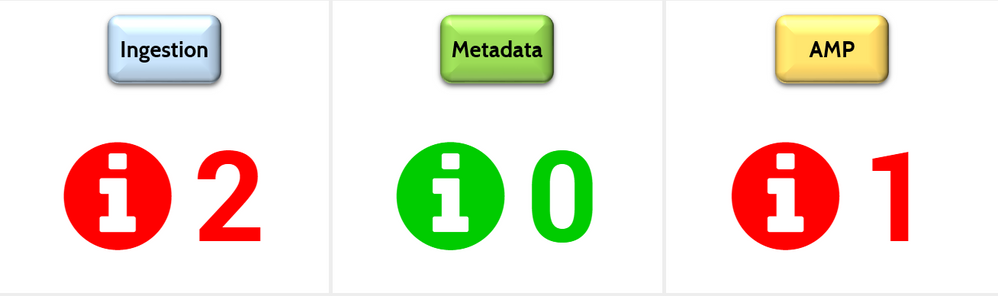
BTW, at figure 2 I manually resized the Status Indicator with mouse.

2) Can I show a different icon based on value? For example, check icon when value is 0 and error icon when value is greather than 0?
I tried to use the option "Field Value" under format but no success.
Thank you!
Regards,
- Mark as New
- Bookmark Message
- Subscribe to Message
- Mute Message
- Subscribe to RSS Feed
- Permalink
- Report Inappropriate Content

For any search that generates a numeric field like result, icon and color fields need to be mapped. Following are two options:
Option 1 - Use Rangemap to set range_color and range_icon
| table result | rangemap field=result green=0-0 yellow=1-10 red=10-11 default=severe|eval range_color=range |rangemap field=result arrow-circle-o-up=0-0 exclamation-circle=1-10 arrow-circle-o-down=10-11 default=arrow-circle-o-down| eval range_icon=range | table result, range_icon, range_color
Option 2 - Use Nested if or case statement
| table result | rangemap field=result green=0-0 yellow=1-10 red=10-11 default=severe|eval range_color=range |eval range_icon=if(result=0, "arrow-circle-o-up",if(result >0 AND result<=10,"exclamation-circle","arrow-circle-o-down"))| table result, range_icon, range_color
| makeresults | eval message= "Happy Splunking!!!"
- Mark as New
- Bookmark Message
- Subscribe to Message
- Mute Message
- Subscribe to RSS Feed
- Permalink
- Report Inappropriate Content
For any search that generates a numeric field like result, icon and color fields need to be mapped. Following are two options:
Option 1 - Use Rangemap to set range_color and range_icon
| table result | rangemap field=result green=0-0 yellow=1-10 red=10-11 default=severe|eval range_color=range |rangemap field=result arrow-circle-o-up=0-0 exclamation-circle=1-10 arrow-circle-o-down=10-11 default=arrow-circle-o-down| eval range_icon=range | table result, range_icon, range_color
Option 2 - Use Nested if or case statement
| table result | rangemap field=result green=0-0 yellow=1-10 red=10-11 default=severe|eval range_color=range |eval range_icon=if(result=0, "arrow-circle-o-up",if(result >0 AND result<=10,"exclamation-circle","arrow-circle-o-down"))| table result, range_icon, range_color
| makeresults | eval message= "Happy Splunking!!!"
- Mark as New
- Bookmark Message
- Subscribe to Message
- Mute Message
- Subscribe to RSS Feed
- Permalink
- Report Inappropriate Content
Thank you niketnilay !!
It worked perfectly!
I was missing the statements eval range_color=range and eval range_icon=range
Regards!
- Mark as New
- Bookmark Message
- Subscribe to Message
- Mute Message
- Subscribe to RSS Feed
- Permalink
- Report Inappropriate Content
Ok, the first one I've discovered myself.
The only thing you have to do is add the following line:
<option name="height">110px</option>
(of course, you can set a value for height that fits you better)
In my case, the xml is:
<viz type="status_indicator_app.status_indicator">
        <search>
          <query> my search </query>
        </search>
        <option name="status_indicator_app.status_indicator.showOption">1</option>
        <option name="status_indicator_app.status_indicator.icon">fix_icon</option>
        <option name="status_indicator_app.status_indicator.fixIcon">info-circle</option>
        <option name="status_indicator_app.status_indicator.useColors">true</option>
        <option name="status_indicator_app.status_indicator.colorBy">field_value</option>
        <option name="status_indicator_app.status_indicator.staticColor">#555</option>
        <option name="status_indicator_app.status_indicator.fillTarget">text</option>
        <option name="status_indicator_app.status_indicator.precision">0</option>
        <option name="status_indicator_app.status_indicator.useThousandSeparator">true</option>
        <option name="height">110px</option>
      </viz>
Now, I'm working on the second question...
- Mark as New
- Bookmark Message
- Subscribe to Message
- Mute Message
- Subscribe to RSS Feed
- Permalink
- Report Inappropriate Content

Thanks Master guimilare!

Join the Splunk Community Slack to learn, troubleshoot, and make connections with fellow Splunk practitioners in real time!
Join Splunk User Groups to connect and learn in-person by region or remotely by topic or industry.
Index This | What travels the world but is also stuck in place?
Discover New Use Cases: Unlock Greater Value from Your Existing Splunk Data
Continue Your Journey: Join Session 2 of the Data Management and Federation Bootcamp ...
