
Turn on suggestions
Auto-suggest helps you quickly narrow down your search results by suggesting possible matches as you type.
All Apps and Add-ons
×
Join the Conversation
Without signing in, you're just watching from the sidelines. Sign in or Register to connect, share, and be part of the Splunk Community.
- Find Answers
- :
- Apps & Add-ons
- :
- All Apps and Add-ons
- :
- All Apps and Add-ons
- :
- How to Prevent Old RDS Instance Data From Displayi...
Options
- Subscribe to RSS Feed
- Mark Topic as New
- Mark Topic as Read
- Float this Topic for Current User
- Bookmark Topic
- Subscribe to Topic
- Mute Topic
- Printer Friendly Page
- Mark as New
- Bookmark Message
- Subscribe to Message
- Mute Message
- Subscribe to RSS Feed
- Permalink
- Report Inappropriate Content

n6BXGybt
Path Finder
08-23-2016
03:39 AM
Splunk Version 6.3.0
Splunk Build aa7d4b1ccb80
Splunk App for AWS App Version 4.2.1 App Build 34
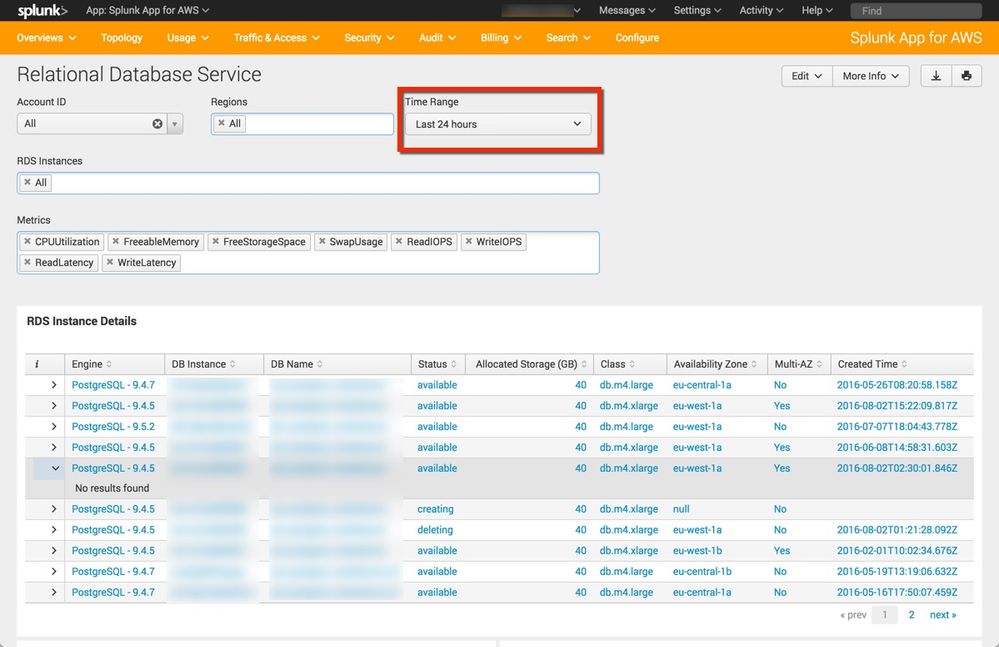
I have a weird situation where old RDS instance information displays in Usage -> Relational Database Service dashboard.
Despite having the Time Range set to 24 hours, I see RDS instances that have long before been deleted. Even ones that show a status of "Available" display but have no data.
Is this a bug - please reference the screenshot
Thanks as always!
1 Solution
- Mark as New
- Bookmark Message
- Subscribe to Message
- Mute Message
- Subscribe to RSS Feed
- Permalink
- Report Inappropriate Content
n6BXGybt
Path Finder
12-01-2016
01:31 AM
- Mark as New
- Bookmark Message
- Subscribe to Message
- Mute Message
- Subscribe to RSS Feed
- Permalink
- Report Inappropriate Content
n6BXGybt
Path Finder
12-01-2016
01:31 AM




Got questions? Get answers!
Join the Splunk Community Slack to learn, troubleshoot, and make connections with fellow Splunk practitioners in real time!
Meet up IRL or virtually!
Join Splunk User Groups to connect and learn in-person by region or remotely by topic or industry.
Get Updates on the Splunk Community!
Catalog Is Now Generally Available on Splunk Cloud Platform
A Unified View of Your Data
Security logs, application events, business data, and historical telemetry often ...
Developer Spotlight with Eduard Lekanne
From Network Engineer to Building Agentic AI for Splunk
Eduard Lekanne has been architecting technology ...
From Data Landing to Insight
Search Across More of Your Data Ecosystem
The data you need may live in Splunk, high-volume machine data, ...
