
Join the Conversation
- Find Answers
- :
- Apps & Add-ons
- :
- All Apps and Add-ons
- :
- How can I validate a data input parameter
- Subscribe to RSS Feed
- Mark Topic as New
- Mark Topic as Read
- Float this Topic for Current User
- Bookmark Topic
- Subscribe to Topic
- Mute Topic
- Printer Friendly Page
- Mark as New
- Bookmark Message
- Subscribe to Message
- Mute Message
- Subscribe to RSS Feed
- Permalink
- Report Inappropriate Content
How can I validate a data input parameter

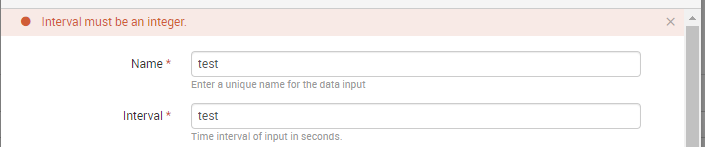
I am using the Splunk add-on builder, and I am trying to validate the value of a data input parameter when the user enters a value. For example, if the parameter is supposed to be an integer and the user enters a string, I would like to prompt the user and let them know it is an invalid parameter value and needs to be an integer. (Similar to entering a string in the 'Interval' parameter for any new input type as shown in the screenshot).
Edit: Answered my own question... I wasn't able to find this in the add-on builder, however I was able to edit two files in the app that can provide the functionality: /etc/apps//appserver/static/js/build/globalConfig.json and/or /etc/apps//bin/rh.py
Both files allow you edit a "validator" section for the parameters, and allows for configuring a regex pattern for matching and an error message for non-matches. Then when creating a new input in the app, the field value is checked against the regex pattern and if it doesn't match there is a error message like the one in the screenshot below.


Index This | What is broken 80% of the time by February?
Unlock Faster Time-to-Value on Edge and Ingest Processor with New SPL2 Pipeline ...
Splunk MCP & Agentic AI: Machine Data Without Limits
