
Join the Conversation
- Find Answers
- :
- Apps & Add-ons
- :
- All Apps and Add-ons
- :
- All Apps and Add-ons
- :
- How can I select multiple values from a drop down?
- Subscribe to RSS Feed
- Mark Topic as New
- Mark Topic as Read
- Float this Topic for Current User
- Bookmark Topic
- Subscribe to Topic
- Mute Topic
- Printer Friendly Page
- Mark as New
- Bookmark Message
- Subscribe to Message
- Mute Message
- Subscribe to RSS Feed
- Permalink
- Report Inappropriate Content


I am looking to select multiple options from drop down and evaluate search according to selection.
I have search previous post and came to know that it can be implemented using sideview Utils App. I have installed it but not sure how to use it.
I am looking to select multiple ScriptName options and display those on Gantt Chart.
Dashboard Section:
<panel>
<title>Gantt Chart</title>
<input type="dropdown" token="script_name_token" searchWhenChanged="true">
<label>Script Name</label>
<choice value="*">*</choice>
<search>
<query>eventtype=mlc_live host=$host_token$ sourcetype=tool_lifecycle | rex field="ScriptName" "^\S+_(?<ScriptName>[^\.]+)\.\S+" | table ScriptName | dedup ScriptName | sort ScriptName</query>
<earliest>$time_token.earliest$</earliest>
<latest>$latest$</latest>
</search>
<fieldForLabel>ScriptName</fieldForLabel>
<fieldForValue>ScriptName</fieldForValue>
<default>*</default>
</input>
<input type="dropdown" token="activity_type_token" searchWhenChanged="true">
<label>Activity Type</label>
<choice value="*">*</choice>
<search>
<query>eventtype=mlc_live host=$host_token$ sourcetype=tool_lifecycle | table ActivityType | dedup ActivityType | sort ActivityType</query>
<earliest>$time_token.earliest$</earliest>
<latest>$time_token.latest$</latest>
</search>
<fieldForLabel>ActivityType</fieldForLabel>
<fieldForValue>ActivityType</fieldForValue>
<default>*</default>
</input>
<viz type="timeline_app.timeline">
<search>
<query>eventtype=mlc_live host=$host_token$ sourcetype=tool_lifecycle | rex field="ScriptName" "^\S+_(?<ScriptName>[^\.]+)\.\S+" | eval ActivityType=if(isNOTNULL(ActivityType),ActivityType,"NA") | search ScriptName = *$script_name_token$* AND ActivityType = *$activity_type_token$* | eval ScriptName2=ScriptName | table _time ScriptName ScriptName2 Duration StartDate StartTime EndDate EndTime UniqueIdentifier Status ActivityType</query>
<earliest>$time_token.earliest$</earliest>
<latest>$time_token.latest$</latest>
<sampleRatio>1</sampleRatio>
</search>
</viz>
</panel>
Working Dashboard with Multiselect in Gantt Chart:
<row>
<panel>
<title>Gantt Chart</title>
<input type="multiselect" token="script_name_token" searchWhenChanged="true">
<label>Script Name</label>
<choice value="*">*</choice>
<search>
<query>eventtype=mlc_live host=$host_token$ sourcetype=tool_lifecycle | rex field="ScriptName" "^\S+_(?<ScriptName>[^\.]+)\.\S+" | table ScriptName | dedup ScriptName | sort ScriptName</query>
<earliest>$time_token.earliest$</earliest>
<latest>$latest$</latest>
</search>
<fieldForLabel>ScriptName</fieldForLabel>
<fieldForValue>ScriptName</fieldForValue>
<default>*</default>
</input>
<input type="dropdown" token="status_token" searchWhenChanged="true">
<label>Status</label>
<choice value="*">*</choice>
<search>
<query>eventtype=mlc_live host=$host_token$ sourcetype=tool_lifecycle | table Status | dedup Status | sort Status</query>
<earliest>$time_token.earliest$</earliest>
<latest>$time_token.latest$</latest>
</search>
<fieldForLabel>Status</fieldForLabel>
<fieldForValue>Status</fieldForValue>
<default>*</default>
</input>
<input type="dropdown" token="activity_type_token" searchWhenChanged="true">
<label>Activity Type</label>
<choice value="*">*</choice>
<search>
<query>eventtype=mlc_live host=$host_token$ sourcetype=tool_lifecycle | table ActivityType | rex field="ActivityType" "^#(?<ActivityType>[^\.]+);" | dedup ActivityType | sort ActivityType</query>
<earliest>$time_token.earliest$</earliest>
<latest>$time_token.latest$</latest>
</search>
<fieldForLabel>ActivityType</fieldForLabel>
<fieldForValue>ActivityType</fieldForValue>
<default>*</default>
</input>
<viz type="timeline_app.timeline">
<search>
<query>eventtype=mlc_live host=$host_token$ sourcetype=tool_lifecycle | rex field="ScriptName" "^\S+_(?<ScriptName>[^\.]+)\.\S+" | rex field="ActivityType" "^#(?<ActivityType>[^\.]+);" | eval ActivityType=if(isNOTNULL(ActivityType),ActivityType,"NA") | search ScriptName IN (*$script_name_token$*) AND ActivityType = "*$activity_type_token$*" AND Status = "*$status_token$*" | eval ScriptName2=ScriptName | table _time ScriptName ScriptName2 Duration StartDate StartTime EndDate EndTime UniqueIdentifier Status ActivityType | dedup UniqueIdentifier</query>
<earliest>$time_token.earliest$</earliest>
<latest>$time_token.latest$</latest>
<sampleRatio>1</sampleRatio>
</search>
</viz>
</panel>
</row>
- Mark as New
- Bookmark Message
- Subscribe to Message
- Mute Message
- Subscribe to RSS Feed
- Permalink
- Report Inappropriate Content
Worked below
  <input type="multiselect" token="script_name_token" searchWhenChanged="true">

   <query>eventtype=mlc_live host=$host_token$ sourcetype=tool_lifecycle | search ScriptName IN (*$script_name_token$*)
- Mark as New
- Bookmark Message
- Subscribe to Message
- Mute Message
- Subscribe to RSS Feed
- Permalink
- Report Inappropriate Content
Worked below
  <input type="multiselect" token="script_name_token" searchWhenChanged="true">

   <query>eventtype=mlc_live host=$host_token$ sourcetype=tool_lifecycle | search ScriptName IN (*$script_name_token$*)
- Mark as New
- Bookmark Message
- Subscribe to Message
- Mute Message
- Subscribe to RSS Feed
- Permalink
- Report Inappropriate Content

@agoyal, have you tried multiselect input instead of Dropdown in Splunk?
| makeresults | eval message= "Happy Splunking!!!"
- Mark as New
- Bookmark Message
- Subscribe to Message
- Mute Message
- Subscribe to RSS Feed
- Permalink
- Report Inappropriate Content
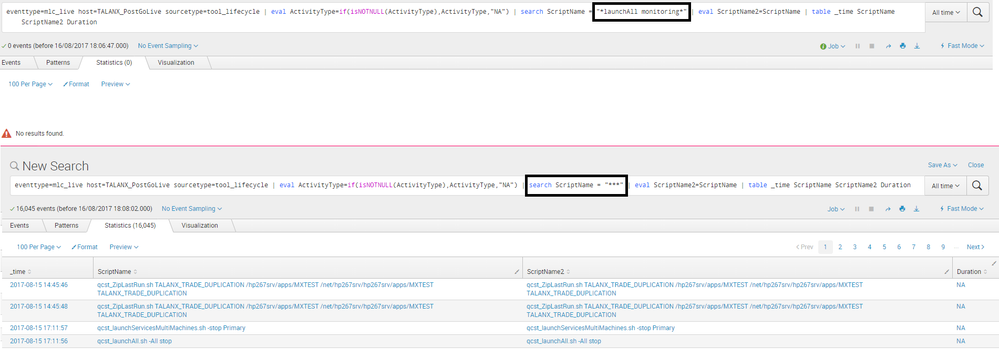
@niketnilay: Thanks for reply. I have used multiselect in place of dropdown. Its allow to select multiple values but search query is not handling multiselect values.
Pls refere attached output for search query.
- Mark as New
- Bookmark Message
- Subscribe to Message
- Mute Message
- Subscribe to RSS Feed
- Permalink
- Report Inappropriate Content
Can you add the updated code for multiselect input?
| makeresults | eval message= "Happy Splunking!!!"
- Mark as New
- Bookmark Message
- Subscribe to Message
- Mute Message
- Subscribe to RSS Feed
- Permalink
- Report Inappropriate Content
@niketnilay: now Gantt chart is working with mulitselect option. I have updated my working dashboard above. Thank you for ur suggestion.
- Mark as New
- Bookmark Message
- Subscribe to Message
- Mute Message
- Subscribe to RSS Feed
- Permalink
- Report Inappropriate Content
Glad to help! Happy Splunking 🙂
| makeresults | eval message= "Happy Splunking!!!"
- Mark as New
- Bookmark Message
- Subscribe to Message
- Mute Message
- Subscribe to RSS Feed
- Permalink
- Report Inappropriate Content

You can use multiselect instead of dropdown,
<input type="multiselect" token="script_name_token" searchWhenChanged="true">
<label>Script Name</label>
<choice value="*">*</choice>
<search>
<query>your query</query>
<earliest>$time_token.earliest$</earliest>
<latest>$latest$</latest>
</search>
<fieldForLabel>ScriptName</fieldForLabel>
<fieldForValue>ScriptName</fieldForValue>
<prefix>(</prefix>
<valuePrefix>ScriptName ="</valuePrefix>
<valueSuffix>"</valueSuffix>
<delimiter> OR </delimiter>
<suffix>)</suffix>
<default>*</default>
</input>
- Mark as New
- Bookmark Message
- Subscribe to Message
- Mute Message
- Subscribe to RSS Feed
- Permalink
- Report Inappropriate Content
Thanks for reply. I have used multiselect in place of dropdown. Its allow to select multiple values but search query is not handling multiselect values.
Pls refere attached output for search query.
- Mark as New
- Bookmark Message
- Subscribe to Message
- Mute Message
- Subscribe to RSS Feed
- Permalink
- Report Inappropriate Content
Thanks for this. Simply adding the multiselect doesnt help as the query needs to update accordingly for multiple values.
<prefix>(</prefix>
<valuePrefix>ScriptName ="</valuePrefix>
<valueSuffix>"</valueSuffix>
<delimiter> OR </delimiter>
<suffix>)</suffix>
does the trick.




Join the Splunk Community Slack to learn, troubleshoot, and make connections with fellow Splunk practitioners in real time!
Join Splunk User Groups to connect and learn in-person by region or remotely by topic or industry.
SOC4Kafka - New Kafka Connector Powered by OpenTelemetry
Event Series: Level up your SOC: Advancing with Splunk Enterprise Security
Announcing Modern Navigation: A New Era of Splunk User Experience
