
Join the Conversation
- Find Answers
- :
- Apps & Add-ons
- :
- All Apps and Add-ons
- :
- Re: Error in SOAR-UI on Splunk SOAR (ex Phantom)
- Subscribe to RSS Feed
- Mark Topic as New
- Mark Topic as Read
- Float this Topic for Current User
- Bookmark Topic
- Subscribe to Topic
- Mute Topic
- Printer Friendly Page
- Mark as New
- Bookmark Message
- Subscribe to Message
- Mute Message
- Subscribe to RSS Feed
- Permalink
- Report Inappropriate Content

Hi all,
We are currently facing an issue with our Splunk SOAR installation
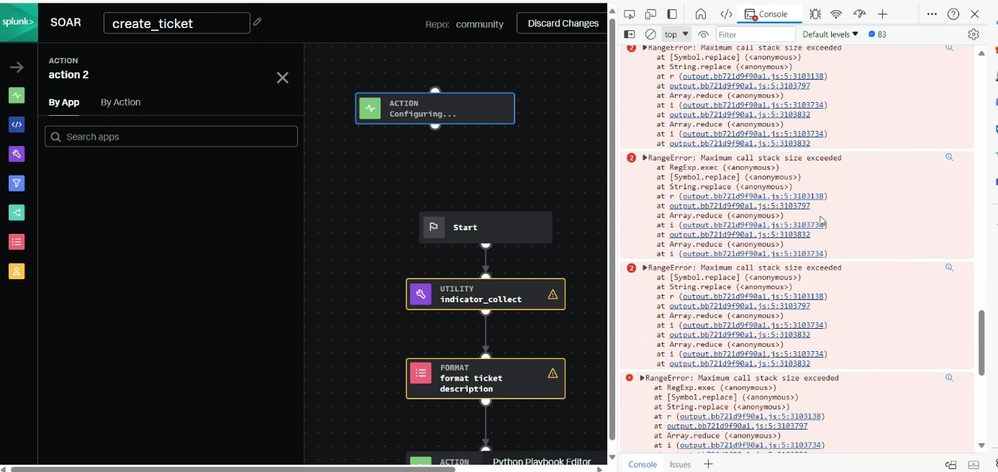
Every time that we open the playbook editor, it shows the errors in the screenshot below and all the dropdown and search fields stop working (eg: we're unable to choose apps or datatypes for the input)
We have also tried to reinstall it (both v6.1.1 and v6.2.0)
The service is running on a VM with Red Hat Enterprise Linux release 8.9
Do you have any suggestions on how we can solve this problem?
Thanks for your help
Best regards

- Mark as New
- Bookmark Message
- Subscribe to Message
- Mute Message
- Subscribe to RSS Feed
- Permalink
- Report Inappropriate Content
We were able to address the issue
It seems that there's a problem between Dynatrace RUM (real-time user monitoring) and the JS library used by SOAR-UI
Basically, by lowering the intensity of the Dynatrace Ruxit Agent, it is not overloading the browser stack and all the callbacks are now working properly
- Mark as New
- Bookmark Message
- Subscribe to Message
- Mute Message
- Subscribe to RSS Feed
- Permalink
- Report Inappropriate Content
We were able to address the issue
It seems that there's a problem between Dynatrace RUM (real-time user monitoring) and the JS library used by SOAR-UI
Basically, by lowering the intensity of the Dynatrace Ruxit Agent, it is not overloading the browser stack and all the callbacks are now working properly

A Season of Skills: New Splunk Courses to Light Up Your Learning Journey
Announcing the Migration of the Splunk Add-on for Microsoft Azure Inputs to ...
Splunk Observability for AI
